You don’t need a thank-you page. A form submission is a DOM event followed by a server response — not a URL. Track it by listening for the form’s submit event and confirming what came back, or by letting your server confirm the lead from the form platform’s own webhook. The redirect is just one signal, and on a modern site it is the least reliable one.
Single-page apps, inline success messages, popup forms and embedded widgets all accept a lead without loading a new page. If your conversion fires on a /thank-you pageview, those leads are invisible to your ad platforms, and the algorithm optimises as though they never happened.
Why does conversion tracking assume a thank-you page exists?
Because pixel-era tracking counted pageviews, and a pageview was the only event a marketer could configure without a developer. The /thank-you URL became the de facto conversion trigger: it was unique, it only loaded after a real submission, and it took ten minutes in a tag manager.
That assumption held while every form did a full POST and a redirect. It stopped holding when forms moved into JavaScript. A React or Vue form posts with fetch, swaps the form for a “Thanks, we’ll be in touch” block, and never changes the document. Framer, Webflow, Typeform and most chat and booking widgets do the same thing by default. The submission succeeded; the URL did not move.
What counts as a successful submission when the URL never changes?
A submission is successful when the receiving system accepted the data — normally an HTTP 2xx response from the endpoint the form posts to, or a success state rendered by the app after that response. Everything else is an attempt, not a conversion.
Keeping that distinction is the whole job. A visitor can hit submit and fail validation, hit submit and get a 500, or double-click and send two identical POSTs. All three produce a submit event; none produce a lead you should report to Meta or Google.
So the signal you want is the pair: the user tried and the server accepted. On a site with a redirect, the thank-you page is a proxy for both. Without one, you have to observe them directly.
How do you detect a submission without a redirect?
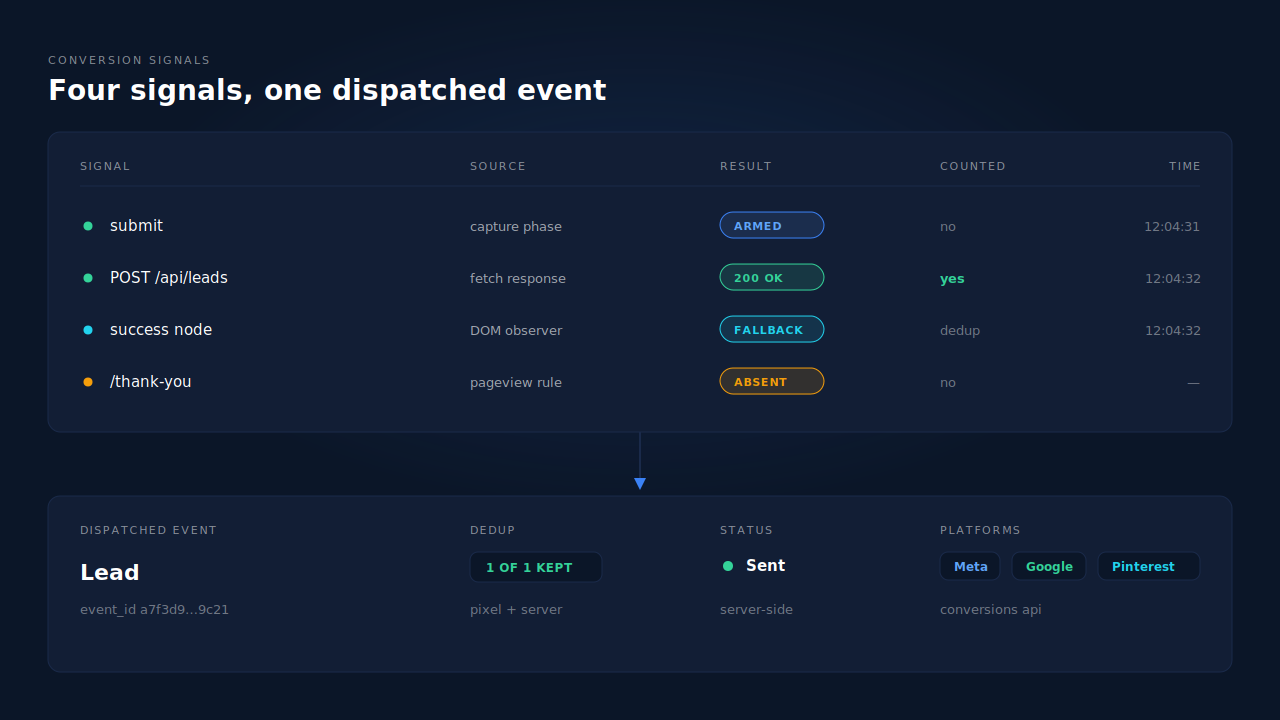
Four browser-side signals, in descending order of reliability: the form’s submit event, the network response to the form’s POST, a success node appearing in the DOM, and a client-side route change. Use the first two together where you can, and treat the last two as fallbacks.
// 1. Capture-phase submit listener — sees submits on forms
//    added to the page later, and before the app's own handler.
document.addEventListener('submit', function (e) {
  const form = e.target;
  if (!form.matches('form[data-lead]')) return;
  pendingSubmit = { at: Date.now(), form: form.id };
}, true);

// 2. Confirm with the response. Wrap fetch once, check the
//    status, and only then count it as a lead.
const nativeFetch = window.fetch;
window.fetch = async function (...args) {
  const res = await nativeFetch.apply(this, args);
  const url = typeof args[0] === 'string' ? args[0] : args[0].url;
  if (pendingSubmit && url.includes('/api/leads') && res.ok) {
    trackLead({ reason: 'fetch_2xx', status: res.status });
    pendingSubmit = null;
  }
  return res;   // never swallow the app's own response
};

// 3. Fallback for forms you cannot see the network call for:
//    watch for the success element the app renders.
new MutationObserver(function (records, obs) {
  if (document.querySelector('[data-lead-success], .form-success')) {
    trackLead({ reason: 'success_node' });
    obs.disconnect();
  }
}).observe(document.body, { childList: true, subtree: true });
Each signal has a failure mode worth knowing before you ship it. A capture-phase listener on document catches forms injected after page load, which is most of them, but it fires on submits that later fail validation. Wrapping fetch is precise, but a form that still uses XMLHttpRequest needs the same treatment on XMLHttpRequest.prototype.send, and a form inside a cross-origin iframe is unreachable from the parent page entirely — that is the Typeform-style embed problem, and it needs the platform’s own webhook instead.
The DOM-mutation fallback is the one that breaks silently: it depends on a class name or a string the site owner can change during a redesign without telling anyone. If you use it, alert on it going quiet. And on a multi-step form, decide which step is the conversion before you wire anything up, because multi-step forms lose people between steps and counting step one as a lead will flatter your numbers badly.
Why does firing on the submit event alone overcount your leads?
Because the submit event means “the visitor pressed the button”, and nothing more. Fire on it alone and you will report bounced validation attempts, failed posts, retries and bot submissions as conversions — then hand that inflated set to an ad platform as training data.
The damage is not the vanity number in your dashboard. It is that Meta and Google optimise toward whatever you tell them a conversion is. Feed them submit attempts and they will find you more people who press buttons and never become leads. Sites running a hosted form builder on a static or no-code host are the most exposed here, because the button is often the only thing the tracking layer can see.
The cheap guard is a two-part rule: require the submit event and a success confirmation within a few seconds of it, and ignore a second success for the same form within the same session.
How do you confirm a submission server-side instead of in the browser?
Take the confirmation from the system that actually received the lead. Most form platforms and CRMs will POST a webhook to a URL you own the moment a submission lands. That webhook is the most trustworthy signal available, because it comes from the server that stored the record rather than from a browser that may be blocking, closing or lying.
Server-side confirmation also survives the things browser tracking does not: a blocker that strips your tag, a tab closed during the redirect, an iOS content blocker, an ad blocker that only blocks some hosts. Once your server knows a lead exists, it can send the conversion to the Conversions API for each platform without the browser’s cooperation.
Two practical constraints. First, a webhook arrives after the visitor is gone, so the event needs identifiers captured earlier — the click ID, the browser cookies, the IP and user agent from the session — or it lands as an anonymous server event and the platform cannot match it to an ad click. Second, Meta requires the event_time on a server event to fall inside the last seven days, so a nightly batch is fine and a monthly backfill is not (Meta Conversions API documentation, 2026).
How do you stop one submission from being counted twice?
Give the event an ID derived from the submission itself, not a random number, and send the same ID from every path that reports it. Meta deduplicates pixel and server events that share an event_id and event_name, so a browser-fired Lead and a webhook-fired Lead for the same submission collapse into one conversion (Meta Conversions API documentation, 2026).
“Derived from the submission” matters. Date.now() or Math.random() produces a new ID on the retry, and the retry is exactly when you need the old one. Hash something stable — the lead record ID, or the session ID plus the event name — so the same submission always yields the same ID. The same logic applies whichever platform you send to, and it is the difference between a deterministic event ID and a coin flip.
This is what makes the belt-and-braces setup safe: you can watch for the submit event in the browser and accept the webhook server-side, knowing the two cannot double-count.
What about the people who fill the form and never submit?
They are the larger version of the same problem. A thank-you page tells you about the minority who finished; it tells you nothing about the visitor who typed an email address, reconsidered at the phone field, and closed the tab. Those people are not a tracking gap you can close by picking a better trigger — the submit event never happens.
That is what partial lead capture exists for: the contact details are read from the fields as they are typed, so the record exists whether or not the form is ever submitted. If you are wiring up submission detection anyway, it is worth solving both at once, because the JavaScript that captures a partial lead is listening to the same fields.
How does PartialLeads track form submissions when there’s no thank-you page?
It stops depending on the submission event for the lead to exist. The PartialLeads tag captures email and phone on input and blur with a 500ms debounce and posts them as they are typed, then runs a terminal flush on submit, pagehide and visibilitychange — draining any pending field through navigator.sendBeacon so the last thing typed is never lost. The lead record is already written before any confirmation page could have loaded.
Submission then becomes a status, not a prerequisite. A lead sits in the Leads list as Partial or Completed, and the flip to Completed can come from the tag’s confirmation detection where a confirmation page exists, or server-side from an inbound webhook when the purchase or order lands — which is also where revenue attaches. Conversion dispatch is decoupled from the browser entirely: each CAPI config carries a send mode — fire on partial leads, on completed leads, on rule-matched leads, on bookings, or manually — so a site with no thank-you page can still fire a Lead event at the moment that suits it. Every send carries a deterministic event_id with a UNIQUE dedup table behind it, so a redelivered webhook physically cannot double-fire.
The honest constraint: the tag’s own confirmation detection is client-side, so on a site where the success state is unreachable — a cross-origin iframe, a form that posts from another domain — the durable path is the captured lead plus a server-side webhook, not a browser signal. And server events still need the identifiers captured at the first touch to match on the platform’s side. Dispatch is the half you control; matching is the half the platform controls.
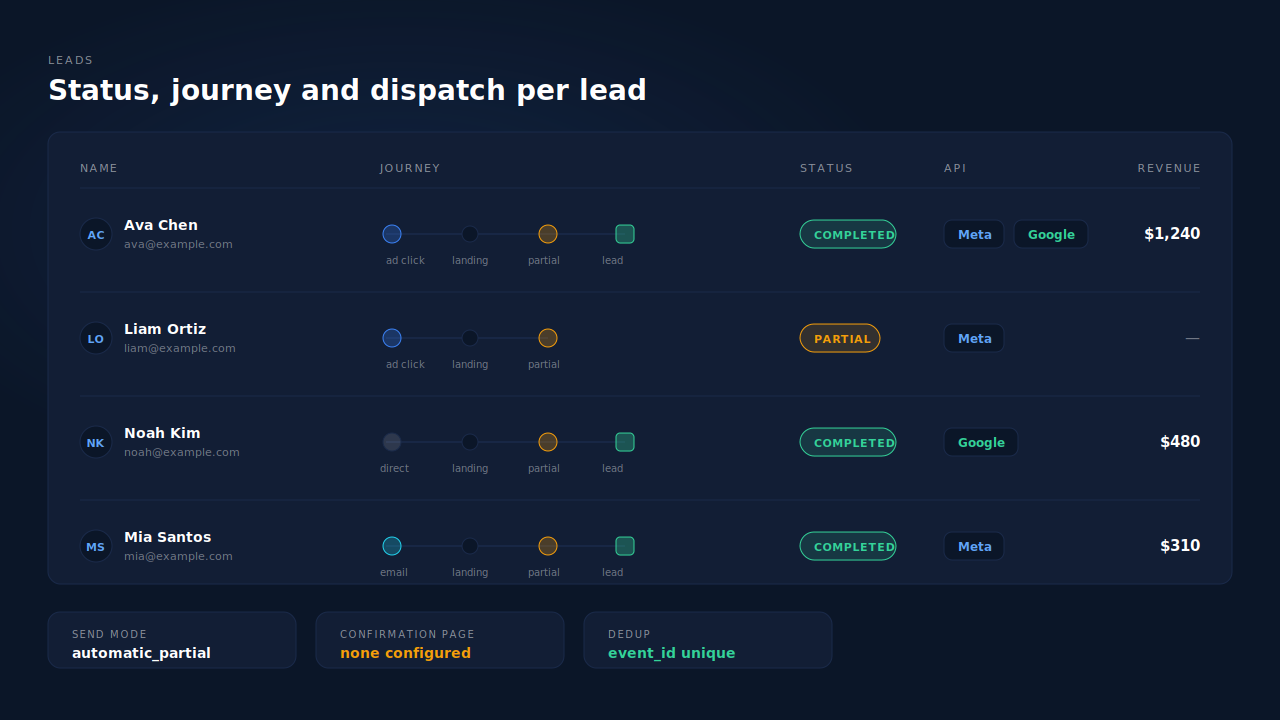
| What breaks | The mechanism | Where you see it in the dashboard |
|---|---|---|
Conversion fires on a /thank-you pageview that never loads |
Field capture on input/blur plus a terminal flush on submit, pagehide and visibilitychange |
Leads list — the lead exists with no confirmation page in the journey |
| No way to tell a finished lead from an abandoned one | Partial vs Completed status, flipped by confirmation detection or an inbound webhook | Leads list status badge; revenue column when an order matches |
| Ad platform never receives the lead because the browser was blocked | Server-side dispatch to Meta, Pinterest, TikTok and Google Ads, independent of the tag | Per-lead API column showing which conversion APIs received it |
| Same submission reported by the pixel and the server | Deterministic event_id (SHA-256 of pixel, event name and record) with UNIQUE dedup tables |
CAPI activity log — one row per event, retries idempotent |
| Nothing to fire on because the visitor never submitted | Partial leads dispatched on their own send mode, before any submission | CAPI config send mode; Partial badge on the lead |
Tell us what's broken. We'll fix your tracking — free.
Describe the tracking/attribution problem you're stuck on and we'll map it to a fix: server-side conversions to Meta, Google, TikTok and Pinterest, plus first-party tracking that survives Safari. No code required.
Sources
https://developers.facebook.com/docs/marketing-api/conversions-api/deduplicate-pixel-and-server-events https://developers.facebook.com/docs/marketing-api/conversions-api/parameters/server-event https://developers.facebook.com/docs/marketing-api/conversions-api/best-practices