Relay the campaign across the frame boundary, then match the lead by email on the way back. A Typeform embed loses attribution for one structural reason: the form runs inside a separate document on a separate origin, so it cannot read your page’s URL, and the UTMs and click ID that arrived with the ad click are not present where the form is running.
Everything that looks broken downstream follows from that. Leads with no campaign attached. A source column that says Direct, or worse, says the name of your form platform. A cost per lead you can only calculate for the whole account, never for the ad that produced it.
Below: what the frame destroys, the fixes you can build yourself and where each stops, and how the campaign gets rebuilt server-side.
Why does a Typeform embed lose your attribution?
Because the embedded form is a different website. The browser treats it as its own document with its own address, referrer and storage, and the same-origin policy stops it reading anything from the page around it. Your campaign data sits outside a wall the form cannot see over.
Six mechanics, and most embeds are hit by several at once.
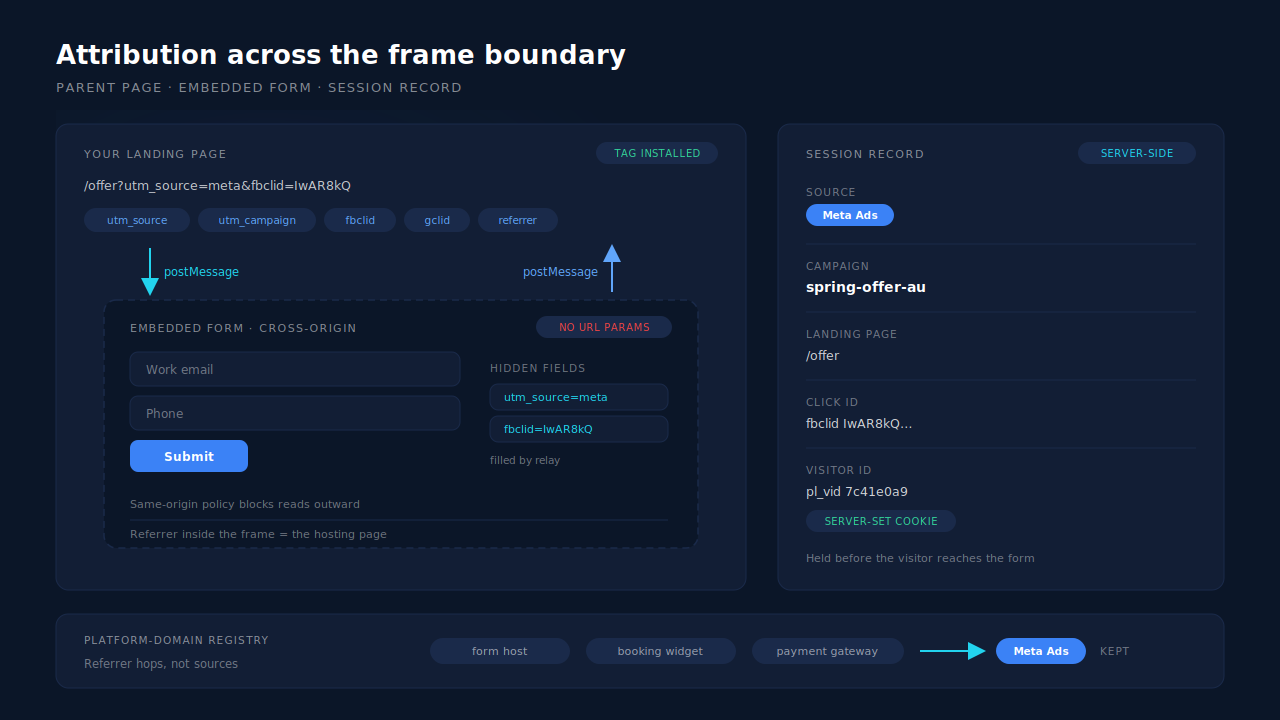
1. The iframe’s URL is not your URL. The embed script builds the frame’s address from the form ID and whatever options you passed it; your query string does not ride along. A visitor lands on yoursite.com/offer?utm_source=meta&fbclid=IwAR…, scrolls to the embed, and the form inside is running at an address containing none of it.
2. Script inside the frame cannot read up. Same-origin policy blocks a cross-origin document from reading the parent’s location, cookies or storage. That is a browser security guarantee, not a Typeform limitation — which is why the fix has to be a deliberate message across the boundary rather than a lookup.
3. The referrer inside the frame is your page, not the ad. The embedded document’s referrer points at the page hosting it, so even the fallback signal is one hop wrong: it names which of your pages the form sits on, and nothing about the click ID that brought the visitor there.
4. Storage inside the frame belongs to the form host. Anything the embedded form writes to cookies or local storage is scoped to the form platform’s origin, and browsers increasingly partition that storage per top-level site. Your own first-party visitor identifier neither exists in there nor can be read from there.
5. The response record stores answers, not context. You get the fields the respondent filled in, plus any hidden fields you deliberately populated. No hidden field, no campaign — the lead exists, its origin does not.
6. A redirect out of the form rewrites your source. If the form sends the visitor onward to a thank-you page, that navigation’s referrer is the form platform’s own domain. Your analytics records a new visit referred by the form host — which is how a click you paid Meta for ends up filed under a domain you do not advertise on.
Whether you receive anything at all for an unfinished response depends on your form platform’s plan and settings, and even then it arrives stripped of context for all six reasons above. That person typed a working email address into your funnel and became a partial lead nobody can trace.
What does broken Typeform attribution actually cost you?
Two separate losses that get confused with each other. Your reporting loses the campaign, so you cannot rank ads by the leads they produced. Your ad platform loses its conversion signal, so optimisation degrades. Different causes, different fixes.
The reporting loss. With no campaign on the lead record, every ad in the account shares one blended cost per lead. Say a month brings 400 leads on £8,000 of spend: a £20 blended CPL hiding one campaign at £11 and another at £46. Those numbers are illustrative, but the shape is not — an average is always an average of things you should be treating differently.
The optimisation loss. The ad platform does not need your UTMs; it needs a conversion event carrying identifiers it can resolve to the person who clicked. If your only signal is a pixel firing inside a frame you do not control, or on a thank-you page many visitors never reach, the platform is learning from a fraction of your leads — and the ones that do reach your reports frequently show up as Direct.
The invisible third loss. Everyone who opened the form, answered two questions and left is not in your data at all — usually the largest group in the flow.
How do you pass campaign data into a Typeform embed yourself?
By reading the parameters on your own page and handing them to the form explicitly. The standard route is hidden fields: define them on the form, supply their values when the embed is created, and the completed response arrives carrying the campaign. It works, within limits worth knowing first.
Step 1 — define hidden fields on the form. Typeform supports hidden fields that take their values from the embed rather than from the respondent. Check Typeform’s own embed reference for the current field names and the exact option your embed method takes — the shape differs between the script embed, the SDK and a plain link.
Step 2 — populate them from the parent page. Read your own page’s query string and pass the values through when the embed initialises:
// Read the campaign off the parent page and hand it to the embed.
const q = new URLSearchParams(window.location.search);
const hidden = {
  utm_source:   q.get('utm_source')   || '',
  utm_campaign: q.get('utm_campaign') || '',
  gclid:        q.get('gclid')        || '',
  fbclid:       q.get('fbclid')       || '',
};
// Pass `hidden` to your embed call, per Typeform's current embed reference.
Step 3 — persist first-touch values before they disappear. Read the parameters on the first pageview, store them in first-party storage, then read from storage at embed time rather than from the URL. Without this, a visitor who lands on your offer page and clicks through to a contact page before filling the form arrives at the embed with an empty query string. The multi-page journey is the common one, and it is the one naive hidden fields lose.
Step 4 — receive the response somewhere you control. Point the form’s response webhook at your own endpoint, so the lead lands in your systems with the hidden fields attached rather than only in the vendor’s dashboard.
Where this ladder stops. Hidden fields travel with completed responses, so anyone who abandons mid-form is still invisible. Browser storage is subject to clearing, private browsing and platform storage limits, which is why a session spanning a week often comes back empty. Redirect chains between the ad and your landing page can strip query parameters before your script sees them. And all of it assumes the click ID was in the URL to begin with. A GoHighLevel funnel hits the identical wall with a different vendor’s frame around it.
Why does your analytics show typeform.com as the traffic source?
Because a redirect out of the form starts a new navigation whose referrer is the form platform’s domain, and any tool that reads the referrer treats a new domain as a new source. Nothing is malfunctioning: the tool is reporting the last hop accurately, and the last hop is your own form vendor.
Same class of problem as a payment gateway showing up as your top revenue source. The fix is not to trust the referrer less; it is to know which domains are continuations of a journey rather than origins of one — form hosts, booking widgets, payment processors, consent walls. A tracking layer that recognises them looks past the hop and keeps the session’s original source; one that does not keeps crediting your form vendor for your paid traffic.
Practically: exclude your form platform’s domain from your referral report, or your channel mix is fiction. And if your source column is full of vendor domains, the gap between your numbers and Ads Manager is a referrer artefact, not a modelling difference.
How does PartialLeads keep attribution on a Typeform embed?
By relaying the campaign across the frame boundary and holding it on a first-party session that outlives the visit, so the lead joins back to its click even though the form never saw one. There is no Typeform app to install: the universal tag — one script, about 10KB gzipped — goes on the page hosting the embed.
The tag talks across the frame boundary in both directions. It broadcasts the parent page’s attribution down into embedded frames and listens for attribution posted up from a parent frame, using the browser’s cross-document messaging channel — the sanctioned way across an origin boundary the same-origin policy otherwise seals. It is the specific mechanism built for embedded form platforms: Typeform and Jotform embeds, GoHighLevel widgets, ClickFunnels pages.
Attribution is captured at first pageview, not at form time. UTMs are read from the URL with a document.referrer fallback, alongside gclid, gbraid, wbraid, gad_source, fbclid, msclkid, ttclid and epik, plus the landing page and referrer. Those values persist server-side against a durable visitor ID, so the visitor can browse four pages before reaching the embed and the campaign is still attached. The referrer fallback is doing real work here — it exists precisely for the case an iframe embed creates.
Known form-host domains are treated as hops, not sources. A platform-domain registry recognises form and funnel platforms in the referrer chain, so a redirect out of an embedded form does not overwrite the visitor’s real source. The lead keeps the Meta or Google label it earned.
The visitor ID survives Safari. The first-party cookie is set by the server rather than by script in the page, so the seven-day cap browsers apply to script-written cookies does not reach it. A visitor returning a fortnight later is still the same person, still attached to the original click.
Sessions become people, and that closes the loop. A six-tier identity resolution cluster unions a person’s sessions by visitor ID, email, phone, IP plus user-agent, device fingerprint and click ID, and visit-sibling inheritance repairs a session that arrived with no source by taking it from a sibling session in the same visit. So when the response reaches your CRM carrying an email address, that email is enough to find the session that carried the campaign — the hidden field is a convenience, not the only route home.
Conversions leave from a server. Matched leads and purchases fan out to Meta’s Conversions API, Pinterest, TikTok, Microsoft and Google Ads offline conversions, PII hashed per each platform’s spec and _fbc reconstructed from a URL fbclid when the cookie is missing (Meta for Developers, Conversions API). Every event carries a deterministic event_id against a unique dedup key, so a retry cannot double-count.
The honest constraint, and it is the important one. PartialLeads captures fields as they are typed on forms in your page — not inside a third-party iframe. No script on your page can read keystrokes inside a cross-origin frame, and none should be able to. So an embedded Typeform does not produce pre-submit partial leads the way a native form does. If recovering abandoners matters more than the form builder’s interface, put a native form on the page and keep Typeform for flows where its UX earns it. Keep your Meta base pixel installed too: _fbc can be rebuilt from a URL parameter, but _fbp is not synthesised from nothing, and server events match at reduced quality without it.
| What breaks | The mechanism | Where you see it in the dashboard |
|---|---|---|
| The iframe cannot read your page’s UTMs or click ID | Cross-document message relay: parent attribution broadcast into embedded frames, frame attribution accepted from parents | Lead detail — source, campaign, landing page and referrer on the record |
| The embed URL is empty on multi-page journeys | Click IDs and UTMs captured at first pageview and persisted server-side against the visitor ID | Lead detail — original landing page, not the page holding the form |
| The referrer names your form vendor instead of the ad | Platform-domain registry treats form and funnel hosts as hops; referrer fallback resolves the real source | Journey ribbon on the Leads list; source badges instead of vendor domains |
| Ad-driven leads recorded as Direct | Six-tier identity cluster plus visit-sibling attribution inheritance | First-touch and last-touch rows in the Attribution report |
| A returning visitor loses the original click | Visitor ID in a server-set first-party cookie, outside the script-cookie cap | Multi-session leads carrying their source across visits |
| The response reaches your CRM with no campaign | Identity match on normalised email and phone back to the session that carried the click | Revenue and source on the lead record; Attribution report |
| The same conversion counted twice | Deterministic event_id plus unique dedup keys per config |
CAPI activity log; deduplicated in Meta’s Events Manager |
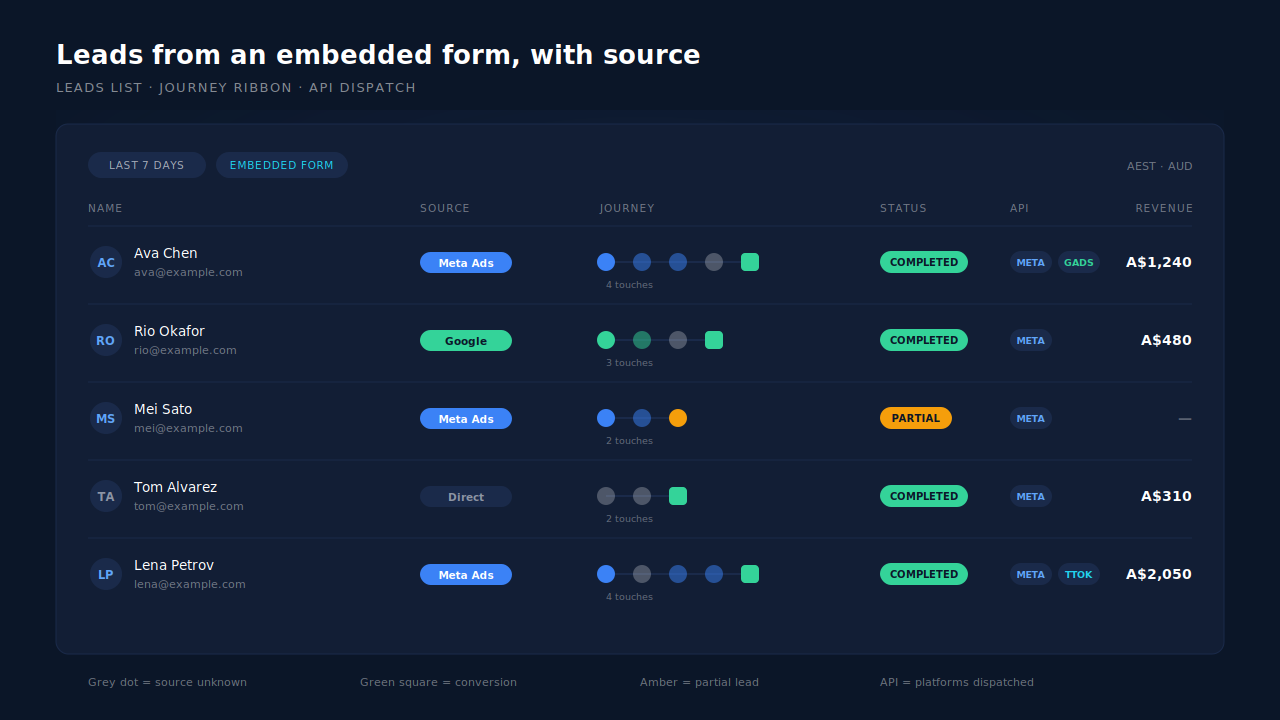
The free tier covers the whole test on 50 leads: put the tag on the page hosting your embed, run one paid click into it, complete the form, and check whether the lead arrives labelled with the campaign rather than with your form vendor’s domain. One lead answers the question faster than a week of report-watching.
Recover the leads you're already earning
Tell us what you're trying to track or fix. We'll show you which visitors your forms miss — and how PartialLeads recovers and qualifies them.
Sources
- Meta for Developers — Conversions API: https://developers.facebook.com/docs/marketing-api/conversions-api
- Meta for Developers — Customer Information Parameters: https://developers.facebook.com/docs/marketing-api/conversions-api/parameters/customer-information-parameters
- Meta for Developers — Deduplicate Pixel and Server Events: https://developers.facebook.com/docs/marketing-api/conversions-api/deduplicate-pixel-and-server-events