You recover them by capturing what they typed while they were typing it. A visitor who filled in their email and then closed the tab has already handed you a contactable lead. The reason it is not in your CRM is not that something failed — it is that nothing ever sent it. Forms write on submit, and this one never submitted.
The data existed. It sat in an input element for ninety seconds, and then the tab closed and it was gone.
Where does the lead go when someone abandons a form?
Nowhere. That is the whole problem, and it is worth being precise about it, because most teams assume there is a log somewhere.
The email lived in the browser’s memory, inside the DOM node for that input. It was never transmitted, so it never reached a server, which means there is no application log, no database row, no queue to replay and no vendor to ask. When the tab closed, the process holding it ended.
This is different from the failures marketers are used to debugging. A blocked pixel is a request that was made and refused. A dropped webhook is a delivery that was attempted and lost. Neither describes an abandoned form, where nothing was attempted at all: the visitor did the work of typing their address, and your stack declined to look at it until they performed one more action they were never going to perform.
That is also why it is invisible in reporting. Form abandonment shows up as an absence — traffic that arrived and produced nothing — and absences do not have detail pages.
Why doesn’t your CRM have any record of them?
Because every layer of a normal form stack is keyed to the same single moment, and that moment is the submit. Remove it and all of them go quiet at once.
Walk the chain as it is usually built:
- The form element posts its values on submit. Before that, the values belong to the browser and nothing else.
- The JavaScript handler — the one your form builder generates — binds to the submit event. That is the function that calls your CRM’s API.
- The CRM only ever hears from that function. It has no other channel into the page.
- Analytics counts a thank-you page view or a submission event, both of which happen after the fact.
- The ad platform’s pixel fires its Lead event on the same trigger, so the platform does not learn about this person either.
One event, five dependents. That is a reasonable design for a form whose job is to create a record on completion, and a bad design for a business whose real question is “who was interested”. The stack has no vocabulary for that state — a visitor is anonymous, or a visitor is a lead, and there is nothing between the two.
The practical consequence: the fix cannot live downstream. No amount of CRM automation or retargeting configuration will recover a record that was never created. Recovery has to start in the browser, while the typing is happening.
What can you do about this without a capture tool?
Five approaches, each real, each with the limit that comes attached. Take these seriously before adding anything to your stack — two of them are free and one of them is often enough.
- Split the form so the email submits on its own. Make step one a single email field that posts when the visitor moves to step two. You have not stopped the abandonment; you have moved it behind a real record. Limit: it is an extra click, it measurably costs some completions on short forms, and you need a backend that accepts a partial payload.
- Add save-and-resume. Persist the draft server-side and email a magic link back. Limit: it requires the email first, which is the field you were trying to secure, and it is a genuine engineering project rather than a setting.
- Use an exit-intent prompt. A modal on cursor-toward-the-close that asks for the email again. Limit: exit intent is a desktop mouse behaviour and does not exist on touch devices. It also asks the visitor to repeat work they already did, which is exactly the reason they left.
- Autosave the draft to local storage. Cheap, and it does help returning visitors. Limit: the data stays on that device. It never reaches you, and it is gone the moment they clear their browser or switch phones.
- Build field capture yourself. Listeners on
inputandblur, a debounce, and a request fired onpagehideusingsendBeaconso it survives the page going away. This one actually works — it is the same mechanism a capture tool uses, and we have written up how to capture a partial form lead in JavaScript in full. Limit: the listener is the easy part. What follows it — normalising phone numbers, deduplicating against existing contacts, gating on consent, carrying attribution through an iframe, retrying failed deliveries — is the part you end up maintaining.
The first four share a ceiling: they either ask the visitor to do something again, or they keep the data on the visitor’s device. Only the fifth moves what was already typed to somewhere you can act on it.
How do you capture a lead who never submits?
You listen for typing instead of listening for submission, and you make sure the last thing they typed leaves the page before the page does. Two mechanisms, and the second one is the one people get wrong: listeners are easy, and the flush at the end is where recovered leads are actually won or lost.
Why does the flush matter more than the listeners?
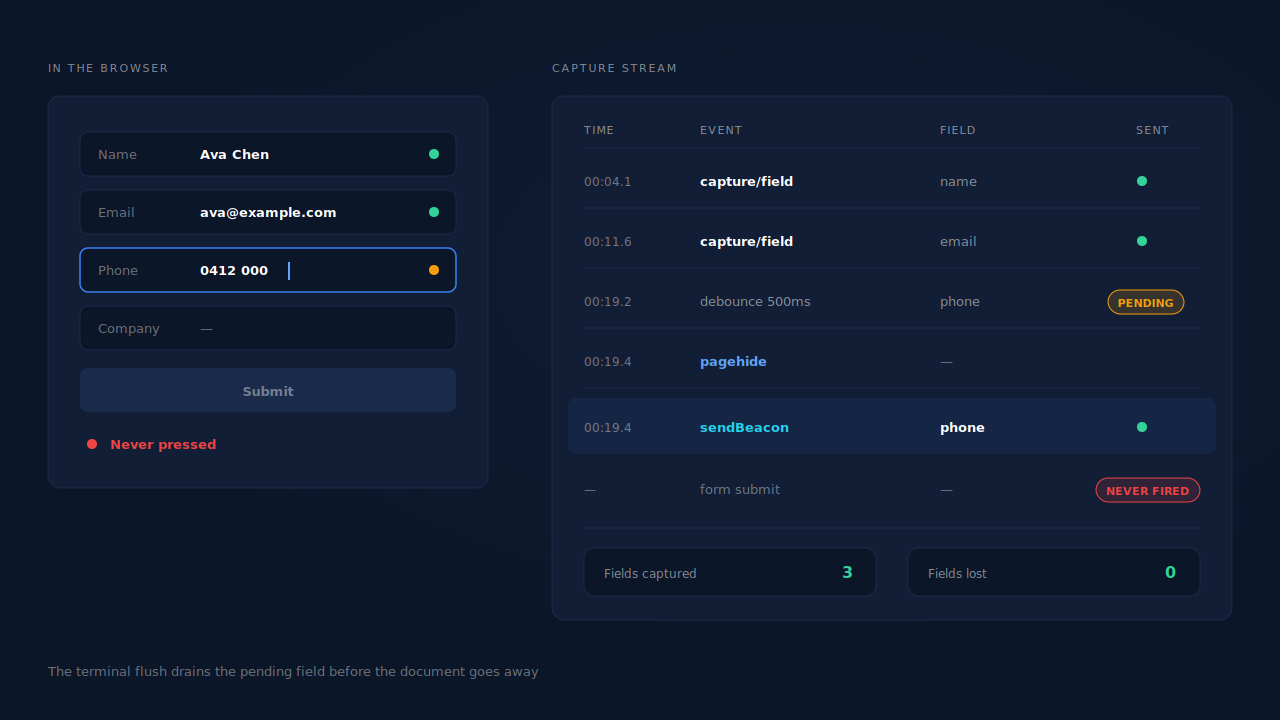
Because the most valuable field is almost always the one still in flight. Capture is debounced — you do not want a network request per keystroke — which means at any moment there is a field that has been typed but not yet sent. When someone abandons, they abandon during that window. Without a flush, you systematically lose the last field every single time, which is the field that tells you where they stopped.
The flush has to fire on the events that actually happen when a page goes away. pagehide and visibilitychange are the dependable ones; the old unload event is unreliable on mobile, where the tab is often discarded rather than closed. The request itself needs to survive the document dying, which is what sendBeacon is for, with a keepalive fetch as the fallback.
What do you capture besides the fields?
Whatever makes the record useful later: the page the form was on, the landing page, the referrer, the UTM parameters, and the platform click identifiers in the URL. A recovered email with no source attached is a contact. A recovered email with a campaign attached is a contact you can price.
What has to happen before a recovered lead is usable?
Five things, and skipping any of them turns recovery into a list of junk that your sales team stops trusting inside a week.
Normalise. Lowercase and trim the email; strip the dots and plus-addressing that Gmail ignores. Convert the phone to E.164 with a country code, inferring it from the visitor’s geography when they typed a local number. Do this before anything hashes or compares it, or the same person will exist twice.
Validate. A field captured mid-typing can be a half-typed address. ava@gmai is real captured data and a real bounce. Check the shape before you send anything, and treat the last captured value as the best available guess rather than a confirmed fact.
Deduplicate. The same person will abandon on Tuesday and come back on Thursday, on a different device, on a different network. If those arrive as two leads, your counts are wrong and someone gets contacted twice. This is why visitor identity resolution is not an optional extra here — matching by email and phone across sessions is what turns three records into one person.
Attach attribution. Source, campaign and journey have to travel with the lead into your CRM, not sit in a separate dashboard. A recovered lead with no source cannot be evaluated, so it will be treated as free traffic and ignored.
Decide the contact rule, and write it down. This is the one people skip. They did not submit, and that is information about intent, not a grant of permission. Disclose pre-submit capture in your privacy policy, gate it behind consent where your market requires it, apply the same retention and deletion rules you apply to submitted leads, and pitch accordingly — a short “you started filling this in, want a hand?” is a different message from a sequence that pretends they opted in.
How does PartialLeads recover a lead who never clicked submit?
The PartialLeads tag captures each field as it is typed rather than waiting for a submit. It listens on input and blur, debounces by 500 milliseconds, and posts each completed field as its own capture event. When the visitor submits, hides the tab or leaves the page, a terminal flush drains whatever is still pending using sendBeacon, with a keepalive fetch as the fallback — so the field they typed last is not the field you lose.
What lands is a partial lead: a real lead record carrying the fields they actually filled in, marked Partial rather than Completed, sitting in the same Leads list as your submitted leads. Email is lowercased and trimmed; phone is normalised to E.164 with the country code taken from the session’s geography when it is missing. Nothing is invented for the fields they never typed. This is partial lead capture doing the only job that matters here — moving what was already in the browser somewhere you can act on it.
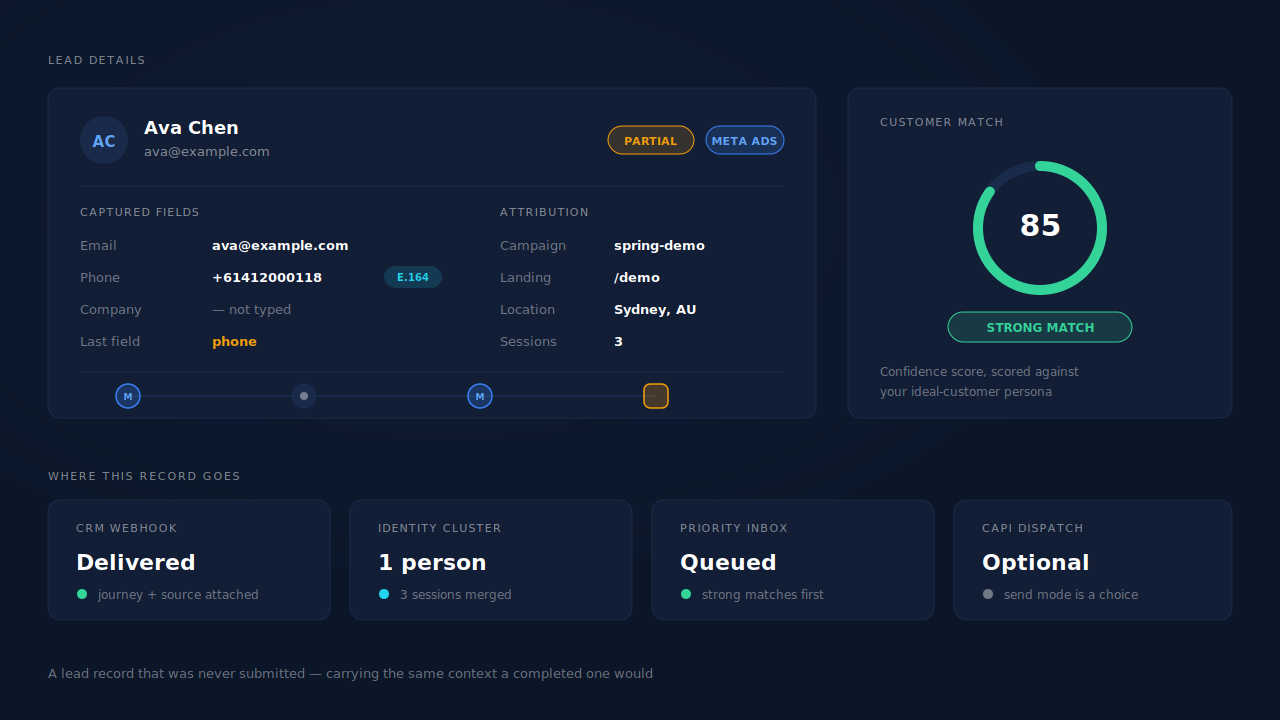
From there the record behaves like any other lead. It carries its UTMs, referrer and click identifiers — including through an iframe, where a postMessage relay passes the parent page’s campaign parameters across the frame boundary, so a Typeform or GoHighLevel embed does not strip the source. It is stitched into the person’s identity cluster, so the same human returning on a laptop next week joins the record instead of creating a second one. And it fires your CRM webhooks with the journey, source, geography and enrichment attached.
Then the part that separates recovery from noise: each lead is scored against your ideal-customer description by a two-step enrichment pass — research on the domain and the person, then a match verdict with a confidence score and stated reasons. Strong matches surface in a priority inbox above the table. More recovered leads do not help if your team chases the wrong ones, and a hundred partials with no ranking is a worse problem than the one you started with.
Recovered leads can also go back to the ad platforms rather than only to sales. Meta and Microsoft configurations both support a send mode that fires the lead event on partial capture, before any submit, alongside the conventional post-submit mode. Whether you want that is a judgement call: you are teaching the platform to find people who behave like someone who did not finish. Many advertisers send only completed or rule-matched leads, and a rule-based mode exists for the middle ground.
One thing it does improve unambiguously is what you are able to transmit at all. Hashed email is the highest-weight customer parameter in Meta’s Conversions API and hashed phone is next, and you can only send identifiers you collected. With email and phone as required form fields, PartialLeads consistently delivers EMQ 9+ — observed across customer accounts. Partial capture is what makes requiring a phone field survivable, because the visitors who typed one and then abandoned still produce a record with both identifiers on it. If you are working on that number specifically, getting to a 9+ Event Match Quality score covers the arithmetic.
| What breaks | The mechanism | Where you see it in the dashboard |
|---|---|---|
| The form only writes a record on submit | Field-level capture on input and blur, one event per completed field |
Leads list, Partial badges |
| The last field typed dies with the tab | Terminal flush on submit, pagehide and visibility change, sent with sendBeacon |
The final field present on the partial lead |
| Recovered contacts arrive in unusable formats | Email lowercased and trimmed, phone normalised to E.164 using session geography | Phone and email on the lead record |
| The same abandoner becomes three leads | Six-tier identity cluster joining sessions by visitor id, email, phone, IP, fingerprint and click id | Customer Journey timeline, unique contacts |
| A recovered email arrives with no source | UTMs, referrer and click ids captured on the session and carried onto the lead | Source badge and UTM column on the Leads list |
| Embedded forms strip campaign parameters | postMessage attribution relay plus referrer fallback across the iframe boundary | Correct source on Typeform, Jotform and GoHighLevel leads |
| Sales receives an orphaned email address | CRM webhooks carrying journey, source, geography and enrichment | Webhook payloads, Lead Intelligence |
| Nobody knows which partials are worth calling | Two-step AI enrichment scored against your ideal-customer persona | STRONG MATCH priority inbox, match verdicts |
| The ad platform never learns about them | Server-side lead events dispatched to Meta, Pinterest, TikTok and Google Ads | CAPI activity log |
Three honest constraints. Capture only ever sees fields the visitor typed into, so a form they scrolled past leaves nothing behind. Capture is consent-gated, so what runs depends on how your banner is configured — in strict-consent markets some of these leads will correctly never be captured at all. And a recovered lead is a contactable record, not a submitted one; how you approach that person stays your judgement, and no tool should make it for you.
Recover the leads you're already earning
Tell us what you're trying to track or fix. We'll show you which visitors your forms miss — and how PartialLeads recovers and qualifies them.
Sources
- Meta for Developers — Conversions API, customer information parameters: https://developers.facebook.com/docs/marketing-api/conversions-api/parameters/customer-information-parameters
- Meta for Developers — Conversions API, server event parameters: https://developers.facebook.com/docs/marketing-api/conversions-api/parameters/server-event