A multi-step form loses leads at every step change, because every transition is a fresh decision to keep going. The steps that ask for the most — phone number, budget, address, a calendar slot — are usually the later ones, so the drop-off concentrates exactly where the visitor has already invested the most effort.
What makes it hard to fix is that the loss leaves no record. Your form tool writes a row when the final step is submitted and at no other moment, so a visitor who finished two steps of four is stored exactly like one who never loaded the page. Both are absences.
Their email is not an absence. It was typed on step one, it sat in an input element for several minutes, and then the tab closed and it was gone.
Where does a multi-step form actually lose people?
At three places, for three reasons. Step one loses people who were never serious. The qualification step loses people who were serious until you asked the expensive question. The transitions lose people to friction that has nothing to do with what you asked.
Take a four-step quote form: contact details, then project details, then budget, then a booking slot. Step one is cheap — information the visitor gives away a dozen times a week. Step two is work, but it is their subject, so people who care will do it. Step three asks them to name a number, which is where the form stops being a quote request and starts being a negotiation. Step four asks for calendar time with a salesperson.
Each of those is a different objection needing a different fix. Lumping them together as “our form converts at 22%” hides all of it.
The transitions add a fourth category that is purely mechanical: a step that takes two seconds to load, a page that resets scroll so the visitor lands above the fields and thinks nothing happened, a progress bar reading “step 2 of 6” when they were told it would be quick. None of these are about willingness. They are about a form that made continuing feel like work.
Why can’t your analytics tell you which step lost them?
Because analytics records events that happened, and an abandonment is the absence of an event. The strongest signal you have is a pageview that was never followed by another pageview, and whether you even get that depends on how your form was built.
If each step is its own URL, you get a pageview funnel: 1,000 people saw step one, 610 saw step two, 240 saw step three. That is the shape of the leak, it is genuinely useful, and it is where most teams stop. What it cannot tell you is what those 370 people typed before they left, or who they were.
If your steps are JavaScript state inside one URL — a React form, an embedded widget, a typical quiz funnel — you get nothing at all. One pageview in, one exit out. To your analytics tool, a visitor who filled three steps and a visitor who bounced in four seconds are the same event stream. This is the common case, and it is why teams running multi-step forms describe the problem as form abandonment they can feel but cannot locate.
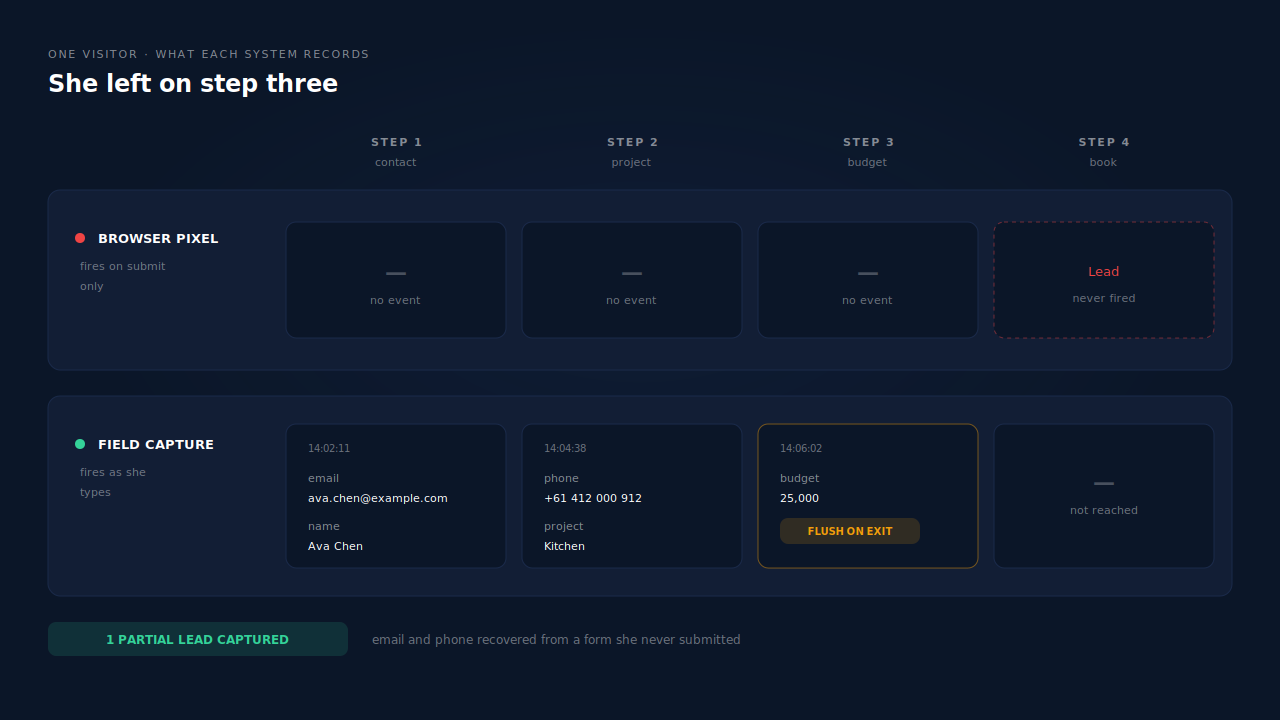
Your ad platform’s pixel has the same blind spot, and worse. It fires its Lead event on the thank-you page. Everyone who did not reach that page is not a weak lead in its model — they do not exist, and the optimisation algorithm is trained accordingly.
Does splitting a form into steps help or hurt?
It does both, and which one dominates depends entirely on what you put in step one. Splitting reduces the effort a visitor sees at the moment they decide whether to start, and it increases the number of moments at which they can decide to stop. You are trading a single large commitment for several small ones.
That trade works when the split is real — step one cheap, the expensive fields arriving after the visitor has invested enough to want their investment back. It fails when the split is cosmetic: nine fields presented as three steps of three is still nine fields, plus two page loads.
The ordering question is separable from the step question and worth answering directly, because the field visitors abandon on most is rarely the one you would guess. A phone field in step one behaves very differently from the same phone field in step three.
No benchmark can tell you whether your form should be one page or four. The comparison that settles it is your own form against itself, which means seeing the abandoners, not just counting them.
Why does attribution break between step one and step three?
Because the marketing identifiers live on the landing URL, and your later steps are different URLs. A visitor arrives on step one with ?utm_source=google&gclid=… attached. They click Continue. Step two loads at a clean URL with no parameters, and if your tracking reads attribution from the current page, it reads nothing.
The failure modes stack up:
Redirects strip parameters. A funnel builder that bounces the visitor through an intermediate URL, or a form host that redirects to its own domain between steps, drops the query string unless told to carry it.
Iframed steps have no referrer. When the form is embedded — a Typeform, a Jotform, a booking widget — the iframe’s URL belongs to the form vendor. Inside that frame there are no UTMs, no click ID, and often no usable referrer.
Subdomain hops break cookie scope. Step one on www.example.com, step three on apply.example.com, and a cookie written without the right domain scope is not there when you look for it.
So the step where the lead is actually created is the step that knows least about where the lead came from. That is the mechanism behind a large share of the sessions that show up as Direct in your ad reporting — not a tagging mistake, but a visitor who moved between pages while attribution was only ever read once.
What can you fix without buying anything?
A fair amount, and it is worth doing first because it costs nothing but attention.
Give each step its own URL, or fire a virtual pageview on each step change. If your steps are JavaScript state, push a history entry or send an event on transition so your analytics has something to count. You get the funnel shape, not the contact details — but shape beats nothing.
Carry the query parameters forward. Read UTMs and click IDs on the first pageview, write them to sessionStorage, and append them to every subsequent step URL or push them into hidden fields. A few lines of JavaScript, and it fixes most self-inflicted attribution loss.
Put the cheap fields first and the expensive ones last. Email in step one, phone and budget later. This does not stop abandonment, but it changes what you still have when it happens.
Stop resetting scroll, and be honest about length. Say how many steps there are up front rather than revealing step five as a surprise.
Post the email on blur to your own endpoint. A small blur listener on the email field firing a fetch will genuinely capture a share of your abandoners — capturing a partial form lead in JavaScript is not hard to prototype.
Be clear-eyed about what the DIY version leaves you to build: consent gating, retries when the request dies with the page, deduplication, email and phone normalisation, storage and retention, and the join between that captured email and the session that produced it. Each is small. Together they are the actual product, and it is usually the join that quietly never gets built — leaving you with a table of email addresses and no idea which campaign paid for them.
How does PartialLeads recover leads lost between form steps?
By capturing fields as they are typed rather than when they are submitted, and by keeping one identity across every step whatever URL, frame or subdomain it lives on. Both halves matter: capture without identity gives you an email with no source; identity without capture gives you a well-attributed session with no contact details.
The capture side is a single tag, about 10KB gzipped, no tag manager required. It listens on input and blur with a 500ms debounce, so the email typed on step one is recorded while the visitor is still reading step one. On submit, on pagehide and on visibilitychange it performs a terminal flush — any pending debounced field is drained and sent with navigator.sendBeacon, with a keepalive fetch as fallback. That flush is what makes step transitions survivable: the moment the visitor leaves step two, the last thing they typed goes out rather than dying with the page. This is partial lead capture applied to a form with more than one exit point.
The identity side keeps the steps connected. The visitor ID lives in localStorage with a first-party cookie backup, and the cookie is set by the server rather than by script, so Safari’s cap on script-written cookies does not apply to it. UTMs and click IDs are read from the URL with a document.referrer fallback, and for embedded steps the tag listens for postMessage attribution from the parent frame and broadcasts it into iframes — which is what makes a Typeform or GoHighLevel widget in step three report the right source.
Behind that sits the identity graph. A person’s sessions are unioned across six tiers — visitor ID, email, phone, IP plus user agent, device fingerprint, and click ID — and visit-sibling inheritance heals attribution inside a single visit: a step page arriving with no source, from the same client, IP and user agent within about thirty minutes of a sibling session that carried the UTMs, inherits that attribution rather than being written off as Direct.
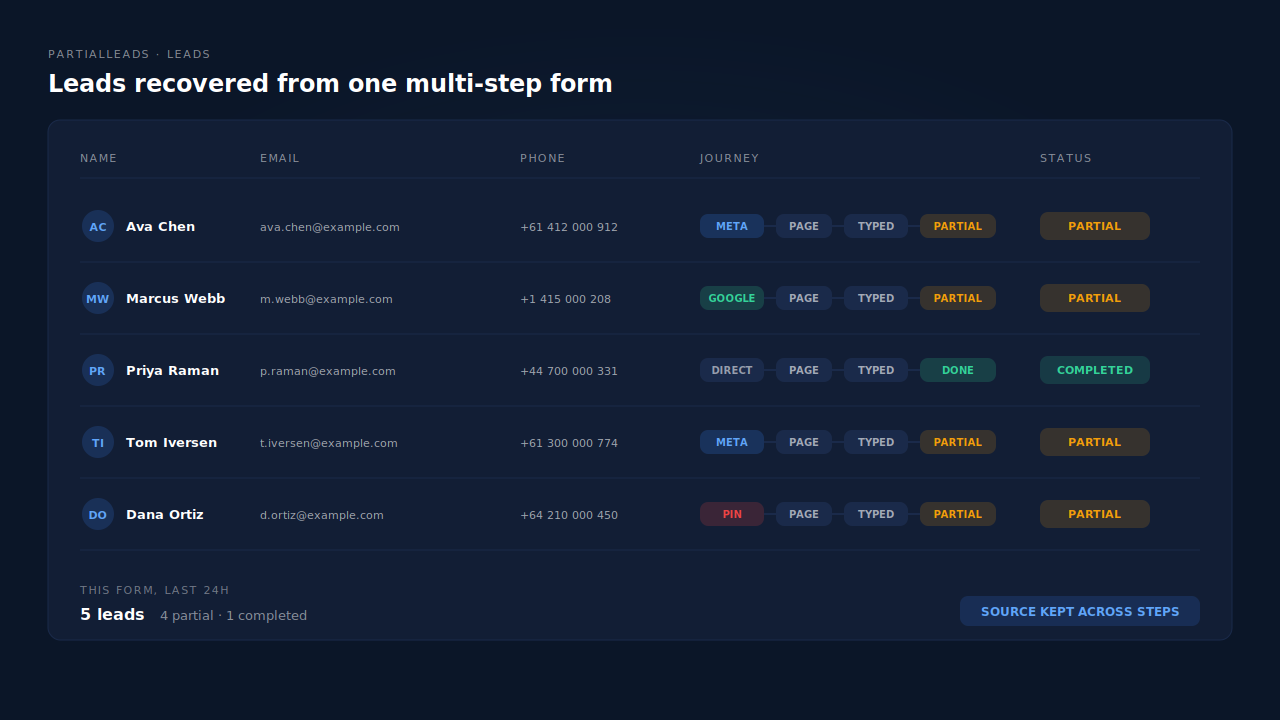
What you get at the end is a lead. It lands on the Leads list with a Partial badge, its email and phone normalised — phone to E.164, country code inferred from session geo — beside a Journey ribbon that reads left to right as the sequence of touches that produced it. Open it and the Customer Journey timeline shows the sessions, source, geo and the fields as they were entered. From there it can go to your CRM by webhook, or be dispatched as a server-side Lead event to Meta, Google Ads, Pinterest, TikTok or Microsoft, so the algorithm sees the people who stopped at step three as well as the ones who finished.
Three honest constraints.
Capture starts when they type. A visitor who reads step two, decides against it and leaves without entering anything produces a session, not a contact. Field capture recovers the people who engaged and stopped; it does not manufacture identity for people who never engaged.
The product does not host or render your form, and has no notion of “step three” as a concept. What it records is which fields were filled and when. Because you know which fields belong to which step, the fields present on an abandoner tell you how far they got — a read you make with knowledge of your own form, not a step-funnel chart the product draws for you.
Consent still governs capture. Where you operate under consent requirements, the tag’s behaviour is gated accordingly, and a visitor who has not consented is not captured.
The general shape holds even if you never use this product: what is recoverable from a multi-step form is exactly what was typed before the visitor left, and only if something was listening at that moment. Every fix downstream — better analytics, better funnels, better reporting — operates on data already discarded. That is the whole case for treating a partial lead as a record worth keeping.
| What breaks | The mechanism | Where you see it in the dashboard |
|---|---|---|
| A visitor abandons on step three and the form tool records nothing | Field capture on input and blur with a 500ms debounce, posted as typed | Leads list, Partial badge |
| The last field typed dies with the page on a step transition | Terminal flush on submit, pagehide and visibilitychange via sendBeacon | Lead detail, captured field entries |
| Step two loads at a clean URL and loses the UTMs and click ID | Attribution read on first pageview with referrer fallback, stored on the session | Lead detail, source and UTM columns |
| The form is an iframe, so the step has no referrer and no parameters | postMessage attribution relay between parent frame and embedded form | Correct source label on the lead |
| Steps split across subdomains break the visitor cookie | Server-set first-party visitor cookie, ITP-durable, with localStorage backup | One lead instead of several visitors |
| A conversion step arrives with no source at all | Visit-sibling inheritance from a same-visit session carrying strong attribution | Journey ribbon, resolved source |
| The same person restarts the form on another device | Six-tier identity cluster unions their sessions into one person | Customer Journey timeline |
| The ad algorithm only ever learns from finished forms | Server-side Lead dispatch for captured partials across the connected APIs | CAPI activity log, per-lead API column |
Recover the leads you're already earning
Tell us what you're trying to track or fix. We'll show you which visitors your forms miss — and how PartialLeads recovers and qualifies them.
Sources
- Meta for Developers — Conversions API: https://developers.facebook.com/docs/marketing-api/conversions-api
- Meta for Developers — Conversions API parameters and customer information: https://developers.facebook.com/docs/marketing-api/conversions-api/parameters/customer-information-parameters