Track a quiz funnel by writing every answer into a form field the moment it is chosen, and by keeping one visitor identity across every step. Quiz builders treat answers as branching logic, not as data. An answer that never lands in a field exists only inside the builder — and it leaves with anyone who quits before the contact step.
You built the quiz to learn something: roof type, budget band, skin concern, which of your four products fits. Then the integration fires and your CRM receives a name, an email, and none of it.
Why do your quiz answers never reach your CRM?
Because most quiz tools only export the answers attached to a completed submission, and hold the answers as internal state until that moment. The branching engine needs to know you picked “commercial” so it can show you screen four. It has no obligation to tell anything outside itself.
Three things follow, and all three bite.
First, a quitter leaves no answer record you can act on. Your builder’s results view may show partial responses for reporting, but that is a report — not a row your sales team sees, not something you can segment a follow-up on.
Second, even finished quizzes hand over less than you think. Many builders send only the fields you explicitly wired into the integration, so branching answers that were never mapped stay behind.
Third, timing. The export happens once, at the end. If someone answers five questions on Monday and returns Thursday to finish, you receive a Thursday record — the Monday visit is gone, along with whatever ad brought them there.
What should you record at every quiz step?
Four things per step: which question it was, what they answered, when, and who they are. Miss one and the rest lose most of their value — an answer with no identity cannot be attached to a person, and an identity with no timestamp cannot be ordered into a sequence.
The “who” is the part people skip, because at step two you usually do not have an email yet. You do not need one to have an identity — you need a stable identifier the email can be attached to later, and whatever tracking you run already has one. Timestamps do the rest: someone who answered four questions in ninety seconds got bored, someone who took eleven minutes got stuck.
How do you turn a quiz answer into a field a tag can read?
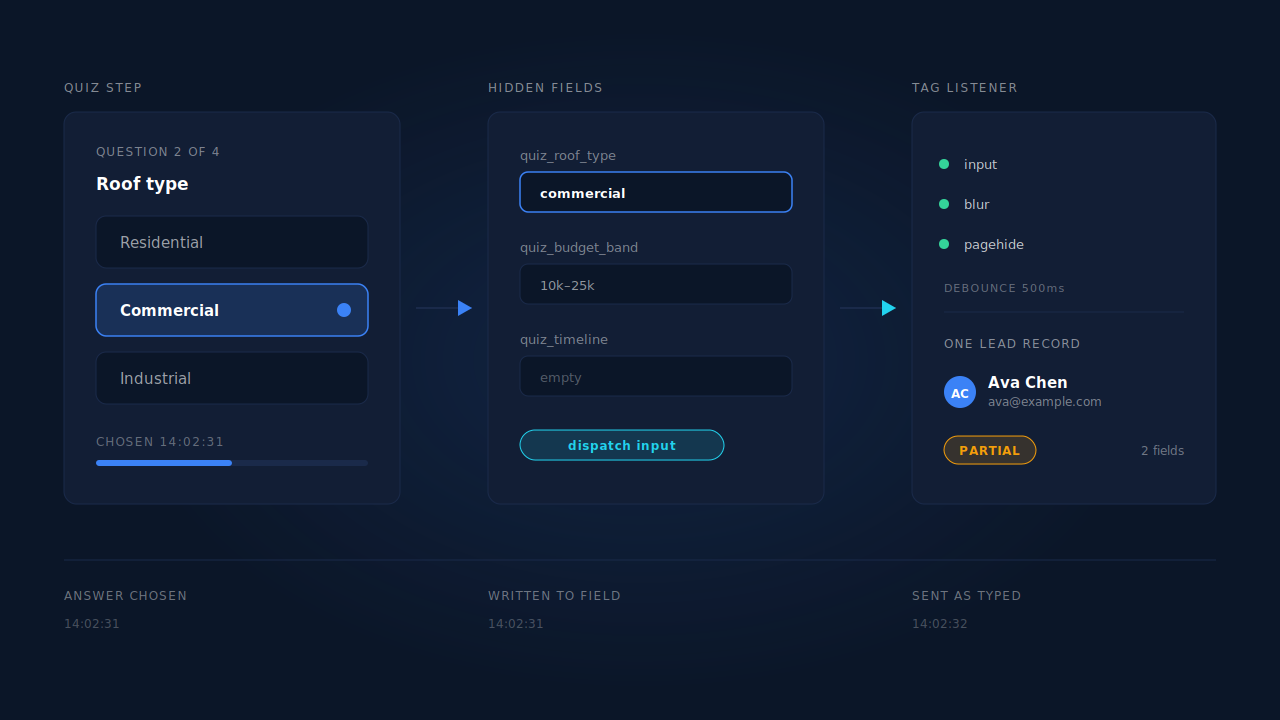
Write it into a hidden input, then announce it. Analytics tags, form-capture tools and tag managers all listen for browser events on form elements, and a value your JavaScript assigns directly does not fire those events — assigning to .value changes the field silently. Dispatch an input event yourself and everything listening sees the answer as it happens.
<!-- One hidden field per question, named for the question -->
<input type="hidden" name="quiz_roof_type" id="q_roof_type">
<input type="hidden" name="quiz_budget_band" id="q_budget_band">
<input type="hidden" name="quiz_timeline" id="q_timeline">
// Call this from whatever handles a quiz answer being chosen.
function recordAnswer(fieldId, value) {
  var el = document.getElementById(fieldId);
  if (!el) return;
  el.value = value;
  // Assigning .value does not fire input/change on its own.
  // Dispatching makes the answer visible to anything listening.
  el.dispatchEvent(new Event('input', { bubbles: true }));
}

recordAnswer('q_roof_type', 'commercial'); // the step-2 button
Two rules make this survive a real funnel.
Name fields for the question, not the position. quiz_budget_band still means something after you reorder the quiz; quiz_step_3 does not. You will reorder the quiz.
Keep the fields in one form element that persists across steps. If each step is its own form, destroyed on advance, the earlier answers go with it. One form with the steps shown and hidden inside it is the version that works, and the version that behaves best for partial lead capture — the email typed on the last step lands in the same record as the choices made on the first.
If your quiz is a hosted embed rather than your own markup, you usually cannot do any of this — the fields are inside someone else’s iframe. Instead you push known values in with the builder’s hidden-field feature and let it hand the answers back on submit, the same pattern as a Typeform embed: parameters travel in, answers travel out, and mid-quiz quitters stay invisible unless the builder reports them.
How do you keep the ad click attached from step one to the last step?
Read the attribution once, on the first page of the quiz, and store it on the visitor — do not expect it to still be in the URL later. Each step navigation, redirect or hop into a hosted booking page drops the utm_source and click ID that arrived with the visit.
A quiz is unusually good at destroying attribution because it has so many transitions. Step one is /quiz, step four might be /quiz/results, the contact step might be another subdomain or a third-party widget. Each is a fresh pageview whose referrer is your own site — and that is how a paid click becomes “Direct” in every analytics tool ever built. Same failure a multi-step form has, with more exits.
How do you tell which answer path produces customers?
Segment your leads by answer value and compare conversion, not by how far down the quiz people got. Depth tells you about your quiz design; answer values tell you about your market. Different questions, different fixes.
An example of the shape, with made-up numbers: “commercial” answers are 18% of your quiz starts and 46% of your closed revenue, while “residential — under $5k” is 40% of starts and 6% of revenue. Nothing about the quiz is broken. Your targeting is feeding it the wrong people, and the quiz is the only thing in your stack that knows.
That read needs the answers on the lead record, and it changes what you buy: you stop optimising the funnel and start changing the audience. An answer is a statement of intent, a different signal from whether someone looks like a good customer on paper — worth keeping both, and worth not confusing one for the other when you score leads against your ideal customer.
What can you fix without buying anything?
Quite a lot, and it is worth doing first.
Wire every branching answer into the integration mapping. Most builders let you map more fields than you originally set up. Ten minutes in the settings usually recovers several answers you assumed were unavailable.
Fire an analytics event per step, with the step and the answer as parameters. That gives you aggregate paths — how many people chose “commercial” — even though it is anonymous.
Cut the quiz. The honest fix for most quiz funnels is fewer questions. A quiz that asks nine questions to route people into three outcomes is asking six for its own amusement, and each costs you people. Same calculus as working out which field loses the most people in an ordinary form.
Ask for contact details earlier. Unpopular, and it lowers completion — but a quiz that collects an email at step two produces a reachable person from every partial run.
The limits, plainly: analytics events give you counts, not people — you will know 240 visitors chose “commercial” and be unable to call any. Integration mapping only covers completed submissions. Neither produces a record for the person who answered six questions and closed the tab.
How does PartialLeads track a quiz funnel lead step by step?
By capturing field values as they are entered rather than on submit, and holding every step of the run against one identity. Together those produce a record for somebody who never reached your contact step.
The capture side is one tag, about 10KB gzipped, no tag manager required. It listens on input and blur with a 500ms debounce, so a value written into a quiz field is recorded while the visitor is still on that step. On submit, pagehide and visibilitychange it runs a terminal flush — any pending debounced field is drained and sent with navigator.sendBeacon, keepalive fetch as fallback. That flush is why the last answer before the tab closes is not the one you lose.
The identity side keeps the run in one piece. The visitor ID lives in localStorage with a first-party cookie backup set by the server rather than by script, so Safari’s cap on script-written cookies does not apply. UTMs and click IDs are read on the first pageview with a document.referrer fallback, and for embedded steps the tag relays postMessage attribution between parent frame and iframe. Behind that, the identity graph unions a person’s sessions across six tiers — visitor ID, email, phone, IP plus user agent, device fingerprint, click ID — so a quiz abandoned Monday and finished Thursday resolves to one person.
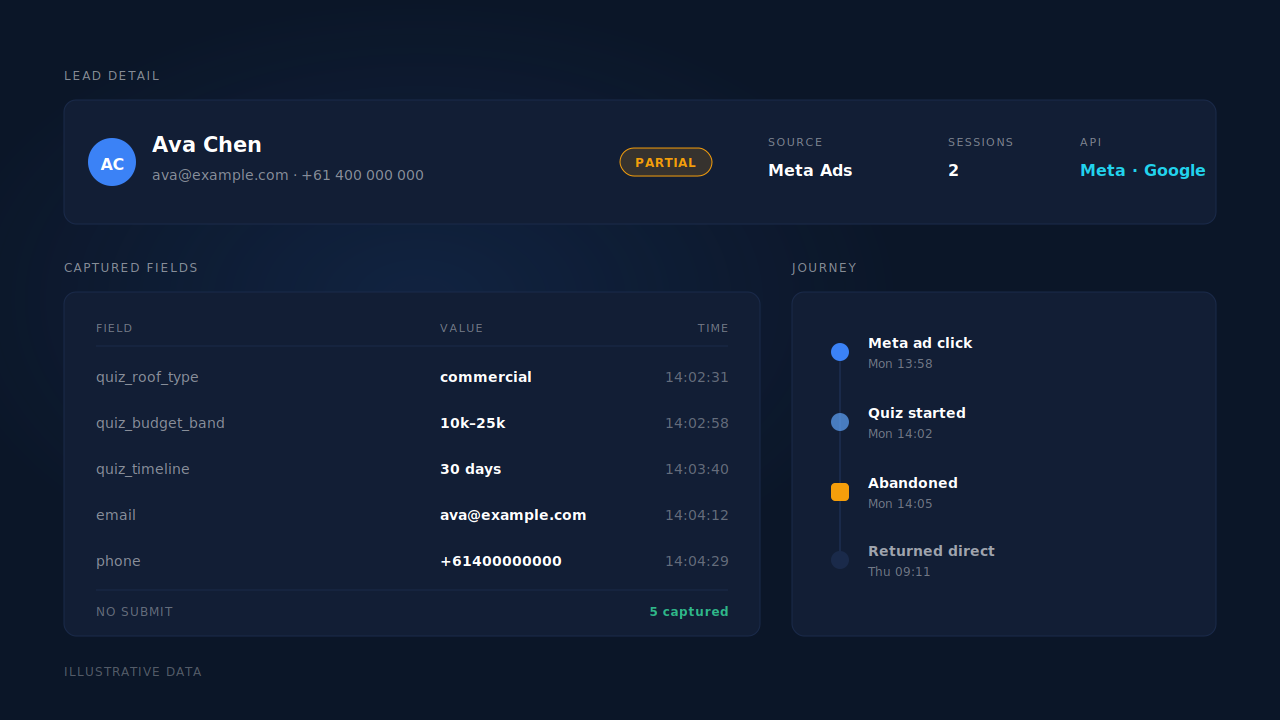
What you get is a lead. It lands on the Leads list with a Partial or Completed badge, email and phone normalised — phone to E.164, country code inferred from session geo — beside a journey ribbon that reads left to right as the touches that produced it. Open the lead and the captured fields sit next to the journey and the attribution, which is where you read the answers of somebody who never finished. From there it can be dispatched as a server-side Lead event to the connected conversion APIs, so the ad platform learns from quiz abandoners too.
Three honest constraints.
Capture starts when a value exists. If your quiz records a choice as a button click and never writes it into a field, there is no field value for anything to read — which is why the hidden-field recipe above comes before this section.
There is no step model. The product records which fields were filled and when. It does not know that quiz_budget_band belongs to step three, because it does not know your quiz — you read the sequence using knowledge of your own funnel.
A hosted embed limits what is visible. When the quiz renders inside another vendor’s iframe, the fields belong to that vendor’s page. Attribution still relays in by postMessage, but the answers come back on the builder’s terms.
The general point holds whatever you use: what is recoverable from a quiz funnel is exactly what was written into a field while something was listening. Everything downstream operates on data recorded at that moment or lost at it — which is why a partial lead is a record worth keeping rather than a statistic worth watching.
| What breaks | The mechanism | Where you see it in the dashboard |
|---|---|---|
| A visitor answers six questions, quits, and leaves no record | Field capture on input and blur with a 500ms debounce | Leads list, Partial badge |
| The last answer before the tab closes never gets sent | Terminal flush on submit, pagehide and visibilitychange via sendBeacon | Lead detail, captured fields |
| Step four loads at a clean URL and the click ID is gone | Attribution read on the first pageview, referrer fallback, stored on the session | Lead detail, source and UTM values |
| The contact step is a widget from another vendor | postMessage attribution relay between parent frame and embed | Correct source label on the lead |
| A quiz started Monday and finished Thursday counts as two visitors | Six-tier identity cluster unions the sessions into one person | Customer Journey timeline |
| Steps split across subdomains break the visitor cookie | Server-set first-party visitor cookie, ITP-durable, localStorage backup | One lead instead of several visitors |
| The ad algorithm only learns from completed quizzes | Server-side Lead dispatch for captured partials | CAPI activity log, per-lead API column |
Recover the leads you're already earning
Tell us what you're trying to track or fix. We'll show you which visitors your forms miss — and how PartialLeads recovers and qualifies them.
Sources
https://developers.facebook.com/docs/marketing-api/conversions-api/using-the-api