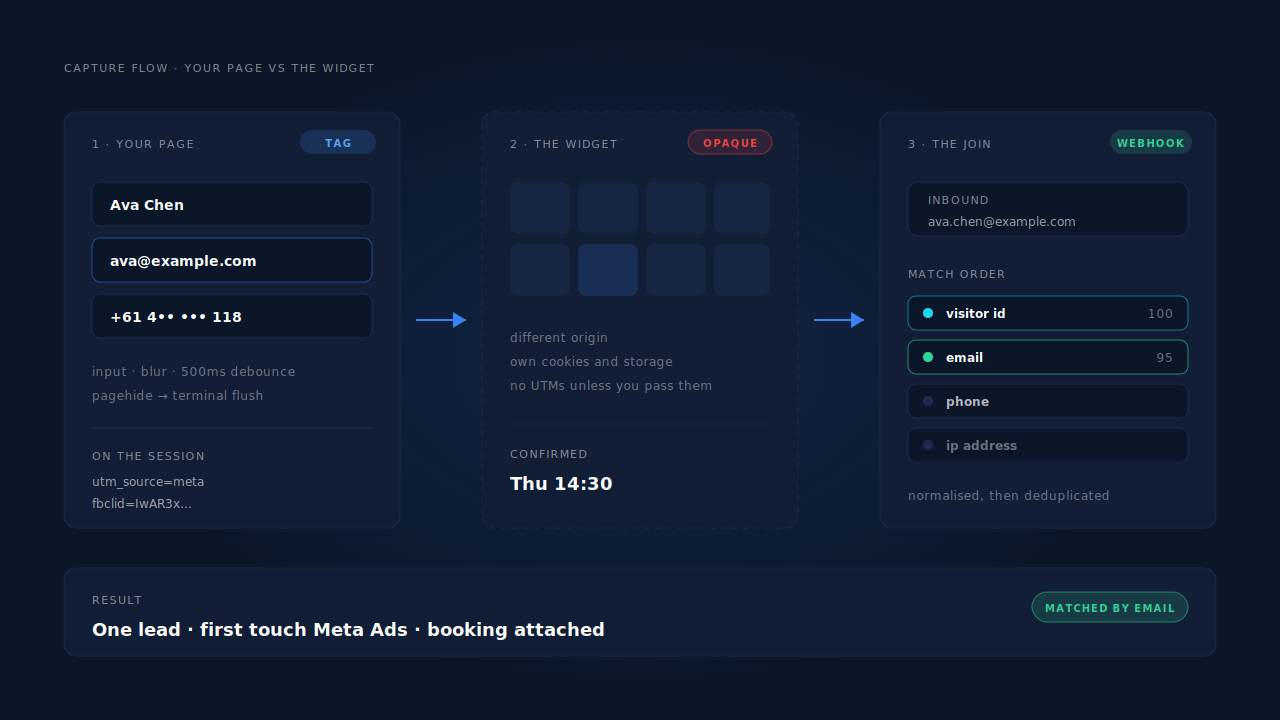
Capture the person on your own page, before they reach the widget. An embedded booking widget is a cross-origin iframe — your site cannot read what a visitor types inside it, and the widget cannot see the ad click that brought them to you. So you ask for email and phone on your page, record those fields as they are typed rather than waiting for a submit, and match the booking back by email when the booking tool’s webhook arrives.
Everything below is detail on those three moves.
Why do leads vanish inside an embedded booking widget?
Because the widget is a separate website wearing your page as a costume. Two different losses happen at the same border: people who open the calendar and never pick a time leave no record anywhere, and people who do book arrive in your calendar as a name and an email with no idea where they came from.
The first loss is the bigger one and almost nobody measures it. A booking widget has no concept of a half-finished booking. Someone can open it, scroll three weeks of availability, type their email into the confirmation step, get interrupted and close the tab — and from your side of the glass, nothing happened. No record, no email address, no follow-up. That is form abandonment with the evidence locked in someone else’s building.
The second loss is the one your media buyer notices first. A booking lands in your calendar carrying a name, an email and maybe a phone number. What it does not carry is the campaign, the ad, the keyword or the landing page — so the booking either goes uncredited or shows up as Direct, right next to the traffic you did not pay for.
Both losses have the same root cause, and it is not a bug in your booking tool.
What breaks when the booking form is a cross-origin iframe?
The browser’s same-origin policy. A page can only read the content, URL and storage of frames that share its origin. Your booking widget is served from the provider’s domain, so as far as the browser is concerned it is a different site that happens to be drawn inside your layout.
Four things follow, and each breaks a piece of tracking people assume is working:
The iframe has its own URL, and your UTM parameters are not in it. A visitor lands on yoursite.com/demo?utm_source=meta&utm_campaign=q3-launch&fbclid=…. The widget loads from the provider’s domain with a URL the provider chose. Nothing in your query string crosses over unless you deliberately put it there.
The iframe has its own cookies and storage. Anything the provider writes belongs to the provider’s origin, and your first-party identifiers are invisible to it. There is no shared “visitor” between the two halves of the page.
Your tracking scripts cannot see inside it. A tag on your page can observe a click landing somewhere in the iframe’s rectangle, and nothing further. Which field was focused, what was typed, whether a time was selected — all of it is on the other side of the border.
Redirect hops quietly eat parameters. Even where a provider supports tracking parameters on the embed URL, the values must survive every hop your funnel makes: a marketing-site redirect, a /go/ link, a consent-gated reload. Each hop can drop the query string, silently.
This is the same boundary that makes an embedded form lose its source, with one extra difficulty: a booking tool’s whole job is to own the confirmation step, so more of the interesting behaviour happens on their side of the line than on yours.
How do you pass your attribution into the booking widget?
By putting the values into the embed URL yourself, from storage you control — not by hoping the widget inherits them from the page. Most booking tools accept prefill and tracking query parameters on the embed URL and hand them back on the booking record; check your provider’s documentation for the exact parameter names, because they differ by tool and they change.
The part that matters is where the values come from. Reading them out of window.location at embed time only works when the visitor lands on the booking page directly from the ad — first click, no navigation. People land on a blog post, read two more pages, come back the next day and then book.
So persist first, read second:
// On the landing page: store the first touch you saw, once.
const p = new URLSearchParams(location.search);
if (!localStorage.getItem('ft')) {
  localStorage.setItem('ft', JSON.stringify({
    utm_source: p.get('utm_source'),
    utm_campaign: p.get('utm_campaign'),
    gclid: p.get('gclid'),
    fbclid: p.get('fbclid'),
  }));
}

// At the booking page: read it back, append to the embed URL.
const ft = JSON.parse(localStorage.getItem('ft') || '{}');
const url = new URL('https://calendar.example.com/you/30min');
Object.entries(ft).forEach(([k, v]) => v && url.searchParams.set(k, v));
document.querySelector('#booking-frame').src = url.toString();
That snippet is honest about its own weakness: it stores the first touch in the browser, and browsers forget. Safari’s tracking prevention caps the lifetime of storage written by JavaScript, so a visitor returning a fortnight later comes back blank. Server-side persistence against a durable first-party identifier is the version that survives.
How do you get the booking back out of the widget?
Through the provider’s webhook, matched to your own records by a normalised identifier. When a booking is created, the provider posts it — invitee name, email, scheduled time, and whatever tracking parameters you passed in — to a URL you nominate, either directly or through an automation platform.
Three details decide whether that webhook is useful or merely noisy.
Normalise before you match. Ava.Chen+book@gmail.com and avachen@gmail.com are the same person to Gmail and different strings to your database. Lowercase and trim every email, apply the dot and plus rules where they apply, and convert every phone number to E.164 before you compare. A match rate that looks catastrophic is usually a normalisation bug, not a tracking failure.
Make the handler idempotent. Webhooks are redelivered — on provider retries, on reschedules, on your own 500s. Key each inbound booking on something stable, like the provider’s booking id plus its status, so the same booking cannot become two leads or fire two conversions.
Match in confidence order. A visitor-id echo — where the booking carries an identifier you passed in yourself — is the strongest possible join. A normalised email is next, then a phone number. An IP address is a weak, last-resort signal and should be treated as one. This ordering is the core of visitor identity resolution: join on what the person typed, not on what the network guessed.
Once the booking is joined to the session, sending it onward as a conversion is a separate problem — tracking booked appointments to Google and Meta covers that path end to end.
What about the people who open the widget and never book?
They are recoverable only if you asked for something before the iframe. No technique reaches inside a cross-origin widget to retrieve a half-typed email — the fix has to happen earlier, on your side of the border.
The pattern that works is a short qualifying step ahead of the calendar: name, email, phone, one qualifying question, then the widget. Two things change. You can prefill the booking from what they typed, which shortens the booking itself. And when someone fills two fields and leaves without picking a time, you still have a contactable person with a traffic source attached — a partial lead rather than an anonymous session.
The trade-off is real: an extra step before the calendar costs you some bookings. Every field between the ad and the confirmation does. What offsets it is that the people who drop out are no longer invisible — they are a list you can email. Whether the trade pays depends on what a booking is worth to you and how fast you follow up on the ones that did not finish.
And it only pays if the capture happens while they type. A form that records on submit gives you nothing from an abandoned step, which is the entire population you were trying to reach.
How does PartialLeads capture leads from an embedded booking widget?
By owning the half of the page you control, and joining the booking to it afterwards.
The PartialLeads tag — one script tag, roughly 10KB gzipped, no tag manager required — listens to input and blur on your own form fields, debounces for 500ms, and posts each field as it is completed. When the page is hidden or closed, a terminal flush drains anything still pending via sendBeacon, so the last field typed before someone abandons is not the one that gets lost. That is partial lead capture: the qualifying step in front of your calendar produces contactable leads whether or not anyone reaches the widget at all.
Attribution is recorded on the same session: UTM parameters from the URL with a document.referrer fallback, plus the click identifiers each platform uses — gclid, gbraid, wbraid, fbclid, msclkid, ttclid and epik. The visitor identifier behind it, pl_vid, sits in localStorage with a first-party cookie backup that the server sets rather than the script, so Safari’s cap on script-written cookies does not quietly expire it after a week. Emails are lowercased and trimmed, phone numbers normalised to E.164 with a country-code fallback from the session’s geo — the normalisation that decides whether the booking webhook matches anything.
When the booking record arrives from a connected source, it runs through the inbound pipeline: normalise the identity, deduplicate idempotently, then match to a session in confidence order — visitor-id echo, then email, then phone, then IP. Records that match nothing still land and stay recoverable once an identifier turns up. A six-tier resolver unions the person’s sessions, so a booking made on a laptop joins the ad click from a phone three days earlier instead of starting a new stranger.
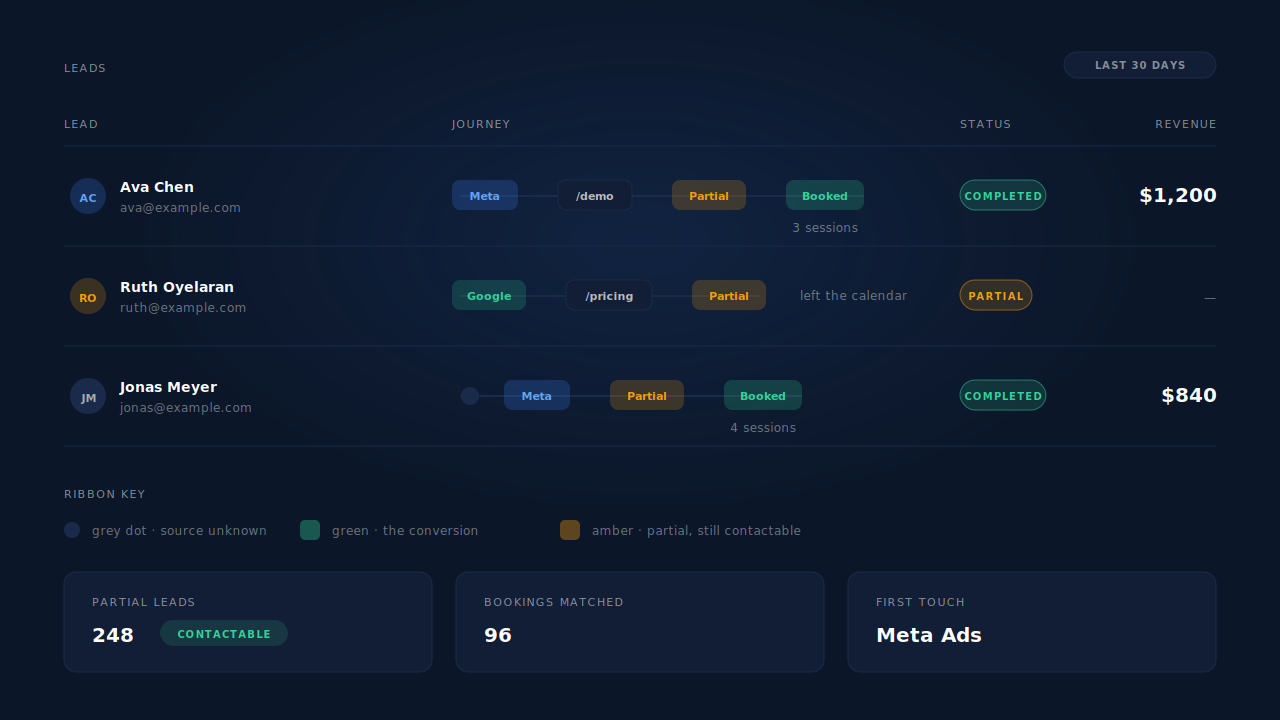
Where you see it: the Leads list shows each person with a Partial or Completed badge and a Journey ribbon — one badge per touch, left to right, so a row reads as a sentence without opening anything. The Attribution report puts first-touch, last-touch and resolved models side by side, which is where a booking that last-click credited to Direct shows up attached to the campaign that produced it.
Two honest constraints. PartialLeads has no privileged access inside a third-party widget either — the same-origin policy applies to every vendor equally, so the capture happens on your page and the booking is joined afterwards by what the person supplied. And getting the booking out of the provider depends on that provider posting it somewhere PartialLeads can receive it, through a connected integration or the universal inbound webhook. We control dispatch; the ad platform controls matching.
| What breaks | The mechanism | Where you see it in the dashboard |
|---|---|---|
| Visitors open the calendar and leave no trace | Field capture on input/blur, terminal flush on pagehide |
Leads list, amber Partial badge |
| The booking has no campaign, so it reads as Direct | UTM and click-id capture, document.referrer fallback |
Journey ribbon; Attribution report |
| The same person books on a different device | Six-tier identity cluster unions the sessions | Journey ribbon “N sessions” label |
| The booking webhook matches nothing | Email and phone normalised, then tiered matching | Lead detail, matched source |
| The same booking arrives twice | Idempotent deduplication on the inbound record | One lead, not two |
| Safari forgets the visitor before they return | pl_vid plus a server-set first-party cookie |
Returning visitors stay on one lead |
Recover the leads you're already earning
Tell us what you're trying to track or fix. We'll show you which visitors your forms miss — and how PartialLeads recovers and qualifies them.
Sources
https://developers.facebook.com/docs/marketing-api/conversions-api https://developers.facebook.com/docs/marketing-api/conversions-api/parameters/customer-information-parameters