You don’t move the dataLayer; you rebuild it. Shopify’s upgraded checkout no longer renders checkout.liquid, so every dataLayer.push() you wrote there has stopped running. The replacement is a custom pixel that listens for Shopify’s own checkout events, rebuilds each push from the event data, and loads Google Tag Manager (GTM) inside the pixel’s sandbox.
That works, with limits. And if GTM in checkout only existed to send conversions to Meta, Google or TikTok, there’s a simpler route: send those events server-side and keep GTM out of checkout entirely.
Why did your checkout dataLayer stop working?
Because the file it lived in doesn’t run anymore. Your old setup was theme code: checkout.liquid loaded the GTM container and pushed events such as begin_checkout or purchase whenever a checkout step rendered. The upgraded checkout is a Shopify-controlled app, so theme code, including checkout.liquid, no longer runs inside it.
The same upgrade retired Additional Scripts on the thank-you and order status pages, which is where many stores fired their purchase push. If conversions fell off a cliff on one specific date, why ad conversions drop to zero after Shopify’s thank-you page upgrade shows how to confirm that date against your orders.
What Shopify gives you instead is Customer Events: a stream of named events you read from a custom pixel, saved under Settings → Customer events in the admin. Code there runs in a sandbox, not on the checkout page. It can’t see the page’s DOM (Document Object Model), and it can’t read variables your theme sets. It only sees the events Shopify hands it.
Before you rebuild anything, export the old setup:
- List every push. Copy each
dataLayer.push()from checkout.liquid and the order status scripts, with the keys each one sent. - List every tag that fired on them. In GTM, filter tags by the triggers that listened to those events. That’s your real scope: often a GA4 tag, a Google Ads tag, a Meta tag and an affiliate tag or two.
Which Shopify events replace your old dataLayer pushes?
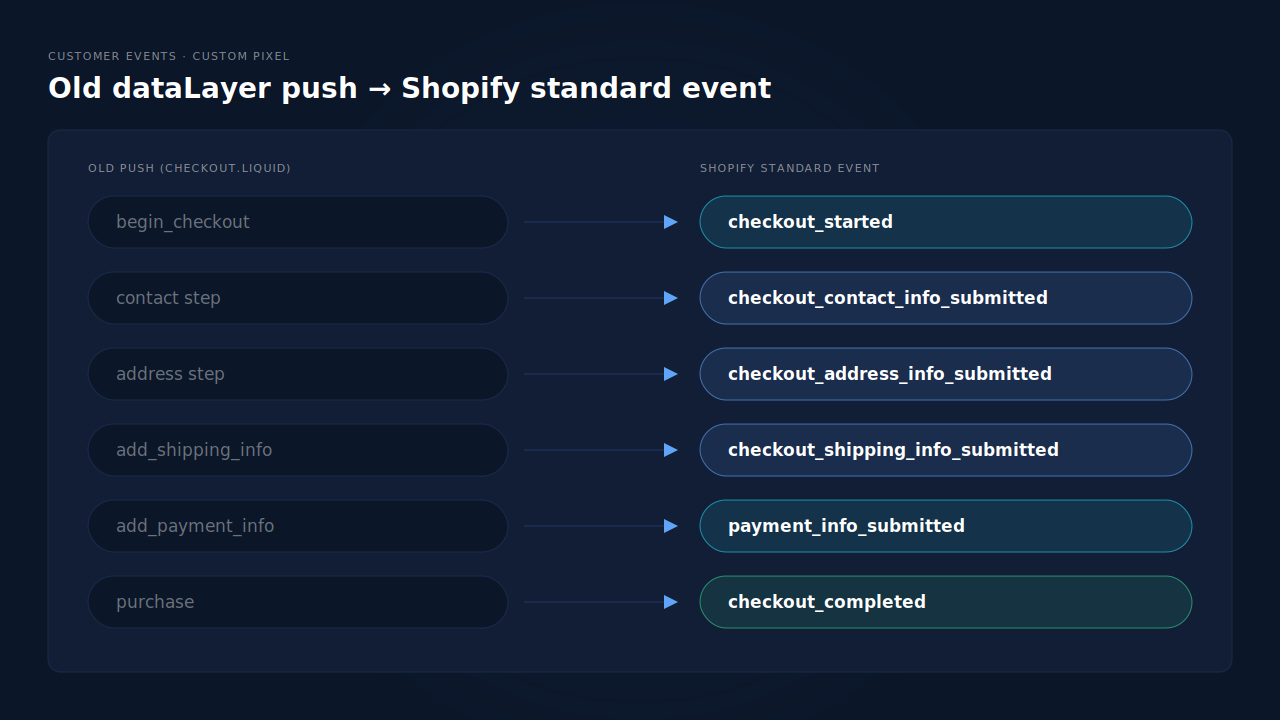
Shopify publishes a standard event for each checkout step, and each one carries the full checkout object. Map your old pushes to them one by one. The event names and descriptions below come from Shopify’s own web pixels type definitions (@shopify/web-pixels-extension 2.18.0):
| Old dataLayer push | Shopify standard event | When it fires |
|---|---|---|
begin_checkout |
checkout_started |
Customer enters checkout |
| contact step | checkout_contact_info_submitted |
Customer submits a checkout form |
| address step | checkout_address_info_submitted |
Customer submits a mailing address |
add_shipping_info |
checkout_shipping_info_submitted |
Customer chooses a shipping rate |
add_payment_info |
payment_info_submitted |
Customer submits payment information |
purchase |
checkout_completed |
Visitor completes a purchase |
Two details from the type definitions matter for a rebuild.
checkout_started can fire more than once. Shopify says that with Checkout Extensibility “this event is triggered every time a customer enters checkout”. A shopper who leaves and returns fires it again. If your old begin_checkout fired once per checkout, add your own guard, keyed on the checkout token.
The step events are extensibility-only. The contact, address and shipping events are “only available in checkouts where Checkout Extensibility for customizations is enabled”. On an upgraded checkout that’s you, but it’s why older tutorials don’t mention them.
Every event carries event.data.checkout, with lineItems, totalPrice, subtotalPrice, totalTax, currencyCode, email, phone, discountApplications and shippingLine. Each line item has a title, a quantity and a variant with its id, sku and price. That covers every key a GA4-style ecommerce push normally needs.
How do you rebuild the dataLayer inside a custom pixel?
Load GTM inside the pixel, then turn each Shopify event into the push your container already expects. That way your existing triggers and tags keep working with their event names unchanged. Here’s the pattern:
// Shopify admin → Settings → Customer events → Add custom pixel
const GTM_ID = 'GTM-XXXXXXX';
window.dataLayer = window.dataLayer || [];
(function(w,d,s,l,i){w[l].push({'gtm.start':new Date().getTime(),event:'gtm.js'});
  const f=d.getElementsByTagName(s)[0], j=d.createElement(s);
  j.async=true; j.src='https://www.googletagmanager.com/gtm.js?id='+i;
  f.parentNode.insertBefore(j,f);
})(window,document,'script','dataLayer',GTM_ID);

const items = (c) => c.lineItems.map((li) => ({
  item_id: li.variant?.sku || li.variant?.id,
  item_name: li.title,
  price: li.variant?.price?.amount,
  quantity: li.quantity
}));

const push = (name, c, extra = {}) => {
  window.dataLayer.push({ ecommerce: null });       // clear the last object
  window.dataLayer.push({
    event: name,
    page_location: c._href,                         // real URL, not the sandbox
    ecommerce: { currency: c.currencyCode, value: c.totalPrice?.amount,
                 items: items(c), ...extra }
  });
};

const MAP = {
  checkout_started: 'begin_checkout',
  checkout_shipping_info_submitted: 'add_shipping_info',
  payment_info_submitted: 'add_payment_info'
};
Object.keys(MAP).forEach((evt) => analytics.subscribe(evt, (e) => {
  push(MAP[evt], { ...e.data.checkout, _href: e.context.document.location.href });
}));

analytics.subscribe('checkout_completed', (e) => {
  const c = e.data.checkout;
  push('purchase', { ...c, _href: e.context.document.location.href },
       { transaction_id: c.order?.id, tax: c.totalTax?.amount,
         shipping: c.shippingLine?.price?.amount });
});
Test with a real order in GTM, then in each destination. Don’t trust a green checkmark in the pixel list alone; it tells you the code saved, not that tags fired.
What breaks when GTM runs inside the sandbox?
Anything in your container that assumes it’s running on the real page. The dataLayer pushes arrive fine. The trouble is tags and triggers that reach past the dataLayer to the page itself.
The usual breakages, in the order people hit them:
- DOM triggers do nothing. Click, form submission and element visibility triggers watch the page. The sandbox has no view of the checkout’s buttons or fields, so those triggers never fire. Replace them with the Shopify event for that step.
- Page URL variables read the sandbox. GTM’s built-in Page URL and Page Path describe the frame the container runs in, not the checkout. That’s why the pattern above passes
event.context.document.location.href, which Shopify documents as a snapshot of the top frame’sdocument. - Custom HTML tags that read the page fail. A tag that scrapes the order total from the DOM, or reads a variable your theme set, finds nothing. Rewrite it to read from the dataLayer.
- Debugging is harder. Preview mode and browser extensions are built around a container on a normal page. Expect to verify in each destination’s own debug view instead.
How do you keep custom pushes from your theme?
Publish them as Shopify custom events, then forward them from the pixel. If the storefront used to push things like newsletter_signup or size_guide_open, Shopify’s types describe custom events as those “emitted by partners or merchants via the publish method”. Your theme publishes, and the pixel subscribes:
// In the theme (storefront):
Shopify.analytics.publish('size_guide_open', { product: 'Trail Jacket' });

// In the custom pixel:
analytics.subscribe('all_custom_events', (e) => {
  window.dataLayer.push({ event: e.name, ...e.customData });
});
This keeps one container fed from one place. You don’t need a second GTM container in the theme sending the same events again.
Do you still need GTM in checkout at all?
Only if a tag in it does something you can’t do another way. Walk through the tag list you exported. For each one, ask what it’s for.
Analytics and affiliate tags that genuinely need checkout steps are the case for the custom-pixel rebuild above. Ad-platform conversion tags usually aren’t. A Meta, Google Ads or TikTok purchase tag in GTM is a browser event, and it still loses the sale when the tab closes before the order status page loads, a blocker strips it, or payment happens off-site. Moving it into a sandboxed container doesn’t change that.
For those, server-side sending is the sturdier replacement, and it doesn’t need a server-side GTM container either. Do you need Stape and GTM for Meta Conversions API walks through that trade-off.
One rule holds whichever you choose: one source per event. If your rebuilt container sends a Meta Purchase and a server-side feed sends the same Purchase with a different event ID, Meta counts both. Why Meta CAPI isn’t deduplicating covers how Meta pairs browser and server events, and why mismatched IDs double-count.
How does PartialLeads send Shopify checkout events without a dataLayer?
The PartialLeads Customer Events pixel subscribes to Shopify’s standard events itself and forwards the funnel steps server-side, so no GTM container or dataLayer has to run in checkout. checkout_started becomes InitiateCheckout and payment_info_submitted becomes AddPaymentInfo, sent from PartialLeads’ server to the ad platforms you’ve connected.
The pieces, step by step:
- Funnel events from the pixel. Alongside the checkout steps, the pixel path also sends ViewContent, AddToCart and Search. The ad platform gets the full funnel through the Conversions API, not just the sale.
- Purchases from the order webhook. The Purchase doesn’t depend on
checkout_completedfiring in a browser. Shopify sends the order to PartialLeads server-side, and every paid order (financial_status = paid) produces a conversion. Cash-on-delivery and bank-transfer orders are sent when they’re marked paid. - Matched back to the ad click. The tag records UTMs and click IDs (fbclid, gclid, ttclid) at landing. The order is matched to that session by the visitor ID echoed from the storefront, then email, then phone. That’s how a sale gets credited to the campaign that started it. The wider picture is in tracking abandoned checkouts back to their source.
The honest constraints. PartialLeads forwards the steps that map to ad-platform events. Keep a custom pixel if you also need the contact, address and shipping steps in GA4 or another analytics tool. The order value sent is the full order total, including tax and shipping, after discounts. There’s no subtotal option, and each order is recorded once, so a post-purchase upsell added to the same order doesn’t update it. PartialLeads never sends its own event twice, but it doesn’t de-duplicate against another app’s or pixel’s browser events. If your rebuilt container also sends Meta a Purchase, switch one off. And the split that matters: PartialLeads controls whether every paid order is sent. Whether the platform ties it to a person and a click depends on the identifiers captured and on the platform’s own matching.
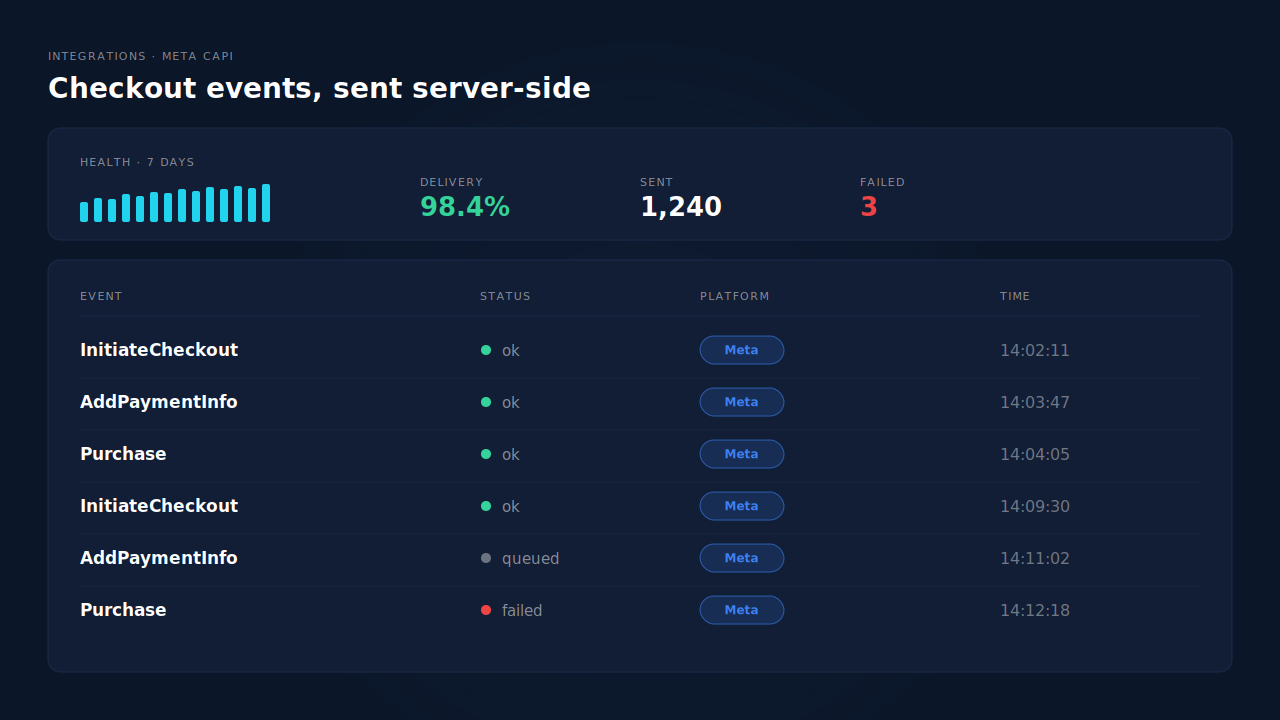
Where you check it. The Meta CAPI page has an activity log with each event name, its status and the platform it went to, plus a health strip with delivery rate and failed sends. The Purchases ledger lists every paid order with its match tier. The Journey timeline on each lead shows the path from ad click to purchase. It’s one piece of the wider Shopify tracking, attribution and catalog fix.
| What breaks | The mechanism | Where you see it in the dashboard |
|---|---|---|
| checkout.liquid dataLayer pushes stop running | Customer Events pixel subscribes to checkout_started and payment_info_submitted directly | Meta CAPI activity log: InitiateCheckout, AddPaymentInfo |
| Purchase tag misses closed tabs and off-site payments | Purchase sent server-side from the order webhook for every paid order | Purchases ledger: every paid order, with match tier |
| Sale credited to Direct, not the ad | UTMs and click IDs captured at landing, order matched by visitor ID, email, phone | Journey timeline per lead |
| Same Purchase counted twice | PartialLeads’ own event IDs; keep one source per event | Meta CAPI activity log: each Purchase sent once |
Tell us what's broken. We'll fix your tracking — free.
Describe the tracking/attribution problem you're stuck on and we'll map it to a fix: server-side conversions to Meta, Google, TikTok and Pinterest, plus first-party tracking that survives Safari. No code required.
Sources
- https://registry.npmjs.org/@shopify/web-pixels-extension/-/web-pixels-extension-2.18.0.tgz
- https://developers.facebook.com/docs/meta-pixel/reference
- https://developers.facebook.com/docs/marketing-api/conversions-api/deduplicate-pixel-and-server-events