To know whether your WooCommerce tracking plugin works with HPOS (High-Performance Order Storage), open WooCommerce → Settings → Advanced → Features. If HPOS is greyed out, a plugin hasn’t declared compatibility, and WooCommerce treats silence as incompatible. Then place a test order after switching, and confirm the purchase reaches your ad platforms. A declaration is the author’s promise, not proof.
The prompt to switch is easy to ignore. But new stores already run on HPOS by default, and plugin authors are writing for it. Sooner or later you will flip the switch, and the thing most likely to go quiet afterwards is the code that tells Meta, Google, TikTok and Pinterest that a sale happened.
What is HPOS, and why does WooCommerce want you to turn it on?
HPOS is WooCommerce’s newer way of storing orders. Instead of keeping each order as a WordPress post with its details in the post meta table, it writes orders to dedicated order tables. WooCommerce’s documentation says that from WooCommerce 8.2, released in October 2023, HPOS “will be enabled by default for new installations.”
HPOS moves orders into four tables of their own: _wc_orders, _wc_order_addresses, _wc_order_operational_data and _wc_orders_meta. WooCommerce’s case for it is scalability, reliability and simpler data.
For a tracking setup, the change that matters is where order data lives. Anything that reads orders through WooCommerce’s own order functions doesn’t notice the move. Anything that reached into the WordPress post tables directly does.
How does WooCommerce decide whether a plugin is HPOS-compatible?
Plugin authors declare it. A plugin calls FeaturesUtil::declare_compatibility( 'custom_order_tables', … ) with true or false in its main file. WooCommerce reads those declarations and, for HPOS, treats any WooCommerce-aware plugin that declares nothing as incompatible. One incompatible active plugin is enough to block the HPOS option.
That default is in WooCommerce’s own code. Most WooCommerce features assume a plugin is compatible unless it says otherwise. The HPOS feature is registered the other way round: default_plugin_compatibility is set to incompatible.
So a tracking plugin that hasn’t been touched in two years shows up as a blocker even if it never reads an order. And a plugin that declares compatibility passes the check whether or not anyone tested it.
WooCommerce shows this information only for plugins that declare a WC tested up to header. A plain WordPress plugin that prints a pixel on the thank-you page may not appear in the list at all: no warning, and no guarantee either.
Where do you see the list?
Go to WooCommerce → Settings → Advanced → Features. If an incompatible plugin is active, the HPOS option is disabled and a “View and manage” link lists the offenders. WooCommerce’s docs also give a direct filter URL on the Plugins screen: /wp-admin/plugins.php?plugin_status=incompatible_with_feature&feature_id=custom_order_tables.
What actually breaks in a tracking plugin when HPOS is on?
Code that reads or writes orders directly in the WordPress post tables. WooCommerce’s developer guide warns that under HPOS, “directly reading from these WordPress tables may mean reading an outdated order.” A plugin that fetches order totals or saved click IDs with get_post_meta() can send a wrong value, an empty one, or nothing.
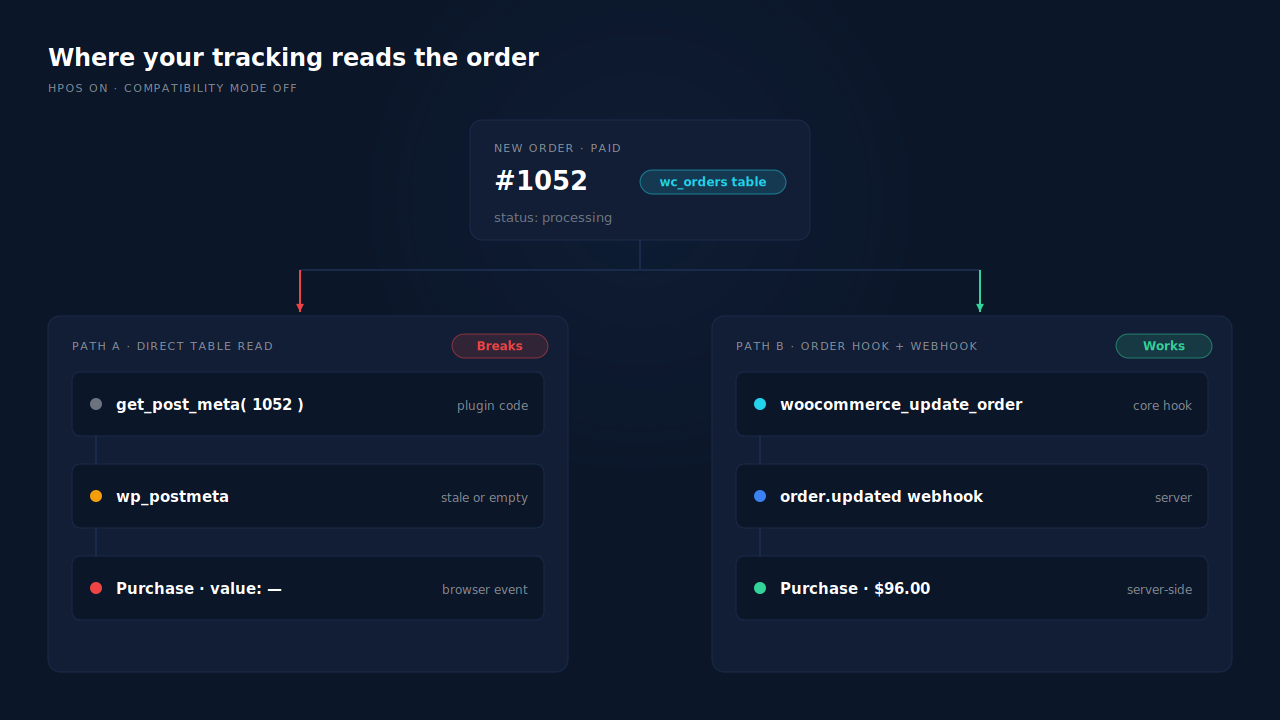
Here is how that plays out in tracking terms.
Purchase value goes missing. A thank-you-page script that builds its Purchase event from post meta finds nothing to read once orders live in the new tables. The event either fires with no value or doesn’t fire.
Stored click IDs disappear. Plenty of setups save the gclid or fbclid onto the order so it can be sent later. If the plugin writes that with update_post_meta(), it is writing to a table WooCommerce no longer treats as the source of truth.
Order-status logic stops triggering. A plugin that watches WordPress post status changes rather than WooCommerce order events can miss the moment an order becomes paid.
WooCommerce’s guide lists the functions to audit for, from get_post_meta to wp_update_post, and tells developers to use wc_get_order() and the order object instead. If your plugin is open source, a search for those names tells you more than its marketing page.
Does compatibility mode protect you?
Partly. With compatibility mode on, WooCommerce keeps the post tables and the order tables synchronised. That gives older code a copy to read, and it is how existing stores migrate. WooCommerce’s guide says the background job will “backfill 25 orders at a time.” It is a bridge, though, not a fix; code reading a synced copy is still reading the wrong source.
Do order webhooks still fire after you switch to HPOS?
Yes. WooCommerce’s webhook topics are tied to its own order hooks, not to the storage engine. order.created listens to woocommerce_new_order, and order.updated listens to woocommerce_update_order. Both the HPOS data store and the legacy posts data store fire those same hooks, so a webhook set up before the switch keeps firing after it.
That makes webhooks the safest place to take a purchase from. The order is created by WooCommerce, the hook fires in WooCommerce’s own code, and the webhook delivers it to whatever server sends your conversion.
The same design protects you when a buyer never reaches the thank-you page, which is a bigger gap than most stores expect (see what share of WooCommerce buyers never reach the thank-you page).
One caution that has nothing to do with HPOS. WooCommerce disables a webhook automatically after more than five consecutive failed deliveries. A failure is any response outside the 2xx range. If you’re debugging after a migration, check the webhook’s status as well as the plugin’s.
How do you test your tracking before and after switching to HPOS?
Run one real order through both states. Before switching, note the order number and confirm the Purchase arrived in each ad platform. Switch on HPOS with compatibility mode still enabled, place a second order, and check the same places. If the second order is missing or has no value, roll back and contact the plugin’s author.
A practical sequence:
- Clone the store to staging if your host allows it.
- Check the Features screen. Note every plugin flagged as incompatible, not just the tracking one.
- Place a baseline order on the current storage and confirm it in Meta Events Manager, Google Ads conversions, and any other platform you send to.
- Enable compatibility mode and wait for the sync to finish. WooCommerce → Status → Scheduled Actions shows the batch jobs.
- Switch to HPOS, keep compatibility mode on, and place a second order.
- Compare the two orders in each platform: did the event arrive, with the right value and order ID?
- Check WooCommerce → Status → Logs for errors, including the
webhooks-deliverysource if you rely on webhooks.
Pay the second order with a method that marks it paid straight away. Bank transfer and cheque orders sit on-hold until you mark them paid, and good tracking won’t send a purchase for an unpaid order (the reason is covered in why Meta counts unpaid or cancelled WooCommerce orders as purchases).
For Meta, the guide to checking whether your Meta CAPI is working walks through what a healthy server Purchase looks like in Events Manager.
What should you do if your tracking plugin isn’t compatible?
Don’t switch yet. WooCommerce’s own advice is to stay on posts storage, or switch back, while you need an incompatible plugin, and to ask its developers to add support. Then plan to replace whatever reads orders directly. Moving the Purchase event to a server-side sender fed by order webhooks removes the dependency on how orders are stored.
Your options, roughly in order of effort:
- Update the plugin. Many authors added the declaration in a later release. Check the changelog before anything else.
- Ask the author. If it’s maintained, a support ticket mentioning HPOS usually gets an answer.
- Stay on posts storage for now. It’s supported. Just know new stores won’t be.
- Replace the purchase path. Keep a browser pixel for page views and match cookies, and take Purchase from the order itself.
If you choose the last option, the pattern is the one in how to track WooCommerce purchases server-side to Meta: the order triggers the event, the server sends it through the Conversions API, and nothing depends on a page loading or a table being read directly.
How does PartialLeads keep tracking working under HPOS?
The PartialLeads WooCommerce plugin declares compatibility with HPOS (custom order tables) and with Cart & Checkout Blocks. Purchases don’t come from the thank-you page or from reading the order tables in the browser; they arrive through WooCommerce’s order webhooks, which fire the same way under HPOS and under posts storage. So switching storage engines doesn’t change what gets sent.
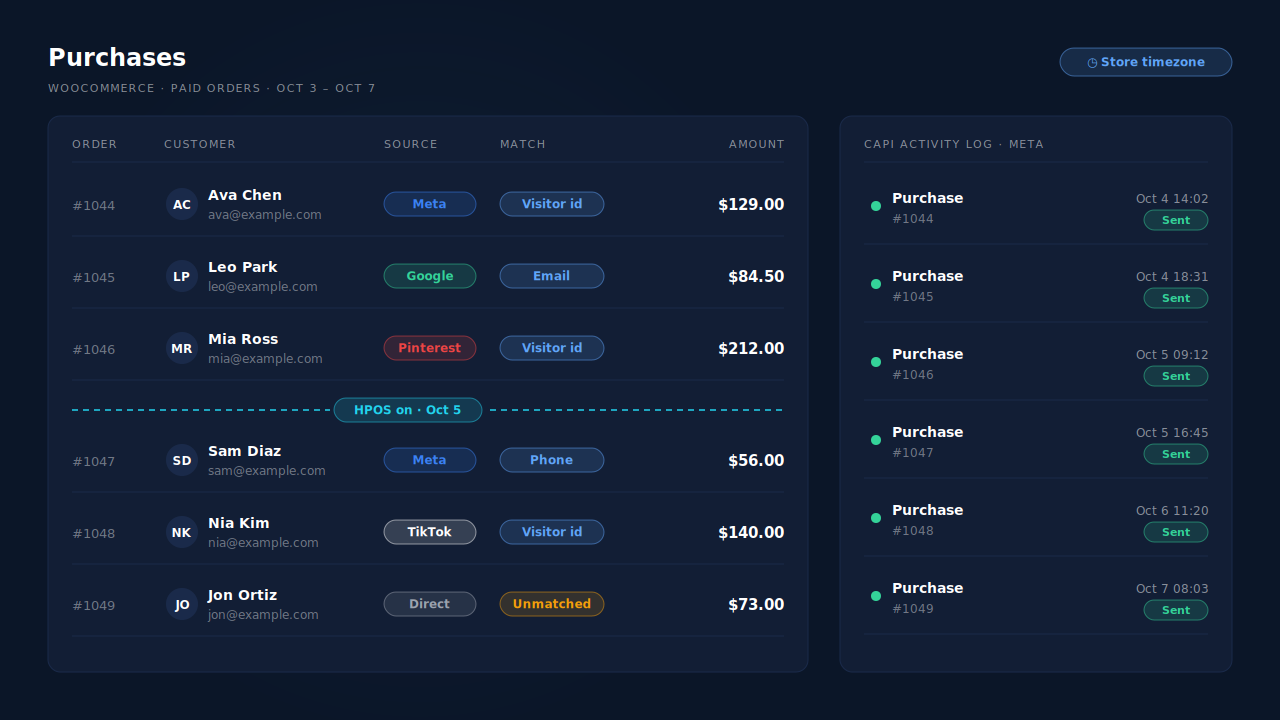
Purchases come from the paid order. When an order reaches processing or completed, PartialLeads records it once and sends a Purchase server-side to Meta, TikTok and Pinterest, and writes a row to the Google Sheet you schedule as a Google Ads offline conversion import. Orders that are pending, on-hold, failed or cancelled are not sent. The value is the full order total, including tax and shipping, after discounts.
Funnel events don’t touch orders at all. View product, add to cart and begin checkout go server-side to Meta, Pinterest and TikTok (not Google). On block carts the plugin watches WooCommerce’s Store API, which is why the Cart & Checkout Blocks declaration matters as much as the HPOS one.
Nothing fires on the thank-you page. That page is where most HPOS breakage in tracking plugins shows up, and PartialLeads doesn’t use it for Purchase.
Where you see it working. The Purchases ledger lists every paid order PartialLeads recorded, matched or unmatched, so you can line it up against WooCommerce’s order list for the days either side of your switch. The CAPI activity log on the Meta CAPI page shows each Purchase send with its status and any error text.
The honest constraints. The compatibility declaration covers the PartialLeads plugin, not your other plugins; one incompatible plugin elsewhere still blocks HPOS. PartialLeads uses its own event IDs and does not deduplicate against another plugin’s Purchase, so keep one source per event. Delivery is the half PartialLeads controls; whether a platform ties each Purchase to an ad click depends on the identifiers captured and the platform’s own matching.
| What breaks | The mechanism | Where you see it in the dashboard |
|---|---|---|
| HPOS blocked by an undeclared plugin | PartialLeads plugin declares HPOS and Cart & Checkout Blocks compatibility | WooCommerce → Settings → Advanced → Features |
| Thank-you-page Purchase reads an empty order | Purchase sent server-side from WooCommerce order webhooks, nothing on the thank-you page | Purchases ledger, CAPI activity log |
| Unpaid orders sent as sales | Only processing or completed orders are sent | Purchases ledger |
| Block cart events lost after a checkout change | Store API add-to-cart and begin checkout forwarded server-side | CAPI activity log |
| Two plugins both sending Purchase | Own event IDs, no cross-tool dedup — keep one source | Leads-list API column vs Events Manager |
Tell us what's broken. We'll fix your tracking — free.
Describe the tracking/attribution problem you're stuck on and we'll map it to a fix: server-side conversions to Meta, Google, TikTok and Pinterest, plus first-party tracking that survives Safari. No code required.
Sources
- https://github.com/woocommerce/woocommerce/blob/trunk/docs/features/orders/high-performance-order-storage/README.md
- https://github.com/woocommerce/woocommerce/blob/trunk/docs/features/orders/high-performance-order-storage/enable-hpos.md
- https://github.com/woocommerce/woocommerce/blob/trunk/docs/features/orders/high-performance-order-storage/recipe-book.md
- https://github.com/woocommerce/woocommerce/blob/trunk/plugins/woocommerce/src/Internal/DataStores/Orders/CustomOrdersTableController.php
- https://github.com/woocommerce/woocommerce/blob/trunk/plugins/woocommerce/src/Internal/Features/FeaturesController.php
- https://github.com/woocommerce/woocommerce/blob/trunk/plugins/woocommerce/includes/class-wc-webhook.php
- https://github.com/woocommerce/woocommerce/blob/trunk/plugins/woocommerce/src/Internal/DataStores/Orders/OrdersTableDataStore.php
- https://developers.facebook.com/docs/marketing-api/conversions-api