TikTok isn’t receiving your Shopify purchase events because the browser event you see in debugging never finishes the trip. On Shopify’s checkout, a TikTok pixel runs inside the Customer Events sandbox, waits on consent, and only sees a purchase if the buyer lands on the order status page. Any one of those can stop the event before TikTok counts it.
The fix has two parts. First, confirm the events are going to the pixel ID you are actually looking at. Second, stop relying on the checkout page alone: send InitiateCheckout and the purchase to the TikTok Events API from your server, built from the order Shopify already recorded.
Why does TikTok show nothing when the Shopify pixel looks fine in debugging?
Because “it fires” and “TikTok counts it” are two different tests. Debugging tools show that your code ran in the browser. Events Manager shows what arrived at a specific pixel ID and was processed. Between the two sit the checkout sandbox, the visitor’s consent choice, network blockers, and the question of which pixel the event was addressed to.
The most common pattern on Shopify looks like this. You paste the TikTok base code into a custom pixel under Settings → Customer events, add ttq.track calls for checkout and purchase, place a test order, and see the calls run. Then Events Manager shows PageView and maybe ViewContent, but InitiateCheckout and the purchase stay at zero.
That split is the clue: an event that works on a product page tells you nothing about the checkout version.
Where do TikTok checkout events get lost on a Shopify store?
They get lost at one of five points: the sandbox, consent, the order status page, a second pixel ID, or the event name. Each one produces the same symptom, an empty Events Manager, so you have to test them in order rather than guess.
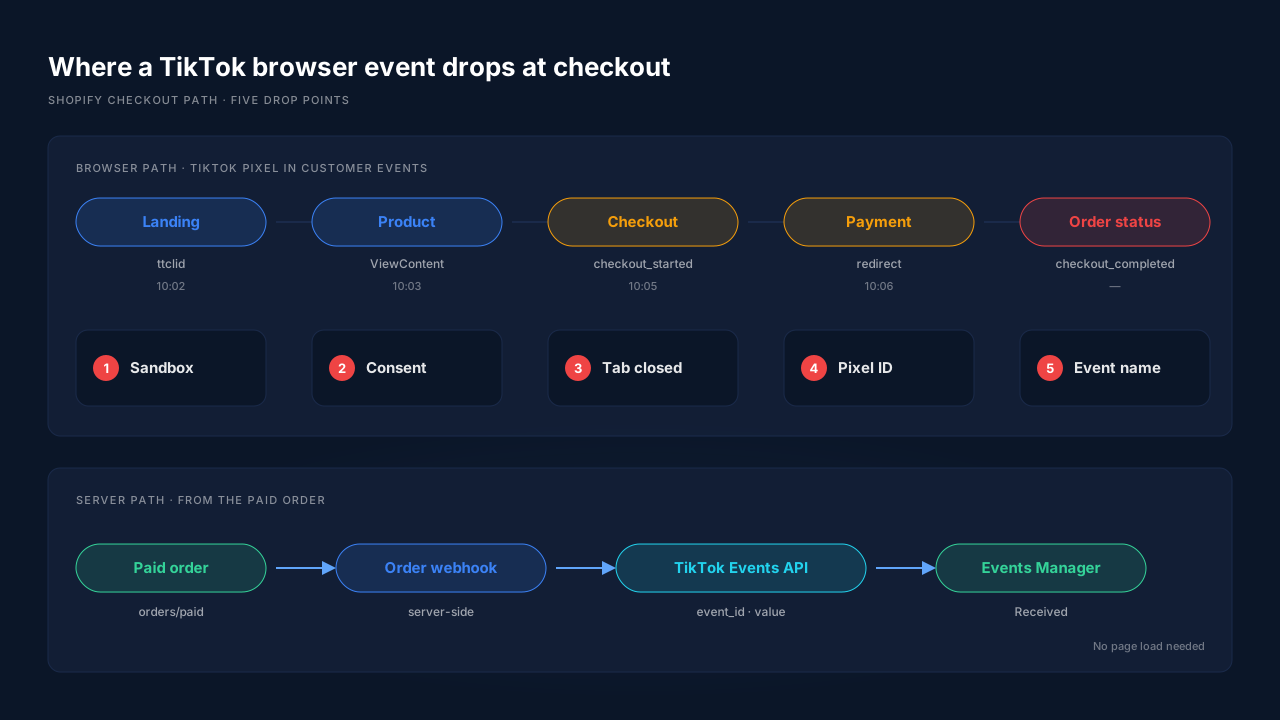
The Customer Events sandbox
Shopify runs custom pixels in an isolated sandbox, not on the page itself. TikTok base code written for a normal web page can load, run your ttq.track call, and still fail to send a usable request from inside that frame.
Consent
Shopify passes every pixel the visitor’s privacy choices. The customerPrivacy object in Shopify’s web pixels API carries marketingAllowed and analyticsProcessingAllowed flags. When a consent banner is active and a buyer declines marketing, a pixel that honours those flags sends nothing for that buyer. Your own test order, where you clicked “Accept”, is the one case that always works.
The order status page
Shopify’s checkout_completed event “logs when a visitor completes a purchase. This event is available on the Order status and checkout pages.” A buyer who pays through a redirect and never returns, or closes the tab after paying, gives the browser nothing to fire on. The order exists in Shopify. TikTok never hears about it.
A second pixel ID
If you connected TikTok’s Shopify app and also pasted your own pixel, you may have two pixel IDs. Events go to one, and you are reading the other in Events Manager. Check the pixel code in your custom pixel against the pixel selected in Events Manager before anything else.
The event name
TikTok’s standard events have their own vocabulary. TikTok’s own API documentation uses CompletePayment as its purchase example. A Meta-style name ported across, or a typo, is accepted as a custom event and lands outside the standard purchase reporting your campaign optimises on.
Ad blockers sit on top of all five. Requests to well-known tracking domains are a standard blocklist target, which is the core of how ad blockers break conversion tracking.
How do you check which stage is dropping the events?
Test from the outside in, one stage at a time, with a real order you can trace. The goal is to find the first point where the event stops existing, because everything after that point is irrelevant.
- Confirm the pixel ID. Open the custom pixel code and copy the pixel code it uses. In TikTok Events Manager, open that exact pixel. If the IDs differ, you have found the problem.
- Check the storefront events. If PageView and ViewContent arrive but checkout events do not, the base code works and the problem is checkout-specific.
- Check checkout_started. Shopify’s
checkout_startedevent “is triggered every time a customer enters checkout” on Checkout Extensibility stores. Subscribe to it and log something you can see. No log means no InitiateCheckout. - Place an order and stay on the order status page. Then place a second order and close the tab right after paying. If only the first one reaches TikTok, your purchase depends on the page load.
- Repeat with consent declined. If events vanish, your consent setup is working as designed, and the browser path will never cover those buyers.
- Compare counts. Paid orders in Shopify for a day versus purchases in TikTok for the same day and timezone. The gap is your loss rate.
Step 4 usually settles it. If the purchase only arrives when the buyer stays on the page, no pixel tweak fixes the buyers who leave.
What does TikTok need on a server-side purchase to count it?
TikTok needs a known event name, a unique event ID, the order value and currency, and enough identifiers to tie the event to a person. The TikTok Events API accepts all of these on the server, so none of them depend on the checkout page loading.
TikTok’s published API SDK documents each field:
eventandevent_id. The event ID is “required if you are sending overlapping events from both TikTok Pixel and Events API”, and TikTok lists “OrderID (for CompletePayment event)” as an example. If you send the same purchase from both sides, the IDs must match, or TikTok counts it twice. The full pairing rule is in why TikTok conversions don’t deduplicate.valueandcurrency. TikTok defines value as “the total price of the order”, with currency as an ISO 4217 code.callback, the TikTok Click ID. TikTok describesttclidas “a tracking parameter appended to a landing page URL whenever a user clicks on an ad on TikTok”, valid for the same period as your click-through window in Attribution Manager.ttp. The value of the_ttpcookie the TikTok Pixel sets, which TikTok uses “to match website visitor events with TikTok ads.”- Hashed
email,phone_numberandexternal_id, each “hashed with SHA256”, plus the non-hashedipanduser_agent.
Received is not the same as attributed. A purchase with no click ID, no cookie and no email arrives in Events Manager but gives TikTok little to match. That is a separate problem, covered in how to fix TikTok Events API match quality.
Should you send TikTok purchases from the browser or the server?
Send the purchase from the server, and keep the browser pixel for the identifiers only it can collect. A server-side purchase is built from the order record, so it fires whether or not the buyer reaches the order status page, accepted cookies, or ran a blocker. That is the general Conversions API pattern, applied to TikTok.
The browser still matters. The _ttp cookie and the landing-page ttclid live in the browser first. A server that never saw them can only send email, phone, IP and user agent. So the strong setup captures identifiers in the browser at landing and sends the conversion from the server.
The one rule that breaks most setups: keep one source per event. If TikTok’s Shopify app fires a browser purchase and your server sends one too, you need matching event IDs on both. If you can’t control the app’s IDs, switch its purchase event off and let the server own it.
How does PartialLeads send Shopify checkout and purchase events to TikTok?
PartialLeads sends the purchase to the TikTok Events API server-side from Shopify’s paid-order webhook, not from the order status page. The Customer Events pixel captures ttclid on the landing visit and carries the visitor ID across the hop between your landing page and Shopify checkout, and checkout events from the pixel are forwarded server-side alongside the purchase.
Purchases come from the order, not the page. When Shopify marks an order paid, the webhook triggers the send. A buyer who closes the tab, pays through a redirect or declines a banner still produces a purchase event, because nothing waits on a page load. Unpaid, pending and cancelled orders are not sent.
Value is the full order total. The event carries Shopify’s order total, including tax and shipping, after discounts, in the order’s currency. There is no subtotal option. An order is recorded once, so an upsell added to the same order later does not change what TikTok received.
Checkout events are forwarded too. The Shopify pixel path fans out ecommerce events, including InitiateCheckout, server-side, with variant IDs as content IDs.
The click ID travels with the order. The pixel captures ttclid at landing. The order is matched back to that visitor by visitor ID, then email, then phone, so the purchase carries the click that started the journey.
Each order sends once. Event IDs are a deterministic SHA-256 hash of the configuration, event name and record, so a redelivered webhook cannot send the same purchase twice.
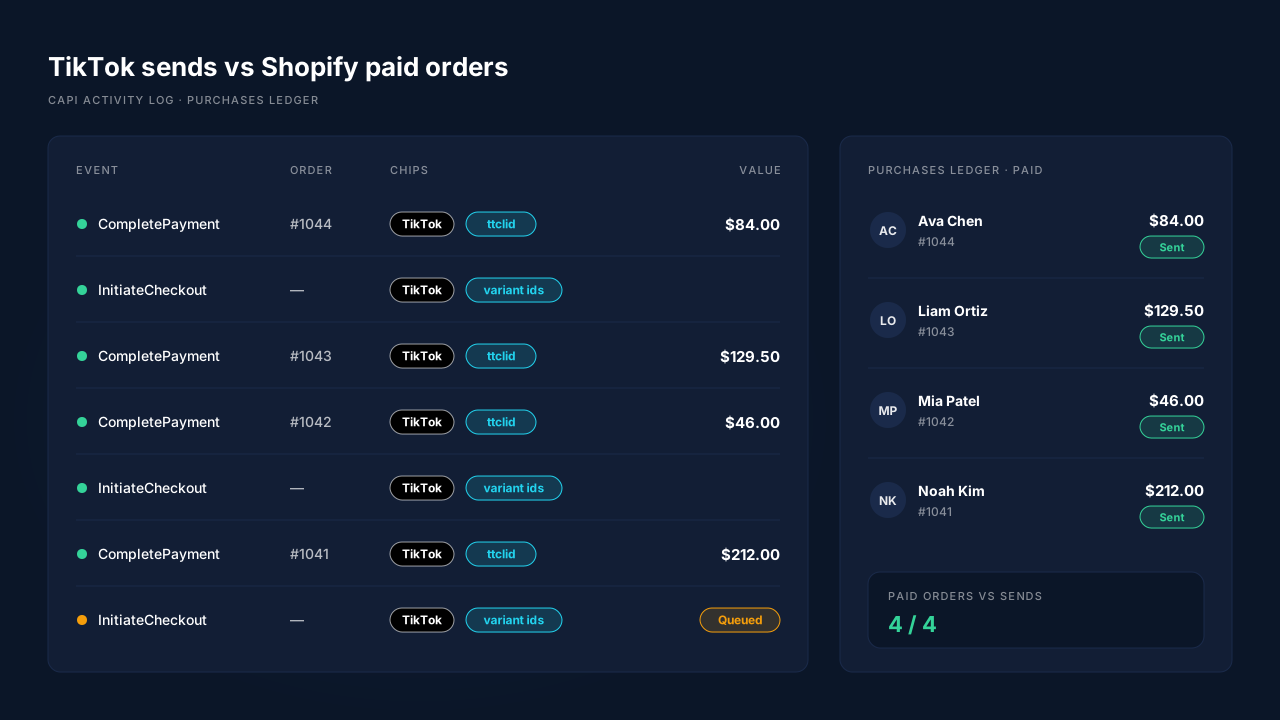
Where you see it working. The CAPI activity log lists each TikTok send with its event name, status and payload. The Purchases ledger lists every paid Shopify order, which is your reconciliation: each paid order should have a matching purchase send. On the Leads list, the API column shows which conversion APIs each lead was sent to, and the Journey timeline shows the TikTok click on the landing visit.
The honest constraints. PartialLeads’ event IDs are its own, so it does not deduplicate against TikTok’s Shopify app or a pixel you pasted yourself. If either still fires a browser purchase, switch it off and keep one sender. PartialLeads controls delivery, not matching: every paid order is sent, but whether TikTok ties it to an ad depends on the identifiers captured and on TikTok’s own matching. Keep the TikTok base code on your storefront so the _ttp cookie exists. And if your pixel ID is wrong, fix that first, because no sender can report to a pixel you are not reading.
| What breaks | The mechanism | Where you see it in the dashboard |
|---|---|---|
| Buyer never reaches the order status page | Purchase sent from Shopify’s paid-order webhook | Purchases ledger, one send per paid order |
| Pixel blocked or consent declined at checkout | Server-side send to the TikTok Events API | CAPI activity log, TikTok rows |
| InitiateCheckout never arrives | Checkout events forwarded server-side from the pixel | CAPI activity log, InitiateCheckout rows |
| Purchase arrives with no ad click | ttclid captured at landing, order matched by visitor ID, email, phone |
Journey timeline, Leads list API column |
| Same order counted twice after a retry | Deterministic SHA-256 event ID | Activity log, one row per order |
| Wrong value or a placeholder amount | Full order total and currency from the order record | Activity log vs Purchases ledger totals |
Tell us what's broken. We'll fix your tracking — free.
Describe the tracking/attribution problem you're stuck on and we'll map it to a fix: server-side conversions to Meta, Google, TikTok and Pinterest, plus first-party tracking that survives Safari. No code required.
Sources
- TikTok Business API SDK — PixelTrackBody (event, event_id): https://github.com/tiktok/tiktok-business-api-sdk/blob/main/python_sdk/docs/PixelTrackBody.md
- TikTok Business API SDK — PixelContextAd (ttclid callback): https://github.com/tiktok/tiktok-business-api-sdk/blob/main/python_sdk/docs/PixelContextAd.md
- TikTok Business API SDK — PixelContextUser (ttp, hashed email and phone): https://github.com/tiktok/tiktok-business-api-sdk/blob/main/python_sdk/docs/PixelContextUser.md
- TikTok Business API SDK — PixelProperties (value, currency): https://github.com/tiktok/tiktok-business-api-sdk/blob/main/python_sdk/docs/PixelProperties.md
- Shopify — @shopify/web-pixels-extension 2.18.0 (checkout_started, checkout_completed, customerPrivacy): https://registry.npmjs.org/@shopify/web-pixels-extension/-/web-pixels-extension-2.18.0.tgz