GA4 shows less than half of your Shopify revenue because it only counts purchases that a browser tag managed to report, while Shopify counts every order in its database. A gap that large is almost never one bug. It is several losses stacked: a purchase event that no longer fires on every checkout, shoppers who declined analytics cookies, ad blockers, and orders that never touched the online-store checkout.
The good news: each loss leaves a different fingerprint, so you can find yours with an order export and an hour.
Is GA4 supposed to match Shopify revenue exactly?
No. GA4 and Shopify will never match to the dollar, because they measure different things. Shopify’s sales reports are built from order records, including orders that never had a website session. GA4’s purchase revenue is the sum of whatever value your tag sent with each purchase event it received. A small, steady gap is normal. Under half is not.
The definitional differences are real, but they are small and predictable:
- What the number includes. Your GA4 tag decides whether
valueincludes tax and shipping. Shopify’s reports have their own definitions for gross, net and total sales, and returns reduce Shopify’s figures later without touching GA4. - Time zone. Shopify reports in the store’s time zone; GA4 reports in the property’s time zone. Orders near midnight land on different days.
- Currency. If the store sells in several currencies, GA4 converts to the property currency and Shopify may report in the store currency.
- Test orders. Shopify flags test orders on the order record; GA4 counts whatever the tag sent.
None of these makes half your revenue vanish. If GA4 is under 50%, events are missing, not being counted differently.
Why does GA4 miss so many Shopify purchases?
GA4 misses Shopify purchases whenever the browser never sends the purchase event. On Shopify that happens in four common ways: the event isn’t wired to every checkout, the shopper declined analytics consent, a blocker stopped the request, or the order was created somewhere no shopper’s browser was involved. Each one alone costs a slice; stacked, they can remove more than half.
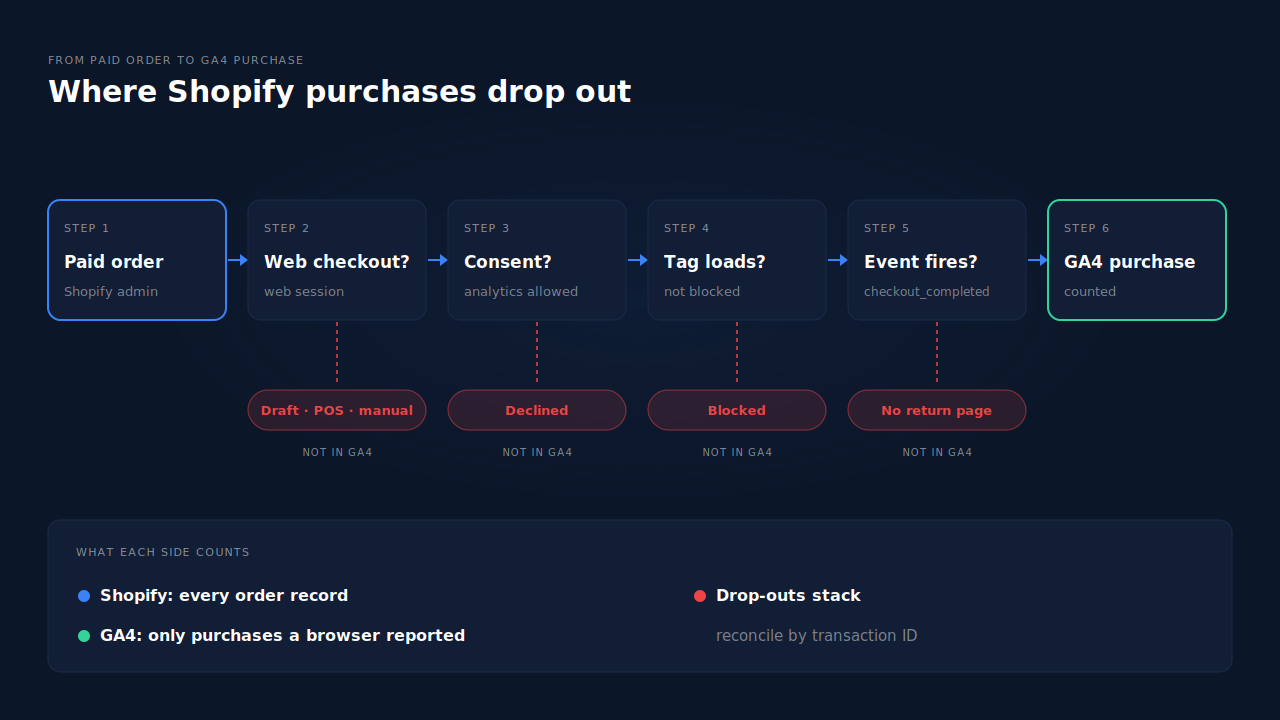
The purchase event stopped firing on some or all checkouts
Shopify now runs tracking in checkout through customer events: sandboxed pixels that subscribe to standard events such as checkout_completed. Shopify’s own type definitions describe checkout_completed as the event that “logs when a visitor completes a purchase”, available on the Order status and checkout pages (@shopify/web-pixels-extension 2.18.0).
If your GA4 purchase still depends on an old script pasted into the thank-you page, it went silent when that page was upgraded. We covered that failure in why ad conversions drop to zero after Shopify’s thank-you page upgrade. A partial version of the same problem is sneakier: the event can fire for card payments but not for a payment method that sends the shopper away from the checkout, if they never come back to a page where your tag runs.
The shopper declined analytics cookies
Shopify passes each shopper’s consent choices to every pixel. The same type definitions expose analyticsProcessingAllowed and marketingAllowed on the pixel’s customerPrivacy object. When a store shows a cookie banner and the shopper declines analytics, a well-behaved GA4 setup does not record that purchase as a normal event. In markets where banners are shown to everyone, this alone can remove a large share of purchases.
That loss is correct behaviour, not a bug. You should not try to “fix” it by tracking people who said no.
An ad blocker stopped the request
Browser blockers match the Google tag’s script and collection endpoints and cancel the request before it leaves the device. The order still completes; GA4 never hears about it. We explain the mechanics in how ad blockers break conversion tracking. Tech-heavy and desktop-heavy audiences lose more here.
The order never went through the online-store checkout
This is the one most people forget. Draft orders you invoice, point-of-sale orders, manually created orders, wholesale orders and many subscription renewals exist in Shopify without a shopper completing your online checkout in a browser. Shopify’s Admin API order record carries a source_name field for exactly this reason (@shopify/shopify-api 11.14.1, Order resource). GA4’s web stream has no way to see these orders unless you send them yourself.
A store with a busy subscription or wholesale side can find that a big chunk of “missing” revenue was never web revenue at all.
How do you find out which loss is yours?
Reconcile by order, not by total. Export one recent week of Shopify orders, export GA4’s purchases for the same week with their transaction IDs, and match them one to one. The orders that exist in Shopify but not in GA4 are your sample. Their shared traits (sales channel, payment method, country, device, date) point straight at the cause.
Here is the order of operations I use:
- Pick a clean week. No tag changes during it, no big refund batch.
- Split Shopify’s export by sales channel or source. Set aside draft, POS and manual orders. Compare only online-store orders against GA4.
- Match on transaction ID. GA4’s
transaction_idshould equal the Shopify order number or ID your tag sends. If it doesn’t, fix that first; nothing else can be audited without it. - Look for a pattern in the unmatched orders. Then read it off this table.
| What the missing orders have in common | Likely cause | First thing to check |
|---|---|---|
| All orders after a specific date | Purchase event stopped firing | Customer events, the date of any checkout upgrade |
| One payment method (wallet, redirect gateway) | Buyer never returned to a page your tag runs on | Test that payment method end to end |
| Mostly EU or UK shoppers | Consent declined | Your banner and consent settings |
| Mostly desktop, one browser | Blockers | Compare with a blocker installed |
| Draft, POS, manual or subscription orders | Never a web checkout | Nothing to fix in the tag |
A second cross-check: if GA4’s purchase count is close to Shopify’s online-store order count but revenue is far lower, your value is wrong (sent without tax or shipping, or in the wrong currency), not your event.
Can you close the gap inside GA4 itself?
Partly. You can fix the parts caused by broken wiring, and you can add orders that never had a web checkout, but you cannot recover purchases from shoppers who declined consent, and you shouldn’t try. The goal is a GA4 that is incomplete in known, stable ways rather than one that silently drifts.
Practical fixes, in order of payoff:
- Keep one purchase source. Use either Shopify’s Google channel app or one custom pixel on
checkout_completed, not both plus a leftover thank-you script. - Send the full value, consistently. Decide whether
valueincludes tax and shipping and document it. - Test every payment method. A wallet or redirect gateway that skips the page your tag runs on is a fixable gap.
- Send non-web orders server-side if you need them in GA4. Google offers a server-to-server API for GA4 (the Measurement Protocol). Events sent that way without the shopper’s GA4 client ID won’t attach to a session, so they add revenue totals but no traffic source.
Even after all of that, GA4 will stay below Shopify. That is why the number to steer by should come from the order records, not the browser.
How does PartialLeads give you a revenue baseline to audit GA4 against?
PartialLeads records every paid Shopify order from the store’s order webhooks, server to server, with no browser involved, and matches each order back to the visitor’s session to attach its source. That gives you a revenue number that doesn’t depend on consent banners, blockers or thank-you pages, and it shows which traffic source each paid order came from.
To be clear about the boundary: PartialLeads has no GA4 integration. It does not send events to GA4 and does not repair your GA4 property. It gives you an independent, order-based view to measure GA4’s gap against.
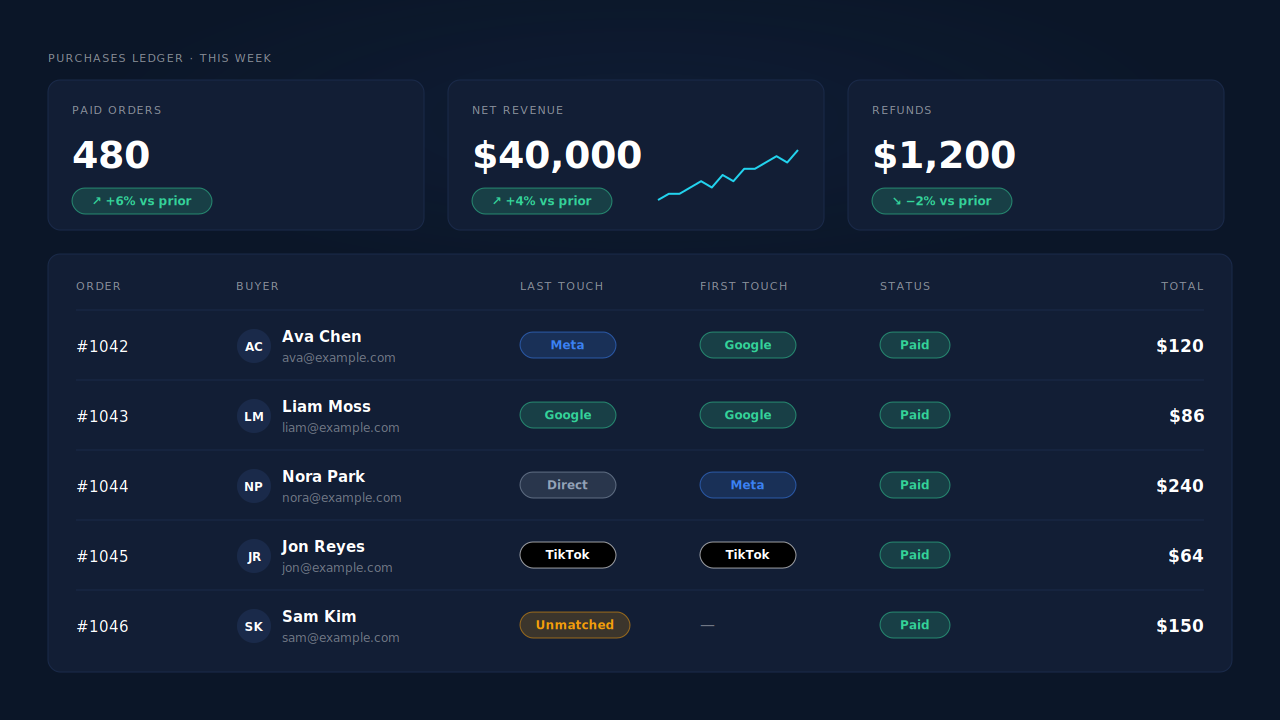
How it works, and its honest limits:
- Paid orders only. An order is recorded and sent when Shopify marks it paid (
financial_status = paid). Pending, unpaid and cancelled orders are not counted, so a cash-on-delivery order appears when it is marked paid. - Value is the full order total, including tax and shipping, after discounts. There is no subtotal option, so compare it with a GA4
valuedefined the same way. - Recorded once. Later edits to an order, such as an upsell added to it, don’t change the recorded value.
- Refunds are their own rows and net against revenue in the Purchases ledger; see why refunds inflate attributed revenue.
- Source matching is maximised, not guaranteed. Each order is matched to a session by visitor ID, email or phone, and gets both a first-touch and a last-touch attribution row. Orders with no matching session still land as unmatched, so the order count stays complete even when the source can’t be found.
In practice you read two numbers side by side. The Purchases ledger’s paid-order count and revenue for the week is your baseline; GA4’s online-store purchases for the same week are the browser’s view. The difference, broken down by the matched source in the Attribution report, shows you which channels GA4 is under-crediting. That is the same logic behind attributing ecommerce revenue to the ad click: the order is the fact, and the session is joined to it afterwards. For why each tool still disagrees on credit once the counts are fixed, see why Shopify attribution differs from ad platforms, and for reading the models themselves, how to read an attribution report.
| What breaks | The mechanism | Where you see it in the dashboard |
|---|---|---|
| GA4 misses purchases from blocked or un-consented browsers | Paid orders recorded from Shopify’s order webhooks, server to server | Purchases ledger (paid-order count and revenue) |
| You can’t tell which channels GA4 is under-crediting | Each paid order matched to its session by visitor ID, email or phone, with first- and last-touch rows | Attribution report grouped by source, medium and campaign |
| Some orders have no traceable web session | Unmatched orders still land and stay in the revenue total | Purchases ledger matched/unmatched split, Revenue by Match Quality |
| Refunds make revenue look higher than it was | Refunds recorded as separate rows that net against paid revenue | Purchases ledger |
Tell us what's broken. We'll fix your tracking — free.
Describe the tracking/attribution problem you're stuck on and we'll map it to a fix: server-side conversions to Meta, Google, TikTok and Pinterest, plus first-party tracking that survives Safari. No code required.
Sources
- Shopify,
@shopify/web-pixels-extension2.18.0 type definitions (checkout_completed,customerPrivacy): https://registry.npmjs.org/@shopify/web-pixels-extension/-/web-pixels-extension-2.18.0.tgz - Shopify,
@shopify/shopify-api11.14.1, Admin REST 2024-10 Order resource (source_name,financial_status,total_price): https://registry.npmjs.org/@shopify/shopify-api/-/shopify-api-11.14.1.tgz