Your Shopify custom pixel sends a sandbox URL because Shopify runs custom pixels inside an isolated sandbox, not on the storefront page itself. Any code that reads window.location or document.referrer gets the sandbox’s own address. Meta’s base code and gtag.js read those automatically, so page paths and UTMs come through wrong.
The real page address is still there. Shopify hands it to your pixel in every event’s context, as a snapshot of the top frame. The fix is to read it from there and pass it to each tag explicitly, instead of letting the tag guess.
Why does a Shopify custom pixel see the sandbox URL?
Because the pixel’s code is not running on your page. Shopify loads custom pixels from Customer Events into a sandbox that is walled off from the storefront, so a pixel can’t read or change the page’s DOM. Inside that sandbox, the browser globals describe the sandbox, not the shop.
That isolation is deliberate. It protects checkout and customer data from third-party scripts. The cost is that every tracking script written for a normal web page now runs somewhere that looks, to the script, like a different page.
So when Meta’s fbq or Google’s gtag.js initialises inside a custom pixel, it does what it always does: reads the current URL and referrer from the browser. Those values belong to the sandbox frame. Merchants report seeing a long Shopify-generated address in their reports where the product or collection path should be.
What does Shopify give you instead?
Shopify gives the pixel a read-only snapshot of the real page with every event. The Context object in Shopify’s web-pixels type definitions is described as “a snapshot of various read-only properties of the browser at the time of event”, and its document is a “snapshot of a subset of properties of the document object in the top frame of the browser.”
That top-frame snapshot carries location (with href, pathname and search), referrer and title. The page_viewed event deliberately carries no page data of its own. Shopify’s types say: “No additional data is provided by design. Use the event context to get the page metadata. E.g. event.context.document.location.href”.
What breaks when the pixel sends the sandbox URL?
Everything that depends on knowing which page the visitor was on. Page paths, landing pages, UTMs and click ids all live in the URL, so a wrong URL takes them all at once. The tag still fires, and the event still arrives, which is why the failure is easy to miss.
UTMs disappear. A visitor lands on /products/linen-shirt?utm_source=meta&utm_campaign=spring-sale. Inside the sandbox, the query string the tag reads is the sandbox’s, not the landing URL’s. The campaign is gone before any event is sent.
Click ids disappear. fbclid, gclid, ttclid and msclkid are URL parameters too. A Meta pixel that never sees fbclid can’t build the _fbc value that ties a later purchase to the ad click. The difference between those identifiers is covered in gclid vs fbclid vs UTM parameters.
Page reports collapse. Every page view reports the same sandbox address, so “top landing pages” becomes one meaningless row.
Referrers are wrong. document.referrer inside the sandbox is the storefront page that loaded it, not the site that sent the visitor. Google, an email or another ad network all look like internal traffic.
The downstream symptom is familiar: paid orders that look unattributed. If Shopify itself shows “session from an unknown source” on Meta orders, that is a related but separate cause. The sandbox URL problem breaks your own pixel’s data, not Shopify’s.
This is the same sandbox that gives you an empty user agent from Shopify’s pixel: the pixel runs one step removed from the page, and anything it reads from the browser directly can be wrong or blank.
How do you send the real page URL from a Shopify custom pixel?
Read the URL from event.context.document.location and pass it to each tag as an explicit parameter. Read the referrer from event.context.document.referrer. For the first page of the session, read UTMs and click ids from that URL’s search string and keep them, because the next page usually won’t have them.
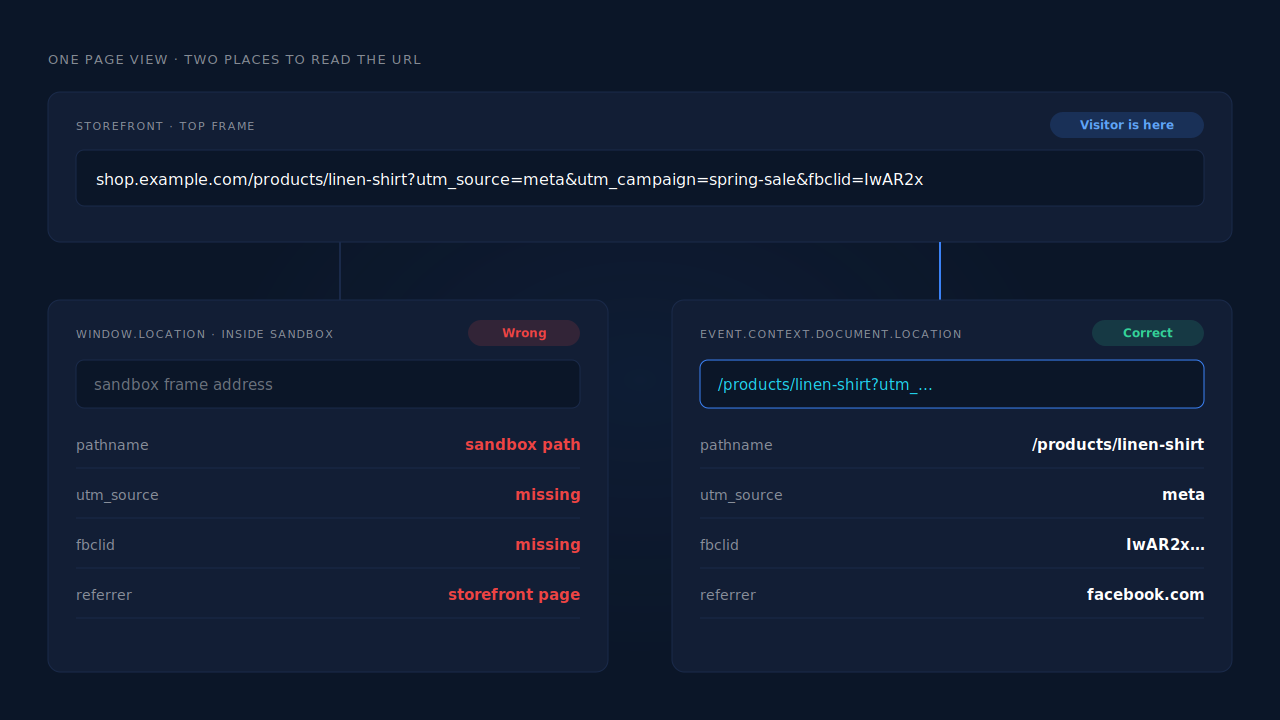
Here is the pattern. It subscribes to page_viewed, reads the real page from the event context, and pulls the campaign parameters out of it:
// Shopify custom pixel: use the top-frame URL Shopify provides, not window.location
analytics.subscribe('page_viewed', (event) => {
  const doc = event.context.document;
  const pageUrl = doc.location.href;      // the storefront page the visitor is on
  const referrer = doc.referrer;          // the real referrer, not the sandbox's
  const params = new URLSearchParams(doc.location.search);

  const attribution = {
    utm_source: params.get('utm_source'),
    utm_medium: params.get('utm_medium'),
    utm_campaign: params.get('utm_campaign'),
    fbclid: params.get('fbclid'),
    gclid: params.get('gclid'),
    ttclid: params.get('ttclid'),
    msclkid: params.get('msclkid'),
  };

  // pass pageUrl and referrer explicitly to every tag you call here
});
The same context object is on every event, not just page_viewed. Shopify’s own package README shows the pattern at registration too, reading init.context.window.location.href rather than the global window.location.
How do you fix GA4 inside a custom pixel?
Turn off gtag’s automatic page view and send your own with the page URL set by hand. Configure the tag with send_page_view: false, then on each page_viewed send a page_view event with page_location set to the context URL and page_referrer set to the context referrer. GA4 then records the storefront path and parses UTMs from it.
How do you fix Meta inside a custom pixel?
The Meta Pixel base code reads the page address itself, and the browser tag is the hard part to correct from inside a sandbox. The cleaner fix is server-side. The Conversions API accepts the page as an explicit event_source_url on each event, so a server event built from the context URL carries the real page. Pair it with an fbc value built from the fbclid you read from that URL, in the format Meta documents.
What about UTMs on the second page?
They are gone by then. UTMs and click ids appear only on the landing URL, so a pixel that reads them on page three gets nothing. Capture them on the first page_viewed of the session and attach them to everything after it, including the eventual order.
Why doesn’t the order itself carry the UTMs?
Because the order is created in checkout, several pages after the landing URL. Unless something carried the campaign through, the order arrives with no idea which ad started the visit. Fixing the sandbox URL gets you the right data on the landing page; something still has to join it to the order.
That join is where most DIY pixels stop. They send correct page views, then a purchase event with no campaign attached. If you send purchases from a custom pixel’s checkout_completed, read the stored attribution there and include it. If purchases come from somewhere else, such as order webhooks, they need a way to find the session that held the UTMs.
How does PartialLeads keep the real landing URL on Shopify?
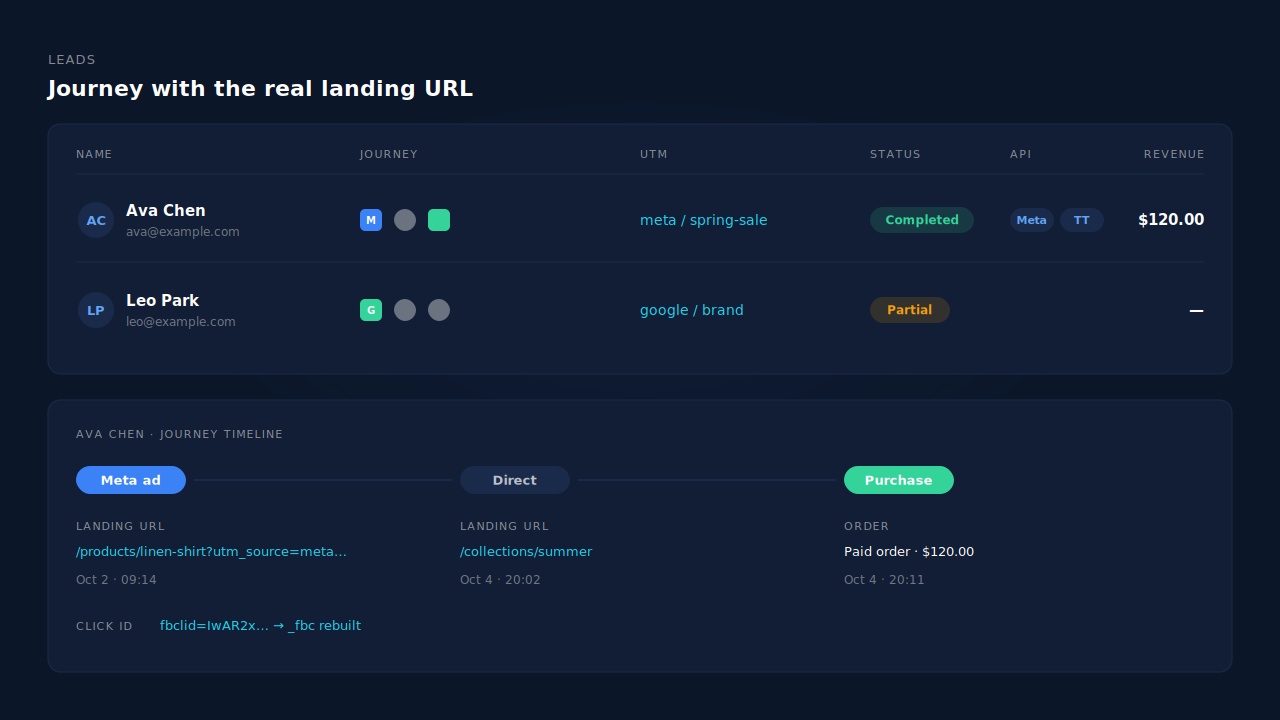
The PartialLeads Customer Events pixel reads the storefront landing URL from the page_viewed event context, not from the sandbox’s own location. From that URL it captures the UTMs and click ids — fbclid, gclid, gbraid, wbraid, ttclid, msclkid and Pinterest’s epik — plus the landing page and referrer, and stores them with the visitor’s session.
Purchases are sent from Shopify’s order webhooks, so they don’t depend on the pixel firing at checkout. Each paid order is matched back to the session that carried the campaign — first by the visitor id, then by email, then phone. Every matched purchase gets first-touch and last-touch attribution rows, and the conversion goes server-side to Meta, Pinterest and TikTok, with _fbc rebuilt from the captured fbclid when the cookie is missing. Google Ads purchases go to a Google Sheet you import on a schedule. The same approach for a lost click is covered in rebuilding a lost click id from a landing URL.
What you see is the Leads list: each person’s Journey ribbon shows every touch with its channel, the UTM column shows the campaign captured on the real landing page, and the Revenue column shows the matched order. Open a lead and the journey timeline lists each session’s landing URL as the storefront page, not a sandbox address.
Four honest constraints.
It doesn’t repair your other pixels. If Shopify’s Facebook & Instagram app or a GA4 custom pixel is still reporting sandbox URLs, it keeps doing so. PartialLeads has no GA4 integration.
Run one source per event. PartialLeads uses its own event ids and never sends the same conversion twice, but it doesn’t deduplicate against another app’s browser pixel. Keep one source for each event.
Only paid orders are sent. Pending and cancelled orders aren’t. Every paid order produces a conversion; whether the ad platform ties it to a click depends on the identifiers captured and on the platform’s own matching.
Shopify’s sandbox can reissue its visitor id. Identity stitching by email, phone and device signals is what joins those sessions back together, and it maximises matches rather than guaranteeing them. It all sits under the wider guide to fixing Shopify tracking, attribution and catalog problems.
| What breaks | The mechanism | Where you see it in the dashboard |
|---|---|---|
| Tags report the sandbox address as the page | Landing URL read from the page_viewed event context | Journey timeline shows real storefront URLs |
| UTMs missing from campaign reports | UTMs parsed from the real landing URL and stored with the session | UTM column on the Leads list |
| fbclid and gclid lost, so purchases can’t tie to the ad | Click ids captured at landing; _fbc rebuilt from fbclid |
Journey ribbon shows the ad touch |
| Order arrives with no campaign attached | Paid orders from webhooks, matched to the session by visitor id, email, then phone | Revenue column and journey on the lead |
| Conversion sent twice by an app and a custom pixel | PartialLeads’ own event ids; keep one source per event | API column on the lead |
Tell us what's broken. We'll fix your tracking — free.
Describe the tracking/attribution problem you're stuck on and we'll map it to a fix: server-side conversions to Meta, Google, TikTok and Pinterest, plus first-party tracking that survives Safari. No code required.
Sources
- https://registry.npmjs.org/@shopify/web-pixels-extension/-/web-pixels-extension-2.18.0.tgz
- https://developers.facebook.com/docs/marketing-api/conversions-api/parameters/server-event
- https://developers.facebook.com/docs/marketing-api/conversions-api/parameters/fbp-and-fbc