When Meta says your Shopify catalog belongs to another business, the catalog your Facebook & Instagram channel was using is owned by a Meta business portfolio you don’t control. The channel can’t reconnect to it, and you can’t edit it. You have two jobs: get that business to release the catalog or share it, and keep your catalog ads running from a new catalog you own while you wait.
The second job is the one most store owners skip, and it’s the one that costs money. Release requests can take weeks, especially when the owning business is a former agency, a previous store owner, or an account nobody can log into anymore. Your ads don’t have to wait that long.
Below: what the message means, how the catalog ended up in someone else’s hands, how to get it released, and how to run catalog ads from your own feed in the meantime.
What does “catalog belongs to another business” actually mean?
Every Meta catalog has exactly one owner: a business portfolio (what used to be called Business Manager). Other businesses can be given access as partners, but only the owner controls the catalog. When Shopify’s channel tries to reconnect and the catalog’s owner isn’t the business you’re connecting with, Meta refuses the connection.
It’s an ownership problem, not a sync bug. Nothing is wrong with your products, your Shopify store or your pixel. Meta is protecting a catalog that, on its records, belongs to someone else.
That also explains why the two support teams keep pointing at each other. Shopify can’t change who owns an asset inside Meta’s business tools. Meta will generally act only on a request from the owning business, or after its own review of who the rightful owner is.
How does a Shopify catalog end up owned by another business?
It gets created inside whichever business portfolio was active when someone first connected the channel. If that person was an agency, a freelancer, a previous owner or an employee working from their own portfolio, the catalog was born in their business, not yours. Nobody notices until the connection breaks and has to be rebuilt.
The common versions:
- An agency set it up. They connected the channel from their own business portfolio to save time. The catalog lives there, and it stays there after you part ways.
- You bought the store. The previous owner’s business portfolio still owns the catalog, even though the Shopify store is now yours.
- Someone used a personal portfolio. A staff member or contractor connected the channel while logged into their own business, then left.
- You made a second portfolio. You created a new business portfolio at some point, and the catalog stayed in the old one.
Read the error for the owning business’s name. If it’s a name you recognise, you already know who to call.
What does a locked catalog cost you while it stays locked?
It costs you catalog accuracy first, then ad delivery. While the channel is disconnected, the locked catalog stops receiving your product updates. Prices, stock and new products drift out of date, and catalog ads keep showing whatever the catalog last knew. If the owner removes the catalog or your access to it, those ads have nothing to serve.
Three things break in practice:
- Stale products in ads. Out-of-stock items keep getting shown, and new arrivals never appear.
- Retargeting loses its source. Dynamic retargeting relies on the catalog to turn “viewed this product” into an ad for that product. The pillar on keeping your product catalog feed in sync explains why a stale catalog quietly degrades these ads before anything visibly fails.
- You can’t fix anything. Even if you spot a wrong price, you have no edit rights on a catalog you don’t own.
How do you get the catalog released?
Find the owning business, ask them to release or share the catalog, and escalate to Meta only when they won’t or can’t. Work in that order. The owner can fix this in minutes from their own settings; Meta support is the slow path you use when the owner is unreachable.
- Identify the owner. The error usually names the business. If it doesn’t, check your own business portfolio’s settings, under data sources, for catalogs. A catalog you can see but don’t own shows up as shared, not owned.
- Contact them directly. Ask the owning business to either remove the catalog from their portfolio so your channel can create a fresh one, or add your business as a partner with full access. Be specific: name the catalog and your business ID.
- Disconnect the channel cleanly first. In Shopify, remove the broken connection in the Facebook & Instagram channel before you reconnect from your own business portfolio. A half-connected channel can keep trying to reach the old catalog.
- Escalate to Meta support if the owner is gone. When the owning business is a defunct agency or a former owner who won’t answer, open a Meta support case from your own business portfolio. Bring proof that you own the Shopify store and the domain.
Two cautions. Whether Meta will transfer catalog ownership outright between businesses has shifted over time, so ask support what’s possible for your account rather than assuming. And don’t create a second business portfolio just to get around the block; that usually creates a second ownership problem.
Can you run catalog ads without waiting for the block to clear?
Yes. Create a new catalog inside your own business portfolio, fill it from a product feed URL that Meta fetches on a schedule, connect your pixel to it, and point your catalog ad sets at it. Your ads run off a catalog you own, and the locked one stops mattering to your campaigns. Meta supports feed-based catalogs alongside platform integrations.
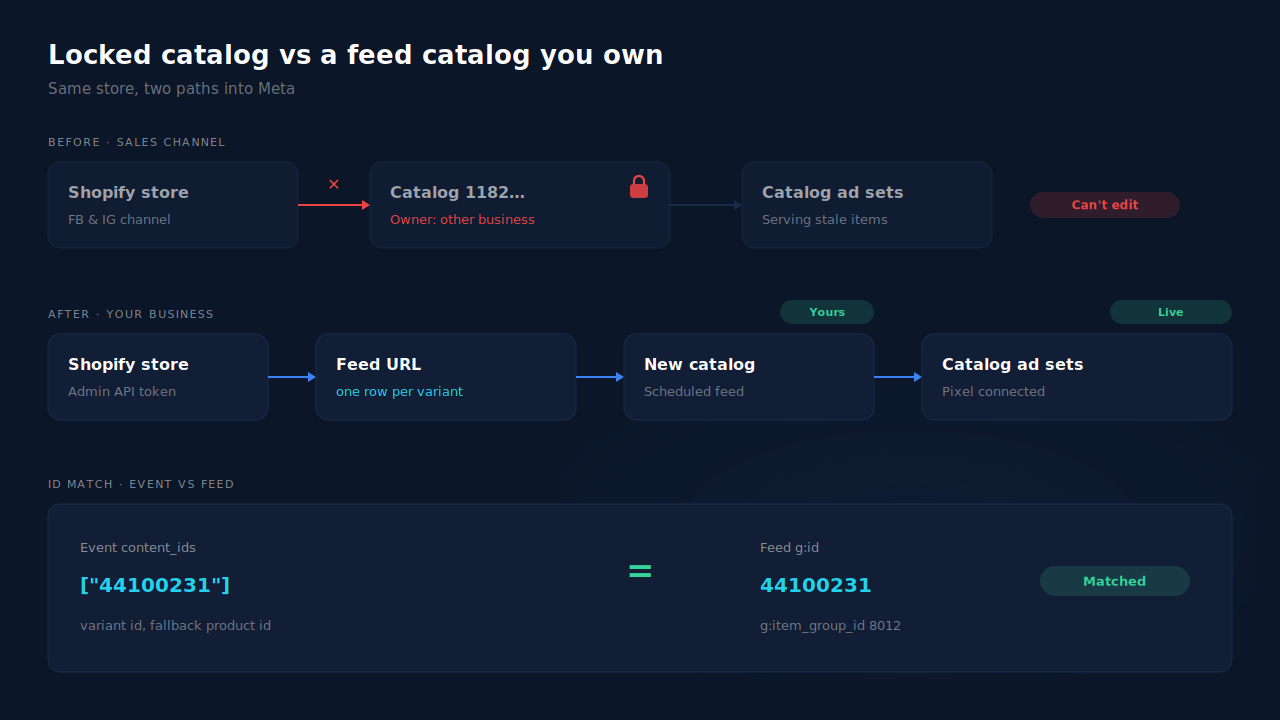
The steps:
- Create the catalog in your business. In Commerce Manager, create a new ecommerce catalog under your own business portfolio.
- Add a data feed. Choose a scheduled feed and paste a URL that always serves your current products. A one-off file upload goes stale the day you upload it.
- Connect your pixel. Link your pixel or dataset to the new catalog so product events can be matched to catalog items.
- Switch your ad sets. Point every catalog ad set at the new catalog. An old ad set still aimed at the locked catalog will keep serving stale products.
The step that makes or breaks it: IDs. Your product events carry content_ids, and those IDs must match the IDs in the catalog. If your events send variant IDs and your new feed uses product IDs, the new catalog matches nothing. That failure has its own guide: why your dynamic product ads show zero catalog match.
What a feed catalog doesn’t restore. A feed catalog is for your ads. If you also relied on the channel for a Facebook or Instagram shop, that part still needs the ownership block cleared.
How does PartialLeads help you run a catalog you own while Meta sorts out the block?
PartialLeads produces a hosted product feed URL from your Shopify store, and you add it to your new catalog as a scheduled feed. The feed uses the same variant IDs that PartialLeads sends in its server-side ecommerce events, so the new catalog and your events line up without you mapping IDs by hand. It produces the feed; you create the catalog and connect it.
Setup is a token, not an app reconnection. You paste a Shopify custom-app Admin API token, which is encrypted and checked live when you save it. Catalog sync is optional and separate from conversion tracking. It stays inert until that token exists. It doesn’t depend on the Facebook & Instagram channel at all, which is the point here.
The feed stays current. Products sync into one row per variant, and variants no longer seen in a completed sync are swept out. Only active variants render. The sync sweep runs every 60 seconds against a 6-hour staleness threshold, so when Meta fetches the URL it reads current data. How often Meta fetches is set in Commerce Manager, and that part is Meta’s clock, not ours.
One URL, protected by a token. The feed is RSS 2.0 XML with Google’s g: namespace, at a URL carrying an unguessable token. The same URL works in Google Merchant Center. A wrong token returns a plain 404, and you can rotate the token if the URL leaks.
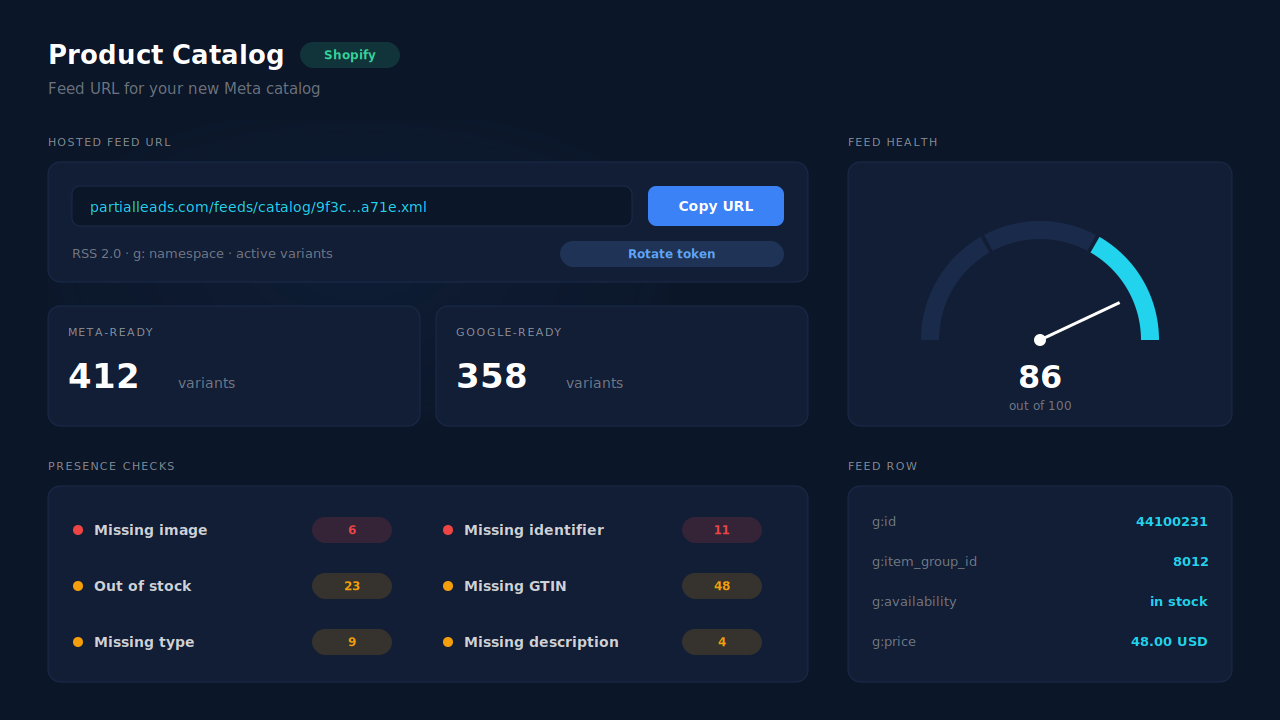
IDs that match by design. Ecommerce events from PartialLeads send the variant ID as content_ids, falling back to the product ID. The feed’s g:id is that same variant ID, with g:item_group_id set to the product ID. Events and catalog speak the same ID language from the first fetch.
Where you see it working. Open Product Catalog in the dashboard. The feed URL is there to copy into Commerce Manager. The Shopify feed-health panel shows a 0–100 score, Meta-ready and Google-ready counts, and six checks: missing image, missing identifier, out of stock, missing GTIN, missing product type and missing description. Fix what it flags before Meta’s first fetch. The guide to checking whether your product feed will be rejected walks through each one.
The honest constraints. The health panel checks that fields are present, not that their values are valid, so it’s a first pass, not a full Meta pre-flight. PartialLeads can’t release the locked catalog or talk to the owning business for you. It doesn’t create a Meta shop or configure the sales channel. And it doesn’t deduplicate against another app’s browser pixel: if Shopify’s Facebook & Instagram app is still sending purchase or product events, keep one source per event. The Meta CAPI on Shopify guide covers choosing that source.
| What breaks | The mechanism | Where you see it in the dashboard |
|---|---|---|
| Channel can’t reconnect; catalog owned by another business | A hosted feed URL from your own Shopify connection, added to a new catalog you own | Product Catalog, feed URL |
| Locked catalog goes stale while you wait | Per-variant sync with unseen variants swept, active variants only | Product Catalog, catalog composition |
| New catalog matches none of your events | Events send the variant ID; feed g:id is the same variant ID |
Product Catalog feed rows; server-side event payloads |
| Products rejected on the first fetch | Six presence checks and a feed-health score (Shopify only) | Product Catalog, feed-health panel |
| Two sources sending the same event | PartialLeads never double-sends; you keep one source per event | Meta CAPI activity log |
Tell us what's broken. We'll fix your tracking — free.
Describe the tracking/attribution problem you're stuck on and we'll map it to a fix: server-side conversions to Meta, Google, TikTok and Pinterest, plus first-party tracking that survives Safari. No code required.
Sources
- https://developers.facebook.com/docs/marketing-api/catalog
- https://developers.facebook.com/docs/commerce-platform/catalog/fields
- https://www.facebook.com/business/help/120325381656392