Email opens should not get credit for sales anymore. Since Apple Mail Privacy Protection, a recorded “open” usually means Apple’s servers downloaded your email, not that a human read it. Credit email only for clicks that brought the buyer to your site. When you exclude opens and bot clicks and email’s share of revenue drops, the lower number is the real one.
That drop feels like a loss. It isn’t. The orders didn’t disappear. They were being claimed by email on evidence that no longer means anything, while another channel usually did the work. This article covers why opens broke, what the smaller number actually measures, and how to credit email so the figure survives a CFO asking “how do you know?”
Why did Apple Mail Privacy Protection break open-based attribution?
Apple Mail Privacy Protection (MPP) loads every email’s remote content, including the invisible tracking pixel that records an open, through Apple’s own proxy servers, whether or not anyone reads the message. For anyone who turned it on in Apple Mail, the open pixel fires anyway. An open stops being a reading signal and becomes a delivery receipt.
Here’s the mechanism. Every email tool detects an “open” the same way: a one-pixel image with a unique URL sits in the message, and when that image is requested, the tool logs an open. Before MPP, the image loaded when a person opened the email. With MPP on, Apple fetches the images in the background, from its own servers, often shortly after delivery. The recipient can be asleep. The tracking pixel still fires.
So for a large share of any consumer list, “opened” now means “delivered to an Apple Mail inbox.” Feed that into an open-based attribution window and every Apple Mail subscriber who buys anything, for any reason, inside the window becomes email revenue.
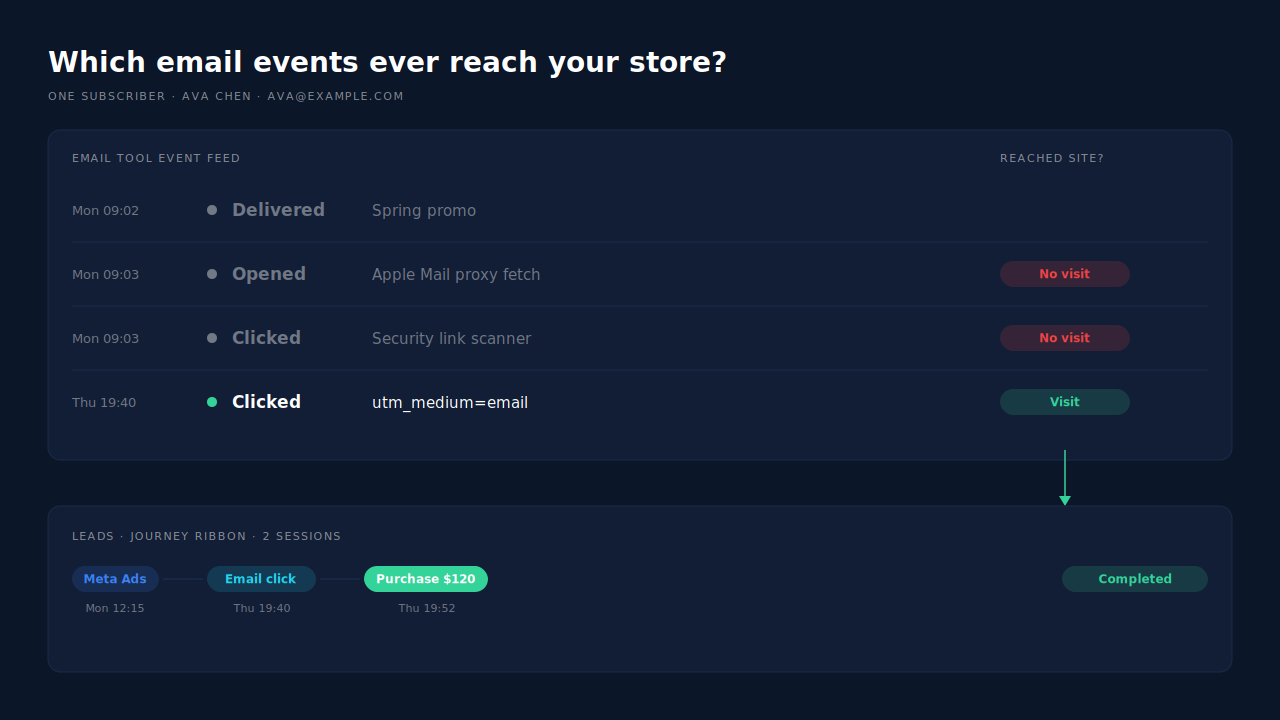
Aren’t clicks polluted too?
Yes, some of them. Corporate mail gateways and security products open links in incoming email to scan them for malware, often seconds after delivery. Those scanner clicks register as clicks in your email tool, so “clicked” is not a perfect signal either. The difference is where a click can be checked: on your own site.
A real click lands a person on a page, in their own browser, with your UTM parameters on the URL. It starts a session you can observe, and it can be tied to a later order. A scanner click tends to come from the security vendor’s infrastructure, and it never turns into a checkout. An open that Apple’s proxy generated never reaches your site at all.
That is the rule worth adopting: email earns credit for a sale when an email click appears in the buyer’s actual journey to that sale. Not when the email tool logged an event near the time of the order.
Which number is real: 40% or 26%?
The smaller one is closer to real. Suppose your email tool showed email and SMS at 40% of revenue, and after excluding Apple proxy opens and bot clicks it shows 26%. The 14 points you lost were orders where the only evidence for email was an event no human necessarily caused. Those sales happened. Email just can’t prove it caused them.
Treat the numbers here as an illustration of the pattern, not a benchmark. The gap depends on how much of your list uses Apple Mail and how long your open window is.
Two cautions keep you from overcorrecting:
- The lower number is a floor, not the truth. Some real readers open, remember, and come back later by typing your URL or searching your brand. Click-based credit misses them. That influence is real, and the only honest way to measure it is a holdout test (below).
- Don’t compare across the change. If you switched attribution settings on a given date, your email revenue chart has a cliff that is a definition change, not a performance drop. Annotate the date and compare periods only on the same rules.
What was the missing 14 points actually doing?
Mostly, those orders belong to other channels. A buyer who clicked a Meta ad, got your promo email the same day, and bought through a Google search was being counted by your email tool, by Meta, and by your store at once. Removing the open credit doesn’t delete the sale. It stops a third claimant from taking it.
This is the same pattern behind why Shopify attribution differs from your ad platform: every tool credits what it can see inside its own walls, and none subtracts what the others claim. Meta, for example, credits a purchase to a click or a view inside its own attribution setting, regardless of what else happened (Meta Business Help Center). Add every platform’s claim together and you’ll routinely total more than you sold.
What’s left after you drop opens is email doing two recognizable jobs:
- Closing. A subscriber found you through an ad weeks ago and your campaign email brought them back to buy. Email is the last touch.
- Assisting. An email click happened mid-journey, and something else closed. That is assisted revenue, which gives full credit to every assisting channel and never sums to your total.
Rarely, email is the first touch, because people on your list already know you. If email looks big in first-touch reporting, check whether a signup form is attributing the subscriber’s first visit to the newsletter instead of the ad that brought them.
How do you set up email attribution that survives MPP?
Credit visits, not inbox events. Tag every link, make clicks the only email event that counts toward revenue, and let one ledger decide which channel gets each order under each model. Then measure the influence clicks miss with a holdout, instead of letting opens stand in for it.
Tag every email and SMS link. Add utm_source, utm_medium=email (or sms) and utm_campaign to every link in every campaign and flow. Most email tools can append these automatically at the account level; check that your flows inherit it. Native mail apps like Apple Mail and Outlook send no referrer, so an untagged click often lands in Direct. The full breakdown is in attributing email campaign leads without UTMs.
Switch your email tool’s revenue attribution to clicks. If you keep open-based credit, read it as a reach metric. Either way, write down the setting and the date you changed it.
Stop summing platform numbers. Start from your real order total and make every channel figure reconcile to it.
Run a holdout for the influence clicks can’t see. Withhold one campaign from a random slice of your list, say 10%, and compare purchase rates between the two groups over the following weeks. The difference is email’s incremental effect, opens or no opens. It’s the only method that credits the reader who never clicked without trusting a proxy-generated pixel.
How does PartialLeads credit email for clicks instead of opens?
PartialLeads credits visits, not opens. The tag records each session’s UTMs, click IDs and referrer, and when a paid Shopify or WooCommerce order arrives, PartialLeads matches it to the buyer’s visits and writes a first-touch and a last-touch row for that order. An order counts as email revenue only when an email click is one of those visits. An open that never reached the site is not a touch.
The match is tiered: the visitor ID from the storefront first, then email, then phone, then IP. Sessions are stitched into one person across visits and devices, so “clicked a Meta ad Monday, clicked the Thursday email, bought” reads as one journey with two touches, not two anonymous visitors. Each order is counted once per model, so the model totals reconcile to the revenue you actually took.
The Attribution report shows first touch, last touch and the PartialLeads resolved model side by side, each with its own purchase count and channel split. Group the channels table by source or medium and email sits in the same table as Meta Ads and Google, with revenue, purchases, average lag and ROAS per row. Where email is big in last touch and small in first touch, it is closing buyers other channels found. The Conversion Paths & Assists panel shows sequences like Meta Ads > Email and which channels assist without closing. The guide to reading an attribution report honestly applies to all of it: every figure is still a model applied to observed visits.
To check one order, open the lead. The journey ribbon on the Leads list shows each touch as a badge ending in the conversion, and the journey timeline shows the timestamp and source of every session.
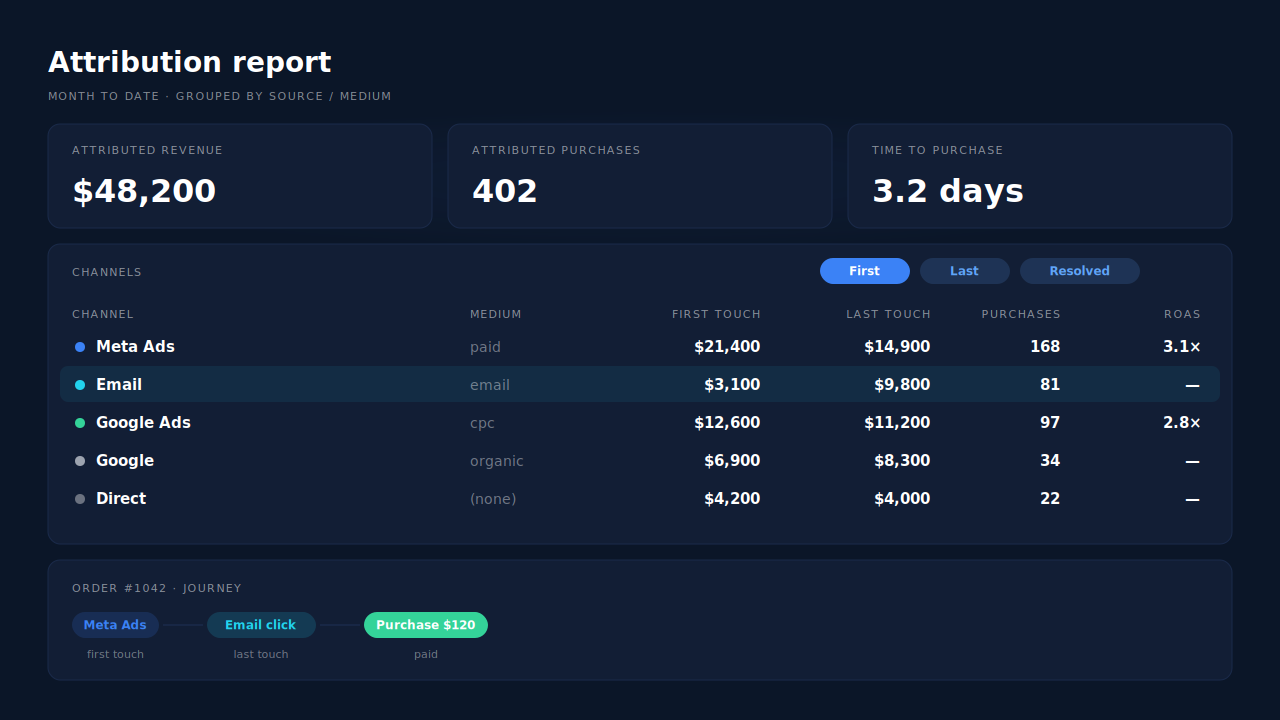
Honest limits. PartialLeads does not read your email tool’s open or click data, so it cannot credit an email that influenced someone who never clicked; use a holdout for that. It has no dedicated bot-click filter: what keeps scanner clicks out of revenue is that a click only earns credit when it sits in the journey of a matched order. An email click with no UTMs can still land as Direct if nothing else ties it to the person. Matching is maximized, not guaranteed; an order that can’t be tied to any visit shows as unmatched instead of being guessed. Only paid orders are sent to ad platforms.
| What breaks | The mechanism | Where you see it in the dashboard |
|---|---|---|
| Apple proxy opens credited as email revenue | Credit comes from visits; an open that never reached the site is not a touch | Attribution report grouped by source/medium |
| Same order claimed by email tool, Meta and the store | Each paid order matched once, one first-touch and one last-touch row | Model totals in the Attribution Models panel |
| Email closes but gets no credit for starting journeys, or vice versa | First touch and last touch shown side by side | First/Last/Resolved toggle on the channels table |
| Email assists hidden behind the closing channel | Full journey per buyer, assists counted separately | Conversion Paths & Assists panel |
| Can’t tell what email did for one order | Sessions stitched per person by visitor ID, email, phone and IP | Journey ribbon and journey timeline on the lead |
Opens were always a soft signal. MPP made them no signal. Credit the clicks you can see on your own site, measure the rest with a holdout, and the number you budget against will stop moving every time an inbox provider changes a setting.
Tell us what's broken. We'll fix your tracking — free.
Describe the tracking/attribution problem you're stuck on and we'll map it to a fix: server-side conversions to Meta, Google, TikTok and Pinterest, plus first-party tracking that survives Safari. No code required.
Sources
https://www.facebook.com/business/help/458681590974355
https://developers.facebook.com/docs/marketing-api/conversions-api