Without UTM parameters, an email click is identified only by the referrer the reader’s mail client sends. Webmail sends the mail provider’s host. Native apps — Apple Mail, Outlook desktop, most phone mail clients — send nothing, because the link was not opened from a web page. Those visits arrive naked and get filed as Direct.
That is the whole problem in two sentences, and it explains the thing that makes people distrust their analytics: the campaign you know produced sales shows almost no traffic, while Direct quietly grows by the same amount.
Why does email traffic vanish from your reports when the links aren’t tagged?
Because nothing in an untagged click identifies the campaign. A tracking tag reads channel information from the URL first — that is what UTM parameters and click IDs are for — and falls back to the referrer when the URL is bare. An email link with no query string gives it nothing to read, so the fallback is all there is.
The fallback then fails in two different directions.
If your reader is in webmail, the browser hands over the mail provider’s host. Your report shows a referral from a webmail domain, or — because some mail providers route clicks through their own redirector — a visit that looks like it came from a search company. Neither says “email.”
If your reader is in a native mail app, there is no referring web page in the first place. The click opens a browser with a clean URL and an empty referrer, which is indistinguishable from someone typing your domain in by hand. Everything unlabelled ends up in the same bucket, which is why ad conversions and email clicks both show as Direct.
What does the referrer actually tell you about an email click?
Less than most marketers assume. Even when a referrer arrives, modern browsers hand over only the linking site’s origin on a cross-site click, not the full URL. You learn which site the person came from. You do not learn which page, which link, or which send.
| Where the click starts | What arrives at your page | How it usually gets filed |
|---|---|---|
| Webmail in a browser | Referrer naming the mail provider’s host, often via a redirector | Referral, or misread as search traffic |
| Native mail app (desktop or phone) | No referrer, no query string | Direct |
| A link wrapped by your email platform | Referrer naming the wrapper’s tracking domain | Referral from a vendor domain |
| A link with UTMs | The campaign, source and medium you set | Email, correctly |
The third row is worth dwelling on, because it looks like a solution and is not. Click wrapping tells you the click happened — your email platform counts it — but the referrer that reaches your site names the wrapper, not the campaign. You end up with a channel called “your email vendor,” which is true and useless.
Why can’t the referrer tell you which campaign it was?
Because campaign identity is something you write into the link, not something the browser derives. The referrer is a property of where the click came from; a campaign name is a property of why you sent it. No amount of processing recovers information that was never transmitted.
This is the honest ceiling on the whole problem, and it is worth being blunt about it: for a send that has already gone out, the campaign name is gone. You can recover that these people came from your list, which is most of the value. You cannot recover that they came from the Tuesday re-engagement send, unless the link carried it.
What does untagged email traffic actually cost you?
Three things, in rising order of expense.
You lose the channel’s scoreboard. Email looks smaller than it is, so it loses budget and staffing arguments to channels that label themselves properly.
You get credit misplaced rather than merely missing. Reports that use a last-non-direct rule — which includes most attribution displays, PartialLeads’ included, where the display layer resolves Direct visits back to the last known source inside a 28-day window — will skip an untagged email visit and hand its sale to whatever channel touched the person before it. Your Meta or Google numbers get a quiet, permanent bonus paid for by your newsletter.
You lose the segment comparison that makes email worth doing. Without per-send tags you cannot compare a re-engagement blast against a product announcement, or a segment against the full list, which is the only way the channel improves.
How do you fix it without buying anything?
Five fixes, in the order they pay off. All of them apply to future sends only.
1. Tag every link with a per-send campaign. The minimum viable scheme, set in your email platform’s template so nobody has to remember:
https://example.com/pricing
  ?utm_source=newsletter
  &utm_medium=email
  &utm_campaign=2026-09-reengagement
  &utm_content=header-cta
Use utm_medium=email consistently — that single value is what lets a report group the channel at all. utm_content separates the header button from the footer link, which is how you learn where in the email people actually click. Most platforms expose a merge field for the campaign name, so the tag can be generated per send rather than typed.
Limit: it does nothing for mail already sent, and a forwarded email carries your tags to someone who was never on the list.
2. Check that your own site isn’t stripping the parameters. Query strings die on redirects: a bare-to-www redirect, an HTTPS upgrade, a trailing-slash normalisation, a marketing redirect from a short link, or a consent flow that reloads the page can all drop everything after the ?. Click one of your own tagged links, land on the page, and confirm the parameters are still in the address bar.
Limit: fixing redirects on your own stack does not help when the link passes through a third-party wrapper first.
3. Use a click-tracking domain on your own root domain. If your email platform lets you host click tracking on links.example.com rather than a shared vendor domain, the resulting referrer at least belongs to you, and the link stays same-site in a way that survives more privacy defaults. It also stops the vendor’s domain from appearing as a phantom traffic source in your reports.
Limit: setup is a DNS change plus vendor configuration, and it still identifies the wrapper, not the campaign.
4. Give a campaign its own landing page when the stakes justify it. A unique URL per send is the crudest possible tag and it is completely reliable — the page itself is the campaign identity.
Limit: it does not scale past a handful of sends a year, and it splits your page-level data.
5. Stop using opens as the denominator. Some mail clients proxy image loads on behalf of the reader, so an open is not evidence a human looked at anything. Clicks and downstream outcomes are the only email metrics worth optimising against.
Limit: this improves your judgement, not your attribution.
None of these five recovers a single lead from a campaign you sent last month. For that, you need a different join key.
What do you do about the campaigns you already sent?
You stop trying to identify the click and start identifying the person. Everyone on your list has an email address, and anyone who fills in a form on your site types an email address. That shared value is a join key that does not care whether the link was tagged, whether the referrer arrived, or which device the person used.
This is the durable version of the idea: first-party attribution built on data you collect yourself, rather than on parameters and cookies that any intermediary can strip.
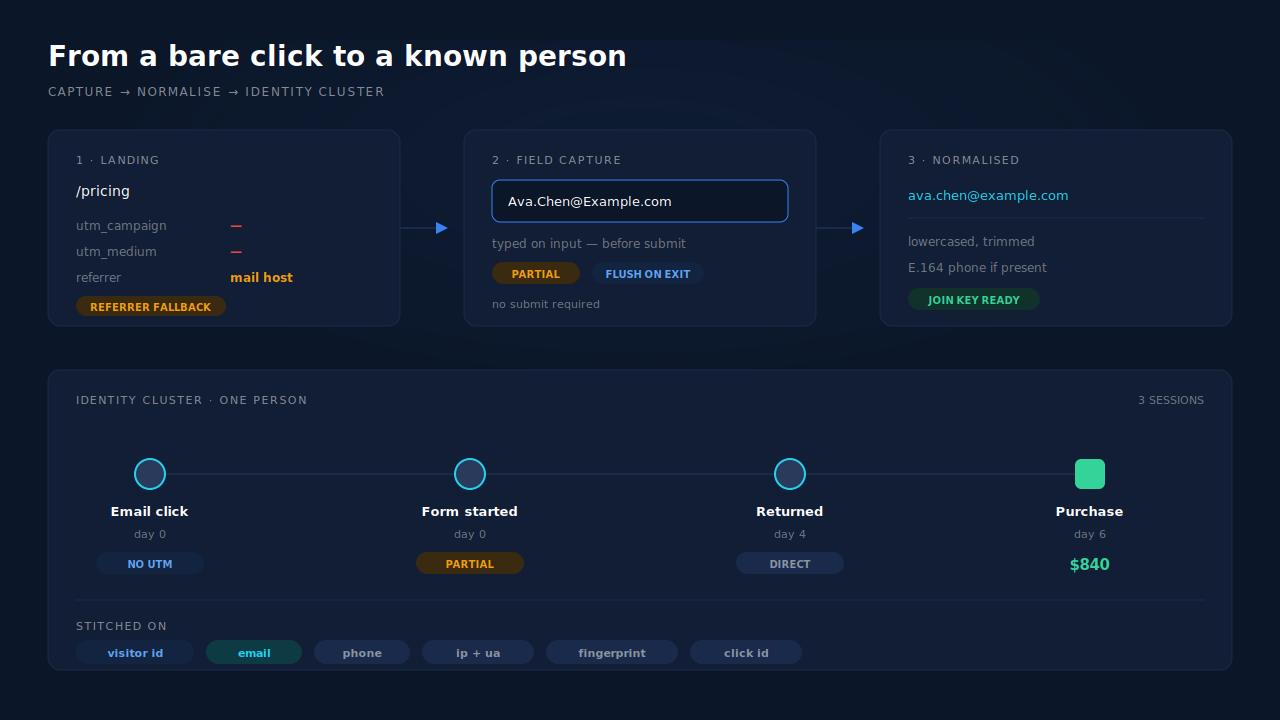
Two details make the join work in practice. The address has to be normalised before it is compared — case, whitespace and the variants a person will happily type — or half your matches fail on cosmetics. And the address has to be captured even when the visitor does not finish the form, because the people who arrive from an email, read the page, start typing and then hesitate are exactly the ones you most want to identify.
How does PartialLeads attribute email leads without UTMs?
By reading the referrer when the URL is bare, capturing the email address as it is typed, and then using that address to pull the session into the person’s identity cluster — so the visit stops being an anonymous Direct hit and becomes a known reader with a history.
The chain, in order:
The tag falls back to the referrer, and keeps the landing page. PartialLeads reads UTMs and click IDs from the URL and falls back to document.referrer when they are absent, storing the referrer and the landing page on the session. That fallback exists because it is load-bearing for iframe embeds, and an untagged email click is the same shape of problem.
The email arrives before the submit. Fields are captured on input and blur with a short debounce, and a terminal flush on pagehide drains the last-typed field so it is never lost — this is partial lead capture, and it is why the join key exists for readers who abandon.
The address is normalised, then used as an identity tier. Email and phone are normalised on the way in, and normalised email is the second of six tiers in the cluster resolver that performs visitor identity resolution — after the durable visitor ID, ahead of phone, IP plus user agent, device fingerprint and click ID. For the Google Ads offline upload path, Gmail dot and plus variants are normalised before hashing.
Sessions with no source inherit from their siblings. Visit-sibling inheritance repairs attribution inside a single visit: a session that arrives with nothing can inherit strong attribution from a sibling session on the same client, IP and user agent within ±30 minutes, or within ±10 minutes on a matching _fbc cookie when the IP changed mid-visit. An email click that lands in a second tab stops being an orphan.
Every matched purchase writes both models. First-touch and last-touch rows are written per purchase with the UTMs, click IDs, referrer, landing page and time-to-purchase snapshotted — so an email visit that closed a sale it did not start is visible as an assist rather than swallowed.
Where you see it working, on real surfaces:
The attribution report runs three models side by side — first touch, last touch and PartialLeads Resolved — and the resolved model can show a higher purchase count than the other two, because it recovers purchases they lose. Underneath it, the Recovered Attribution panel itemises that recovery by mechanism, and the relevant one here is named exactly for this case: no utm_source, but the session classifier resolved a real channel. It carries per-channel counts and is typically the largest of the three buckets.
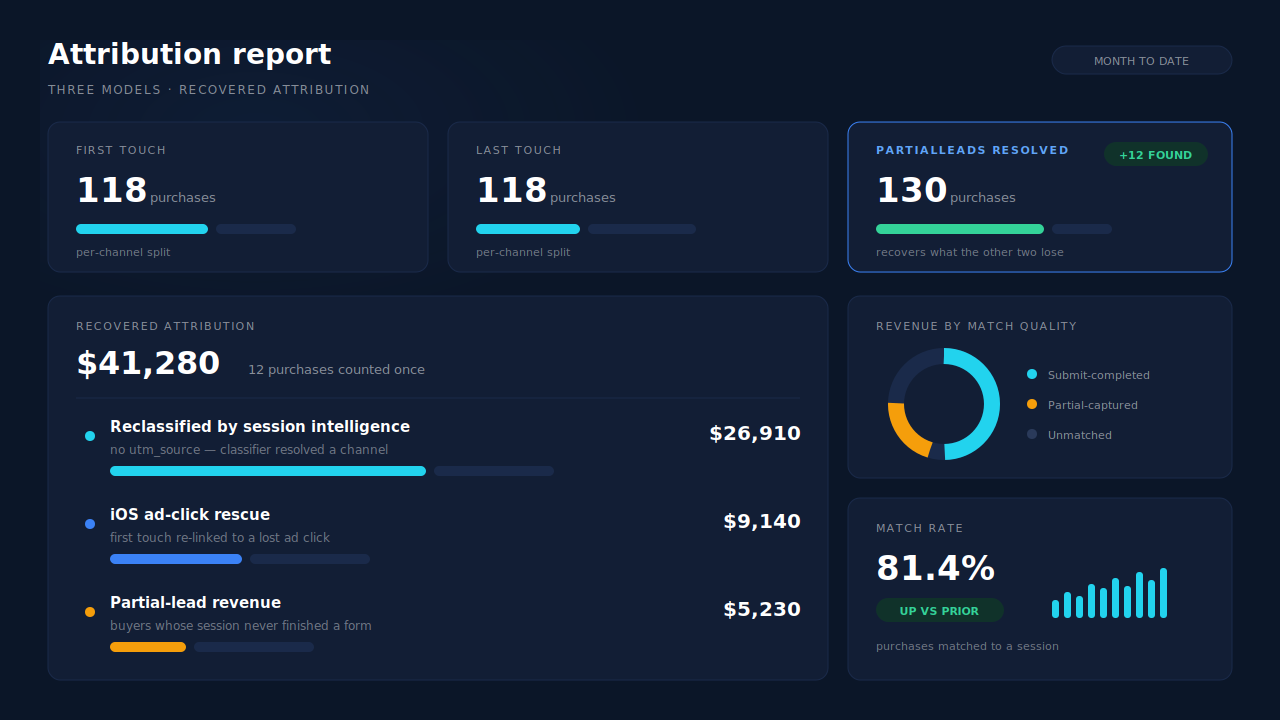
On the Leads list, the Journey column draws each touch as a badge: a grey dot with no brand glyph means the source is genuinely unknown rather than a channel called Direct, a multi-session lead carries an “N SESSIONS” label, and the ring treatment on each badge encodes how that session was stitched into the person — visitor ID, email, phone, IP and user agent, fingerprint or click ID. When a lead was pulled in by email, the ribbon says so. The API column on the same row shows which conversion APIs that lead was dispatched to, and Revenue by Match Quality splits net revenue across partial-captured, submit-completed and unmatched.
Honest constraints, because they decide whether this is worth doing:
- The campaign name is not recoverable. Identity matching gives you the person and, through the classifier, a channel. It cannot invent a send identity that was never in the link. Tag your future sends anyway.
- A match needs an identifier. A reader who clicks, browses and leaves without typing anything stays anonymous until they come back and identify themselves.
- PartialLeads does not read your email platform. There is no open, click or list feed from your ESP — the join happens on the address captured on your own site, not on your send data.
- Channel labelling is the classifier’s call, not a tag you set. Confirm how mail-host referrals are grouped in your own report before you build a KPI on top of them.
| What breaks | The mechanism | Where you see it in the dashboard |
|---|---|---|
| Untagged email click carries no campaign, no source | UTMs read from the URL with a document.referrer fallback; referrer and landing page stored on the session |
Leads list UTM and Journey columns |
| Native mail app sends no referrer at all — the visit is Direct | Email captured on input before submit, normalised, used as identity tier 2 of six in the cluster resolver | Journey ribbon: “N SESSIONS”, ring encodes the stitch method |
| A second tab or a network switch orphans the converting session | Visit-sibling inheritance: ±30 min on client + IP + user agent, ±10 min on a matching _fbc |
Journey ribbon, Customer Journey timeline |
| Email’s sale gets handed to the previous channel by a last-non-direct rule | First-touch and last-touch rows written per matched purchase, plus a resolved model | Attribution report, three models side by side |
Revenue with no utm_source disappears into Direct |
Session classifier resolves a real channel; recovery itemised by mechanism | Recovered Attribution panel, per-channel counts |
| You cannot tell which leads were sent onward | Deterministic SHA-256 event_id with unique dedup, so a conversion cannot double-count |
API column per lead, CAPI activity log |
Tell us what's broken. We'll fix your tracking — free.
Describe the tracking/attribution problem you're stuck on and we'll map it to a fix: server-side conversions to Meta, Google, TikTok and Pinterest, plus first-party tracking that survives Safari. No code required.
Sources
https://developers.facebook.com/docs/marketing-api/conversions-api/parameters/customer-information-parameters https://developers.facebook.com/docs/marketing-api/conversions-api/deduplication https://developers.facebook.com/docs/marketing-api/conversions-api/using-the-api