A live-chat lead gets its attribution from the browsing session it happened in, not from the chat tool. The chat widget records the conversation; your site records the ad click, the UTM set and the landing page. Join the two on the email or phone the visitor typed in chat, and the campaign that paid for the conversation becomes visible.
That join is the whole job. Everything below is about why it does not happen by default, and what it takes to make it happen reliably.
Why does a live-chat lead arrive with no source?
Because the chat widget runs in a cross-origin iframe owned by the chat vendor. Scripts on your page cannot read what is typed inside it, and the widget cannot read your page’s URL parameters or cookies unless you explicitly hand them over. The conversation and the click end up in two systems that share no identifier at all.
Here is the shape of it. A buyer taps your Meta ad on her phone. She lands on /pricing?utm_source=facebook&utm_campaign=q4-retarget&fbclid=IwAR.... She reads for four minutes, clicks through to /case-studies, then opens the chat bubble and asks whether you integrate with her CRM. She gives her email. Your rep books a call.
Three systems now hold one third of the story each. The chat tool says a visitor on /case-studies started a conversation. Meta says it bought a click and got nothing back. Your CRM has a lead with an email and a rep’s name against it. Nobody has the row that says “this lead came from q4-retarget” — which is exactly why chat-sourced revenue tends to show up as Direct in every report you run.
What does your live-chat tool actually know about the visitor?
Most chat platforms record the page URL the conversation opened on, a referrer string, a device and browser string, a vendor-side visitor cookie, and whatever custom attributes you push into them. What they do not carry by default is the click ID or the UTM set from the landing URL.
The page-URL field fails for the same reason last-click reporting fails: conversations almost never start on the landing page. By the time somebody has enough context to ask a question, they are two or three pages in, and the URL the widget captures is /case-studies — a page that tells you nothing about acquisition.
The vendor’s visitor cookie is no help either. It is first-party to the chat vendor’s domain, not yours, so there is no way to line it up against your own visitor ID. And the fields that would actually settle the question — gclid, fbclid and the UTM parameters — only ever existed on the landing URL, several navigations ago.
How do you pass the ad click into the chat conversation?
Read the click ID and UTMs from the landing URL on the first pageview, store them yourself, then push them into the chat widget as custom visitor attributes when it loads. Every major chat platform supports arbitrary key-value attributes on the visitor record, and those attributes travel with the transcript into your CRM.
The important detail is which values you push. Push the first touch, not the current URL — otherwise you are just re-recording /case-studies in a second place.
// 1. On every pageview: keep the FIRST touch, never overwrite it.
const p = new URLSearchParams(location.search);
const firstTouch = {
  utm_source:   p.get('utm_source')   || '',
  utm_campaign: p.get('utm_campaign') || '',
  gclid:        p.get('gclid')        || '',
  fbclid:       p.get('fbclid')       || '',
  landing_page: location.pathname,
  referrer:     document.referrer || '(direct)'
};

if (!localStorage.getItem('pl_first_touch')) {
  localStorage.setItem('pl_first_touch', JSON.stringify(firstTouch));
}

// 2. When the chat widget is ready, hand it the same values.
//    The method name differs per vendor — check your platform's JS API.
const ft = JSON.parse(localStorage.getItem('pl_first_touch') || '{}');
chatWidget.setVisitorAttributes(ft);
Two practical notes. Set the attributes before the visitor sends their first message, because some platforms snapshot the visitor record when the conversation opens. And keep the key names identical to the column names in your CRM, so nobody has to write a mapping layer later.
This is the same problem class as tracking leads from a Typeform embed: a third-party frame owns the interaction, so attribution has to be handed across the boundary deliberately rather than picked up automatically.
How do you join a chat lead back to its session afterwards?
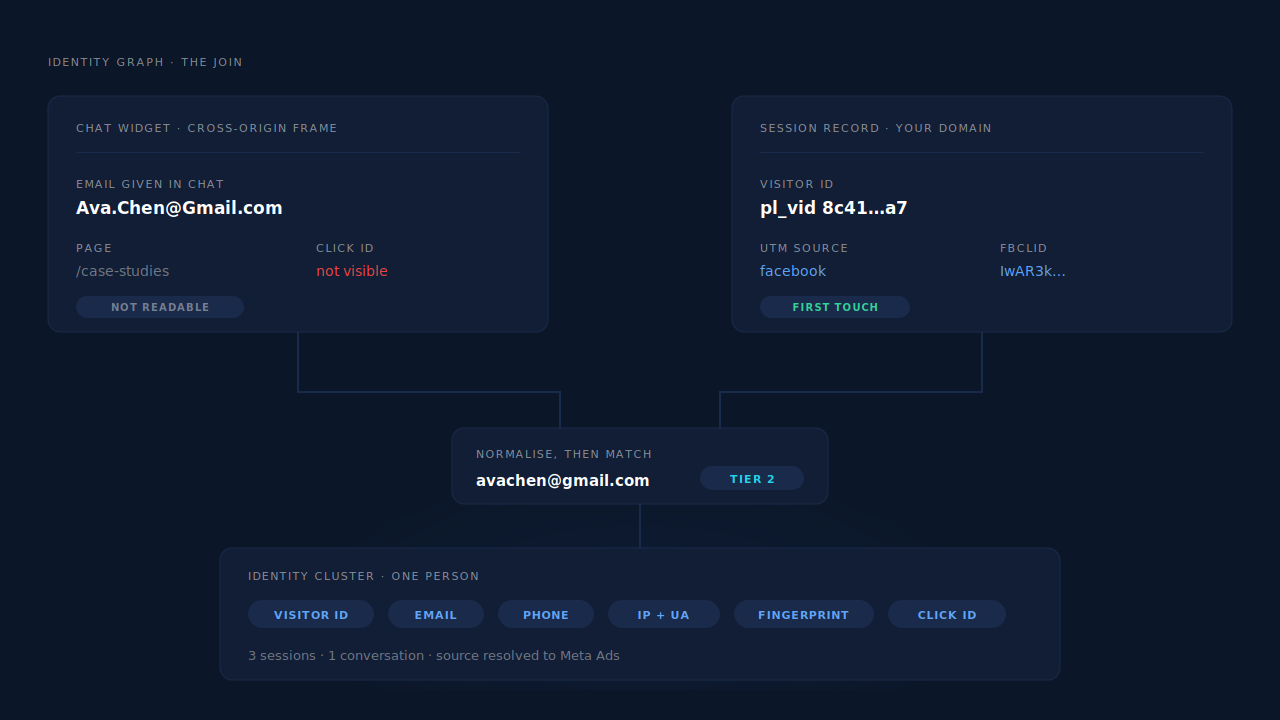
Use the email or phone as the join key, and normalise both sides the same way before you compare them. Lowercase and trim the email; convert the phone to E.164 with an explicit country code. The identifier the visitor typed into chat is the only value both systems hold, so the join is only as good as the normalisation.
Normalisation is where most home-built joins quietly fail:
Ava.Chen@Gmail.comin the chat transcript andavachen@gmail.comin your session table are the same mailbox. Gmail ignores dots and everything after a+.0412 345 678and+61412345678are the same phone. A string comparison says they are not.- A visitor who chats from work and later fills your form from home gives you two different sessions and one email — which is a join you want to make, not a duplicate to suppress.
That last case is the interesting one, and it is why a real join happens at the person level rather than the session level. Once several sessions are tied to one person, a conversation that started on /case-studies inherits the campaign that brought them to /pricing last Tuesday. This is the same machinery as visitor identity resolution generally, and the within-visit case — a source-less session sitting next to one that carried the click — is what visit-sibling inheritance repairs.
What are the limits of doing this yourself?
The custom-attribute approach works, and it will get you most of the way. It has four failure modes worth knowing before you build a report on top of it.
It only covers pages where your snippet runs first. If the widget initialises before your first-touch code, the attributes arrive empty. Blog pages, help-centre subdomains and anything served by a different template are the usual offenders.
Local storage is not durable. Clear the browser, switch from phone to laptop, or browse in a private window, and the first touch is gone. Safari is stricter still with anything a script writes.
Your CRM has no session table to join against. The transcript arrives with six attribute fields attached, which is better than nothing, but there is nowhere to ask “which other pages did this person see, and when.” You get a label, not a journey.
Nothing goes back to the ad platform. Even with perfect labelling, Meta and Google still have a click with no conversion against it. The report improves; the bidding does not.
How does PartialLeads attribute a live-chat lead?
PartialLeads attributes the session, not the chat. From the first pageview, the tag records the UTM set, the click IDs, the referrer, the landing page and geo against a durable first-party visitor ID. When the email or phone from that conversation reaches PartialLeads — on a form on your site, or on a purchase — the identity graph ties that person to every session they have had, and the campaign behind the chat becomes readable.
The pieces that matter for this problem:
- The visitor ID survives.
pl_vidis set by the server as a first-party cookie with a one-year TTL, with localStorage as a backup. Because the server sets it rather than a script, Safari’s cap on script-written cookies does not apply — the returning visitor stays one person instead of becoming three. - The click ID is kept even when the cookie was not. When
fbclidis on the landing URL but the_fbccookie is missing or malformed, the backend reconstructs_fbcin Meta’s documentedfb.1.{timestamp}.{fbclid}format, with the URL value as source of truth. - The join is six-tier, not one-tier. The cluster resolver unions sessions by visitor ID, normalised email, normalised phone, IP plus user-agent, device fingerprint, and shared click ID — so the chat email lands the person, not just the session they were in when they typed it.
- Source-less sessions get repaired. Visit-sibling inheritance re-links a session with no attribution to a sibling session within ±30 minutes carrying the same client, IP and user-agent — or within ±10 minutes on a matching
fbccookie when the IP changed, which is what a phone switching from wifi to mobile data looks like. - Revenue closes the loop. When the chat lead eventually buys, the purchase is matched to a session — visitor ID echo first, then email, then phone, then IP — and both a first-touch and a last-touch attribution row are written. From there the conversion fans out server-side to Meta, Pinterest, TikTok and Google Ads with SHA-256 hashed email and phone and a deterministic
event_id, so a redelivered webhook cannot double-count it.
The honest constraints, because they decide whether this fits your stack. There is no live-chat integration and no chat-transcript ingestion. PartialLeads does not read your conversations, does not create a lead from a chat, and puts no chat event on the journey timeline. The widget is cross-origin, so the tag cannot capture what is typed inside it — the same hard boundary that applies to any third-party embed. What that means in practice: the email has to reach PartialLeads through a path the product does support — a form capture on your site, or a purchase arriving from Shopify, WooCommerce, Stripe, GoHighLevel or the universal webhook. A visitor who only ever chats, never fills a form and never buys leaves you with the session and no join. That is a real gap, not a rounding error, and it is worth knowing before you plan around it.
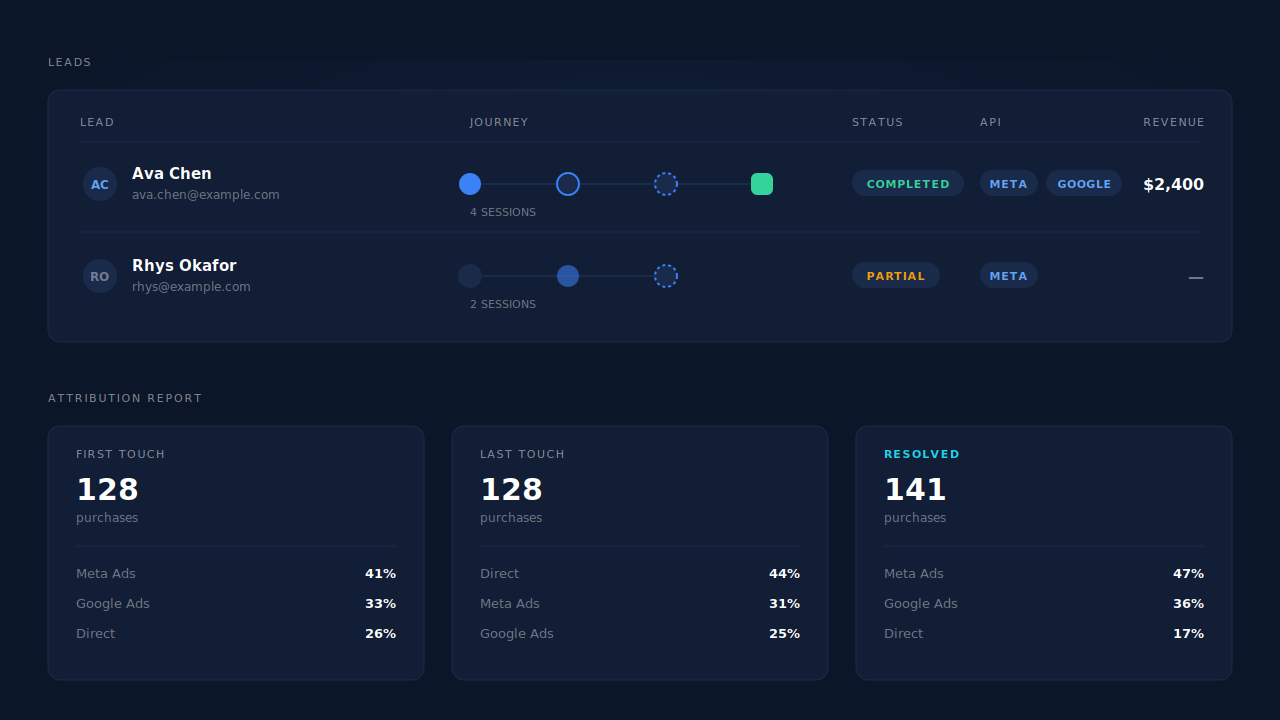
Where you read the result: the Leads list shows the Journey column as a chain of touch badges with a session count, plus an API column confirming which conversion APIs that specific lead was dispatched to. The Customer Journey timeline gives the same story per person. At the aggregate level the attribution report carries first-touch, last-touch and resolved models side by side, and its Recovered Attribution panel itemises revenue a raw last-click view would have lost — including the “reclassified by session intelligence” bucket, which is where traffic that would otherwise read as Direct ends up.
| What breaks | The mechanism | Where you see it in the dashboard |
|---|---|---|
| Chat runs in a cross-origin iframe, so the conversation carries no click ID | The session holds the attribution: UTMs, gclid/fbclid/msclkid/ttclid/epik, referrer and landing page recorded from the first pageview | Leads list — UTM and Location columns |
| Storage cleared, or Safari drops a script-written cookie | Server-set pl_vid first-party cookie, one-year TTL, localStorage backup |
One lead row instead of three for the same person |
| The chat opened three pages in, so that session reads Direct | Visit-sibling inheritance re-links it to the sibling session carrying the click (±30 min, or ±10 min across a network switch) | Journey ribbon on the Leads list |
| The email from the chat lives in the chat tool, not in your session table | Six-tier identity cluster joins on normalised email and phone | Customer Journey timeline |
| Revenue from a chat-sourced buyer reads as Direct | Purchase matched to a session, first-touch and last-touch rows written | Attribution report — Recovered Attribution |
| The ad platform never learns the chat lead converted | Server-side conversion sent with hashed email and phone and a deterministic event_id |
CAPI activity log, API column on the lead |
Tell us what's broken. We'll fix your tracking — free.
Describe the tracking/attribution problem you're stuck on and we'll map it to a fix: server-side conversions to Meta, Google, TikTok and Pinterest, plus first-party tracking that survives Safari. No code required.
Sources
https://developers.facebook.com/docs/marketing-api/conversions-api/parameters/customer-information-parameters https://developers.facebook.com/docs/marketing-api/conversions-api/deduplicate-pixel-and-server-events https://developers.facebook.com/docs/marketing-api/conversions-api/parameters/fbp-and-fbc