Track the click on the funnel page, not in the form. A GoHighLevel lead loses its ad click because the click ID arrives on the parent page URL while the form that creates the contact usually sits inside an iframe that never sees it. Capture the click ID and UTMs at page level, store them against a durable visitor ID, then match the contact back to that visitor.
That is the fix in one sentence, and it is worth unpacking, because the failure has five separate causes and most teams only ever patch one. What follows is why each one breaks, what you can rebuild with hidden fields and a tag manager, where that ceiling sits, and what it takes to put a real source on every contact — including the ones who never submitted.
Why do GoHighLevel leads arrive with no source?
Because the ad click and the contact record are created in two different places, and nothing in GoHighLevel joins them for you. The click lands on a page URL. The contact is created by a form, a booking widget or a workflow — each of which sees a narrower slice of the session than the page did, and sometimes a different session entirely.
Five causes, roughly in order of how often they bite:
1. The iframe boundary. GHL funnel pages commonly embed the form as an iframe. The visitor lands on yourfunnel.com/offer?fbclid=ABC123 and the parent page sees the click ID; the form lives at a different origin and does not inherit the parent’s query string, its first-party cookies, or its referrer. When the submit fires from inside the frame, there is no fbclid, no gclid, no UTMs. The contact is created with an empty source field and everything downstream inherits the blank.
2. Redirects in front of the funnel. Ad → link shortener → tracking redirect → funnel is a common chain, and every hop can drop query parameters. Redirects also reset the referrer, depending on each hop’s referrer policy, so even the fallback signal disappears. What reaches the funnel is a clean URL with no history.
3. Domain sprawl. Agencies and most funnel builds run the landing page, the funnel, and the booking page on different hostnames — sometimes different registrable domains entirely. Browser storage is scoped per domain, so the identifiers you captured on the landing page are not readable on the funnel page, and the two sessions look like two strangers. This is the same mechanism behind ad conversions that show up as Direct: the click happened, the record of it just did not travel.
4. Time. GHL workflows create and update contacts long after the visit — a delayed opt-in, a manual import, a nurture sequence that flips a tag. A contact created by an automation two days later has no session attached to it at all.
5. Single-touch attribution. A contact record holds one source. Someone who clicks a Meta ad on Tuesday, returns through a Google search on Thursday and fills the form then either keeps a stale source or overwrites it with the wrong one. Neither answers “which ad produced this lead”, because that question is about a chain of sessions and a contact field stores one.
What does GoHighLevel actually record about the ad click?
Whatever reached the page that created the contact — and nothing else. That is not a criticism of GHL specifically; it is what any funnel builder can see from inside a browser tab. The contact carries the source, medium, campaign and referrer that were readable at the moment of creation, plus whatever you personally wrote into hidden fields.
The gap matters because of what the ad platforms need back from you. Meta matches a conversion to an ad using the click ID (fbclid, stored as the _fbc cookie) plus hashed customer information; Google matches an offline conversion using gclid, gbraid or wbraid. Those identifiers are the join key, and each platform uses a different one. A UTM is a label you invented for your own reports — it tells you the lead came from a campaign you named spring-offer, and it tells Meta nothing.
So a GHL contact with utm_source=facebook and no click ID is in a specific, common state: you can attribute it in a spreadsheet, and you cannot send it back to the ad platform with any real chance of matching. Conflating those two is why so many funnel builds “have UTMs working” and still cannot optimise a campaign.
One more distinction, because these get mixed constantly. Pixel installation problems — the same event firing from funnel settings and page code, or events arriving with no match data — are a separate failure with their own fixes, covered in fixing Meta Pixel tracking on a GoHighLevel funnel. This article is the other half: getting a true source onto the lead record in the first place.
How do you fix GHL attribution without adding a tool?
You can rebuild a usable amount of it with hidden fields, one script on the funnel page, and some discipline about domains. Each of these five steps works, and each has a ceiling that is worth knowing before you build on it.
1. Tag every ad URL, and turn on auto-tagging. Auto-tagging is what puts gclid on your Google Ads landing URLs; UTMs are what make your own reports readable. Do both — they answer different questions. Limit: this only guarantees the parameters reach the first page. Everything after that is your problem.
2. Relay the parent page’s parameters into the embedded form. If the form is an iframe, the parent has to hand the values across the boundary, and the embed has to write them into hidden fields:
// On the funnel page (parent frame).
const EMBED_ORIGIN = 'https://link.yourfunnel.com'; // scope it; never use '*'
const params = new URLSearchParams(location.search);
const keys = ['utm_source', 'utm_medium', 'utm_campaign', 'utm_content',
              'gclid', 'gbraid', 'wbraid', 'fbclid', 'msclkid', 'ttclid'];

const payload = {};
keys.forEach((k) => { if (params.get(k)) payload[k] = params.get(k); });

document.querySelectorAll('iframe').forEach((frame) => {
  frame.addEventListener('load', () => {
    frame.contentWindow.postMessage({ type: 'attribution', payload }, EMBED_ORIGIN);
  });
});
Limit: it is per-form maintenance, it breaks quietly whenever someone rebuilds a page, and it only works while the parameters are still in the URL. A visitor who clicks the ad, closes the tab, and comes back tomorrow from a bookmark arrives with nothing to relay.
3. Persist the identifiers in a first-party cookie the moment they land. Write gclid and fbclid to a cookie on first visit, then read them into hidden fields on whichever page the form finally lives on. This is what turns a single-page parameter into something that survives a visitor wandering around the funnel. Limit: cookies written by JavaScript are aggressively capped in Safari, so a return visit a week later frequently finds nothing there.
4. Collapse the domains. Put the funnel on a subdomain of the main site rather than a separate hostname, so first-party storage is shared and the referrer chain stays intact. Limit: it fixes cross-page identity within one browser. It does nothing for a visitor who clicked on a phone and converted on a laptop.
5. Send the lead server-side from a GHL workflow webhook. A workflow can POST the new contact to your own endpoint, which forwards it to Meta or Google as a server event. This is the right shape — it is what the Conversions API is for. Limit: you can only send what the contact holds. Fire it with an email and no click ID and you will see the event arrive in Events Manager with poor match quality, which is a different kind of failure from not arriving at all.
All five share one ceiling: they reconstruct attribution for a single session that ended in a submit. Someone who typed their email into your funnel and abandoned before submitting produces no contact and therefore no attribution, no matter how well the relay works. On a typical funnel that is the majority of the traffic you paid for.
How does PartialLeads track GoHighLevel funnel leads to the ad click?
PartialLeads captures attribution at page level, keeps it on an identity that survives the funnel, and then joins the GHL contact back to it. One script tag on the funnel page reads UTMs from the URL with document.referrer as a fallback, and stores the click IDs each platform needs — gclid, gbraid, wbraid, gad_source, fbclid with _fbp/_fbc, msclkid, ttclid and epik — alongside the landing page and referrer for that session.
The iframe problem is handled at the layer where it happens. The tag listens for postMessage attribution from parent frames and broadcasts UTMs down into iframes, which is what makes GHL widgets, Typeform and Jotform embeds, and ClickFunnels pages report a real source instead of a blank one. When fbclid is present in the URL but the _fbc cookie is missing or malformed, the backend reconstructs it in Meta’s fb.1.<timestamp>.<fbclid> format, with the URL value treated as the source of truth.
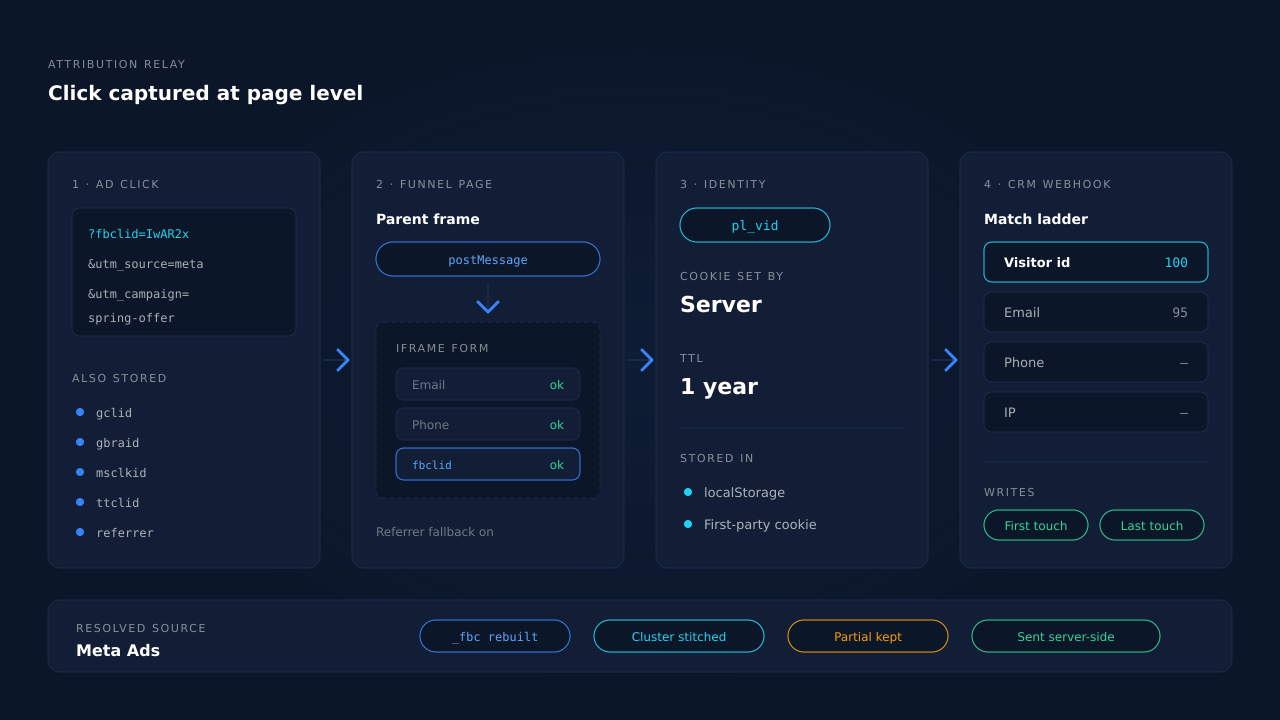
The identity that carries all of this is a durable visitor ID stored in localStorage with a first-party cookie backup on a one-year TTL — and the cookie is set by the server, not by document.cookie from a script, so Safari’s cap on script-written cookies does not apply to it. That is the difference between attribution that survives a visitor coming back next week and attribution that quietly resets.
Then the contact gets joined back. GoHighLevel is a supported inbound source — legacy webhook and OAuth Marketplace app — and every inbound record runs the same pipeline: normalise the identity (email lowercased and trimmed, phone converted to E.164 using the session’s geography to supply a missing country code), deduplicate idempotently, then match to a session on a confidence ladder of visitor ID echo, then email, then phone, then IP. A matched record flips the lead to Completed, attaches any revenue, and writes both a first-touch and a last-touch attribution row snapshotting the UTMs, click IDs, referrer and landing page. Records that do not match still land and stay recoverable when a better identifier arrives later.
Above that sits the identity cluster, which unions a person’s sessions across six tiers — visitor ID, email, phone, IP plus user agent, device fingerprint, and a shared click ID seen on more than one session. Visit-sibling inheritance heals the common funnel case directly: a conversion session showing no source inherits strong attribution from a sibling session on the same device inside a short window, including the cellular-handoff variant where the IP changes because a phone switched from wifi to LTE mid-funnel.
What you see is a partial lead or a completed one, with its source on the row. The Leads list renders each touch of the journey left to right as a badge — brand glyph per channel, a grey dot where the source genuinely is unknown, a green square for the conversion — next to the UTM column, the location, the status, and an API column showing which conversion APIs that specific lead was dispatched to. A multi-session lead carries its session count, so you can read “six Google touches, then converted” without opening the record.
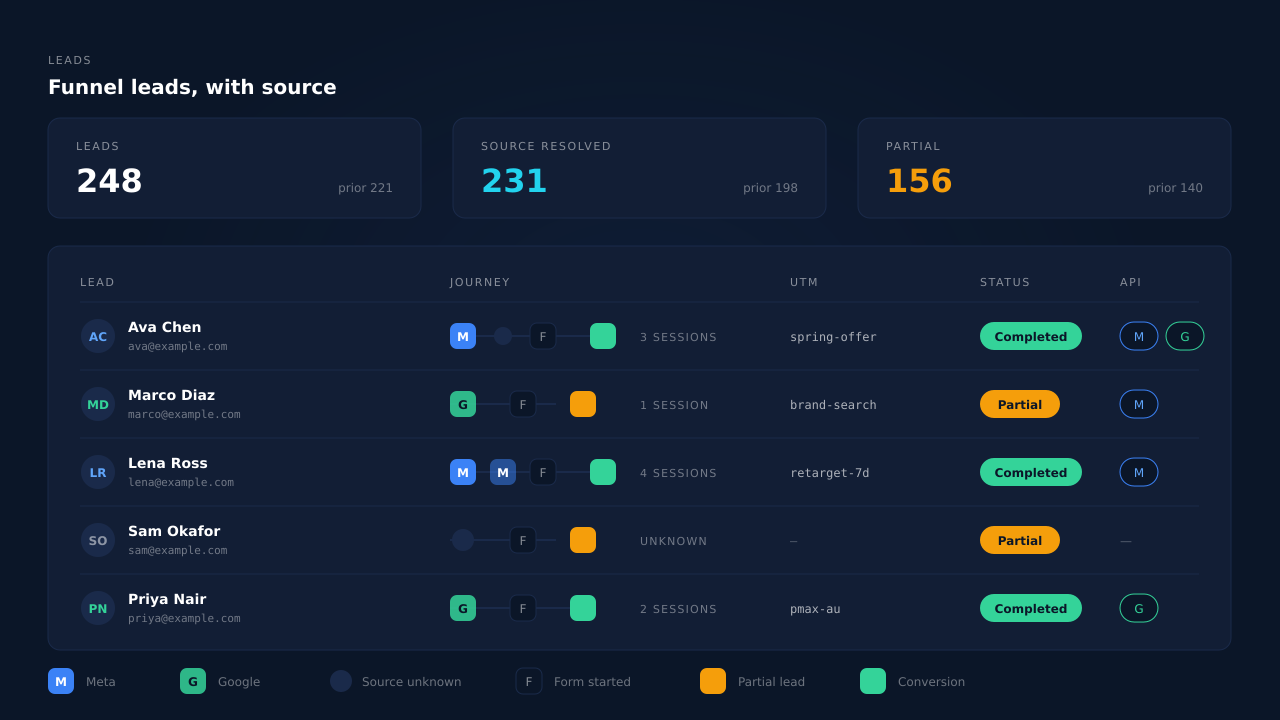
And because the attribution is attached before the submit, the leads who abandon are in the same list. Field-level capture posts each field as it is typed — debounced on input and blur, with a terminal flush on submit, pagehide and visibility change so the last field is never lost — which means someone who typed an email into your GHL form and left still produces a lead record with a source on it. Those records fan out server-side to Meta, Pinterest, TikTok and Google Ads, deduplicated by a deterministic event_id so a redelivered webhook cannot double-count. If the funnel ends in a booking rather than a form, booked appointments attribute the same way.
| What breaks | The mechanism | Where you see it in the dashboard |
|---|---|---|
| The iframe form never sees the parent page’s click ID | postMessage attribution relay plus document.referrer fallback across the frame boundary |
Source badge on embedded-form leads |
| Redirects strip UTMs before the funnel loads | Landing URL and referrer captured per session, click IDs stored server-side | UTM column on the Leads list |
_fbc is missing because the cookie was blocked |
_fbc reconstructed from the URL fbclid in Meta’s fb.1.<ts>.<fbclid> format |
CAPI activity payload |
| Safari forgets the visitor between visits | Visitor ID in localStorage with a server-set first-party cookie backup, one-year TTL | Returning visitors stay on one lead |
| Funnel, landing page and booking page are different hostnames | Six-tier identity cluster unions the sessions into one person | Journey ribbon, session count on the row |
| A conversion session shows no source at all | Visit-sibling inheritance, including the wifi-to-LTE handoff case | Journey ribbon, resolved source |
| The GHL contact arrives with no session attached | Inbound webhook matched on visitor ID, then email, then phone, then IP | Lead record with source and journey |
| The contact holds one source, the journey had five | First-touch and last-touch rows written on every match | Attribution report, first vs last tables |
| Form-starters who never submit produce nothing | Field capture on input/blur with a terminal flush before pagehide |
Partial badges on the Leads list |
| The lead never reaches the ad platform as a conversion | Server-side dispatch to Meta, Pinterest, TikTok and Google Ads with deterministic event_id dedup |
API column per lead, CAPI activity log |
Three honest constraints. Match quality on the ad platform still depends on a platform cookie captured client-side — keep your base Pixel installed, because _fbc can be reconstructed from a click ID and _fbp cannot be synthesised from nothing. Capture is consent-gated, so what runs depends on how your banner is configured. And a contact created by a workflow with no email, no phone and no visitor ID has nothing to join on; it lands unmatched and waits for an identifier, rather than being guessed at.
Tell us what's broken. We'll fix your tracking — free.
Describe the tracking/attribution problem you're stuck on and we'll map it to a fix: server-side conversions to Meta, Google, TikTok and Pinterest, plus first-party tracking that survives Safari. No code required.
Sources
- Meta for Developers — Conversions API, customer information parameters: https://developers.facebook.com/docs/marketing-api/conversions-api/parameters/customer-information-parameters
- Meta for Developers — Conversions API, server event parameters: https://developers.facebook.com/docs/marketing-api/conversions-api/parameters/server-event
- Meta for Developers — Conversions API, deduplication for Pixel and server events: https://developers.facebook.com/docs/marketing-api/conversions-api/deduplicate-pixel-and-server-events