To see which WooCommerce orders came from a specific Facebook ad, you have to name the ad in its landing URL, store that name when the shopper arrives, and join each paid order back to the stored visit. Meta Ads Manager reports purchases per ad as a count and a value. It never lists which orders those were, and your store can’t read an ad name out of a Facebook click ID.
So the order list you want doesn’t exist in either tool yet. You build it with a join.
Below: why Meta can’t show you order numbers, how to get the ad name onto each visit, how to join orders to it, why your count won’t match Meta’s, and where the join still breaks.
Why can’t Meta Ads Manager show you the orders behind an ad?
Because Meta reports conversions as aggregates, not as a list of buyers. Ads Manager can tell you an ad drove 8 purchases worth $640 inside your attribution setting. It won’t tell you those were orders #4821, #4830 and six others, or who placed them. Your store holds the orders but only knows what the landing URL told it.
That split is by design. Meta matches a purchase event to a person on its side, credits it to an ad, and shows you the total. The link between a specific order and a specific ad lives inside Meta and isn’t exported.
Your WooCommerce store sees the other half. When a shopper clicks a Facebook ad, Meta appends an fbclid to the URL. That value is a click identifier for Meta’s matching, not a label. Inside your store it’s a long random string. It carries no campaign, ad set or ad name you can read. Only UTM parameters you set yourself name anything outside the platform.
So you end up with two true reports that don’t meet:
- Ads Manager: “Ad: UGC video v3, 8 purchases, $640.”
- WooCommerce: “Order #4821, $79, Origin: Facebook” or “Unknown”.
Nothing says #4821 was one of the video’s 8.
How do you get the ad’s name onto the visit?
Add UTM parameters to every ad through Meta’s URL parameters field, using its dynamic placeholders so they fill in at click time. Put the ad in utm_content, the ad set in utm_term and the campaign in utm_campaign. Meta swaps each placeholder for the real value when someone clicks, so the landing URL names the exact ad.
A parameter string that works for most stores:
utm_source=facebook&utm_medium=paid_social&utm_campaign={{campaign.name}}&utm_term={{adset.name}}&utm_content={{ad.name}}
A shopper then lands on a URL like:
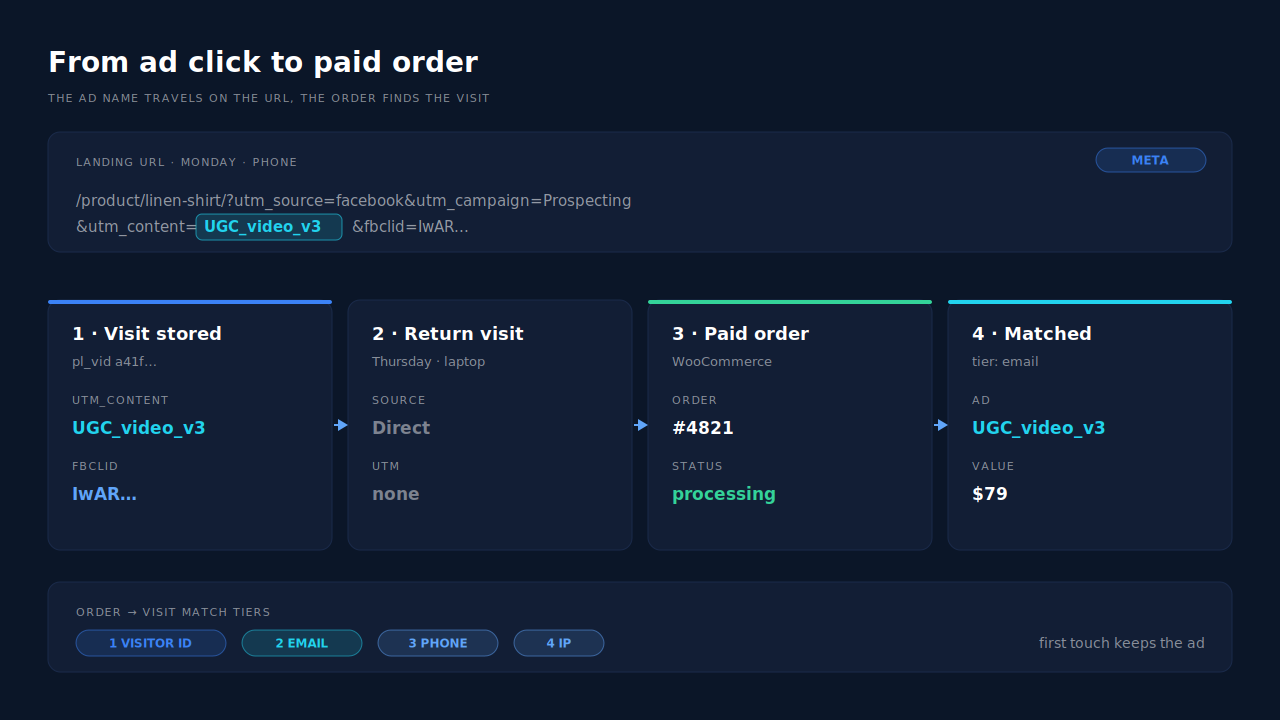
https://yourstore.com/product/linen-shirt/?utm_source=facebook&utm_medium=paid_social&utm_campaign=Prospecting+Sept&utm_term=Broad+25-44&utm_content=UGC+video+v3&fbclid=IwAR...
Three details decide whether this holds up.
Names versus IDs. {{ad.name}} is readable, but it changes when someone renames the ad, and two ads can share a name. {{ad.id}} never changes. A safe pattern is the ID in utm_content and a readable name in your own lookup sheet, or the name if your team never renames ads mid-flight.
Check every ad. The URL parameters field is set per ad, so one ad built without it breaks the chain for its orders. Spot-check a few live ads, especially ones created by a different teammate or agency.
Test the landing URL. Click a live ad and confirm the parameters reach the page the shopper actually sees. Redirects, language switchers and some cache setups drop query strings before the page loads.
Doesn’t WooCommerce’s own order attribution already do this?
Partly. WooCommerce’s built-in order attribution records the source of the buyer’s visit on each order, including utm_campaign, utm_content and utm_term when the landing URL had them. So once your ads carry the parameters above, an order’s attribution panel can show which ad it came from. The weak points are timing and history.
WooCommerce’s own source code lists the fields it stores: source type, referrer, the UTM fields including utm_content, the session entry page, pages viewed and visit count (WooCommerce on GitHub). That’s genuinely useful. It also has three limits you should know before you trust it for ad-level reporting.
It keeps one touch. Each order stores one source, read from the visitor’s tracking cookie at checkout. If the buyer clicked the ad on Monday and came back on Thursday by another route, you see one of those visits, not both.
It lives in the browser. The source reaches the order through a script and hidden checkout fields. Ad blockers, deferred JavaScript, cached checkout pages and consent timing can leave those fields empty, and the order is saved as Unknown.
It doesn’t cross devices. A shopper who clicked the ad on their phone and bought on a laptop arrives at checkout with a fresh browser and no ad in its history.
For a quick look it’s fine. Open the orders whose origin says Facebook and read utm_content in each order’s attribution panel. For a weekly “which ads made money” report, you need the join to work across visits and devices.
How do you join orders back to the ad across visits?
Store the UTMs on the visitor when they land, and when a paid order arrives, find that visitor again by browser ID, email or phone. The ad on their landing visit becomes the ad on the order. The return visit that actually placed the order may carry nothing, so you need the earlier visit, not the last one.
A typical path:
- Monday: the shopper taps your UGC video ad on Instagram. The URL carries
utm_content=UGC+video+v3. - They view two products, add one to cart, and leave.
- Thursday: they search your store name on a laptop, return, and buy.
Thursday’s visit has no UTMs and a different browser. To credit the video, you need something that ties Monday’s visitor to Thursday’s buyer: the email they entered on Monday, matched to the email on the order. That kind of stitching is what visitor identity resolution does.
The do-it-yourself version is a spreadsheet. Export paid orders with emails. Export any email captures from your forms that stored UTMs. Match on email. It works for buyers who gave you an email before buying, it misses everyone else, and you redo it every week.
Why won’t your ad-level order count match Meta’s?
Because the two systems count different things. Meta credits purchases to an ad inside your attribution setting, which covers a set number of days after a click and can include views (Meta Business Help Center). Your join credits orders to the ad the buyer’s stored visit carried. Those rules overlap, but they aren’t the same rule.
That’s why “Meta says 8, I count 10” is normal. Common reasons:
- Windows. Your join has no click window. An order three weeks after the click still carries the ad. Meta stops crediting once the purchase falls outside your attribution setting.
- Views. Meta can credit a purchase to someone who saw the ad and didn’t click. That buyer’s landing URL never carried your UTMs, so your join can’t credit it.
- Unpaid orders. A browser pixel can fire on the thank-you page for orders that later fail or get cancelled. Your join should only count orders that were paid.
- Other paths. A buyer who clicked your ad and then a Google ad can appear in both platforms’ numbers.
Neither number is wrong. Meta’s tells you how its delivery system scored the ad. Yours tells you which paid orders a stored visit actually connects to that ad. The breakdown of why Meta shows more conversions than your CRM covers the reverse gap, and the same causes run both ways.
How does PartialLeads show the WooCommerce orders behind each Facebook ad?
It stores the ad on the visit and carries it to the order. The PartialLeads tag reads the UTMs, fbclid and landing page on arrival. When WooCommerce reports a paid order, PartialLeads matches it to the visitor by visitor ID, then email, then phone, then IP, and writes a first-touch and a last-touch attribution row with that visitor’s source, campaign and content.
The order comes from WooCommerce, not a thank-you page. Orders arrive through the store’s webhook once they reach processing or completed. Pending, on-hold, failed and cancelled orders aren’t recorded as purchases, so your ad-level revenue only counts money that came in. The guide to attributing ecommerce revenue to the ad click walks through that pipeline.
The ad survives the return visit. Sessions from the same person are stitched into one identity, so Thursday’s laptop buyer keeps Monday’s video ad as first touch. Last touch shows the visit that closed.
Where you see it working.
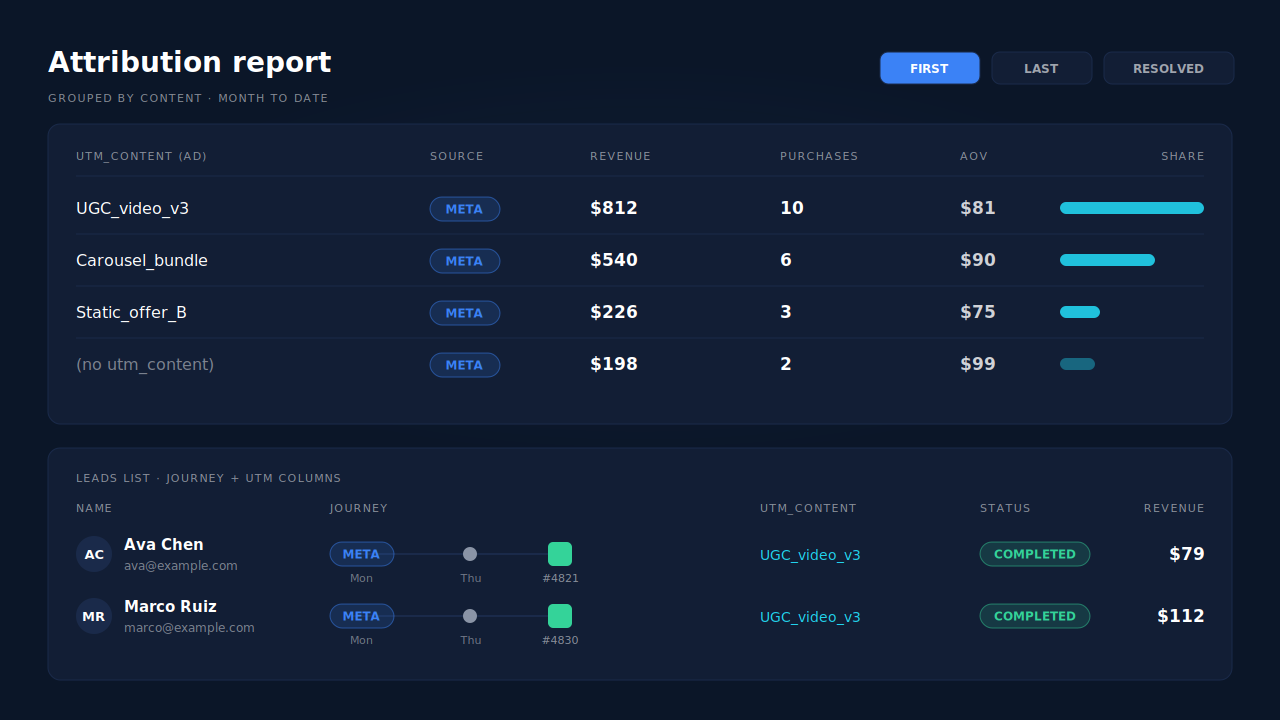
- Attribution report, grouped by content. Group by
utm_contentand each ad becomes a row with its revenue and purchases. First touch and last touch sit side by side, next to the PartialLeads Resolved model; how to read an attribution report explains what each model proves. Group by campaign or term to roll up to campaigns and ad sets. - Leads list. Each buyer’s row shows the UTM column, the Journey ribbon (for example, Meta, then Direct, then the purchase) and the Revenue column, so you can read which ad one order came from without opening anything.
- Purchases ledger. Every paid order PartialLeads recorded, matched or unmatched, so you can reconcile order by order against your WooCommerce order list.
The same paid order also goes back to Meta as a server-side Purchase through the Conversions API, carrying the full order total. If Meta for WooCommerce or another plugin already sends Purchase to the same pixel, keep one of them. PartialLeads never double-sends its own events, but it doesn’t deduplicate against another plugin’s pixel. The server-side WooCommerce purchase tracking guide covers that choice.
The honest constraints.
- The ad must be on the URL. PartialLeads doesn’t decode
fbclidinto an ad. Add the URL parameters above, or orders group by source and campaign only. - View-through purchases don’t appear. A buyer who never clicked has no ad on any visit.
- Matching is maximized, not guaranteed. A buyer who switched devices and never gave you an email or phone before checkout can’t always be tied to the click. Those orders sit in the Purchases ledger as unmatched.
- Nothing is written back into WooCommerce. The ad per order lives in the PartialLeads dashboard, not the order’s attribution panel.
- It starts at install. Visits before the tag went live weren’t captured.
| What breaks | The mechanism | Where you see it in the dashboard |
|---|---|---|
| Ads Manager shows purchase counts, never order numbers | Each paid WooCommerce order matched to the visit that carried the ad’s UTMs | Purchases ledger, matched vs unmatched |
| fbclid names no ad outside Meta | utm_content read from the landing URL and stored on the visit | Leads list, UTM column |
| Buyer returns days later on another device | Sessions stitched by visitor ID, email or phone; first touch keeps the ad | Attribution report, first vs last touch |
| Thank-you page script misses or counts unpaid orders | Orders taken from the WooCommerce webhook at processing or completed | Purchases ledger, Revenue column |
| No per-ad revenue view | Revenue and purchases grouped by utm_content | Attribution report grouped by content |
Tell us what's broken. We'll fix your tracking — free.
Describe the tracking/attribution problem you're stuck on and we'll map it to a fix: server-side conversions to Meta, Google, TikTok and Pinterest, plus first-party tracking that survives Safari. No code required.
Sources
- https://www.facebook.com/business/help/458681590974355
- https://developers.facebook.com/docs/marketing-api/conversions-api
- https://github.com/woocommerce/woocommerce/blob/trunk/plugins/woocommerce/src/Internal/Traits/OrderAttributionMeta.php