You judge Meta ads on subscription lifetime value by keeping two ledgers. Meta gets the first payment, the one event it can tie to an ad click and optimise on. Your own report credits every renewal back to the campaign that first acquired the subscriber. Then you divide each campaign’s cumulative subscriber revenue by its spend, and compare campaigns at the same subscriber age.
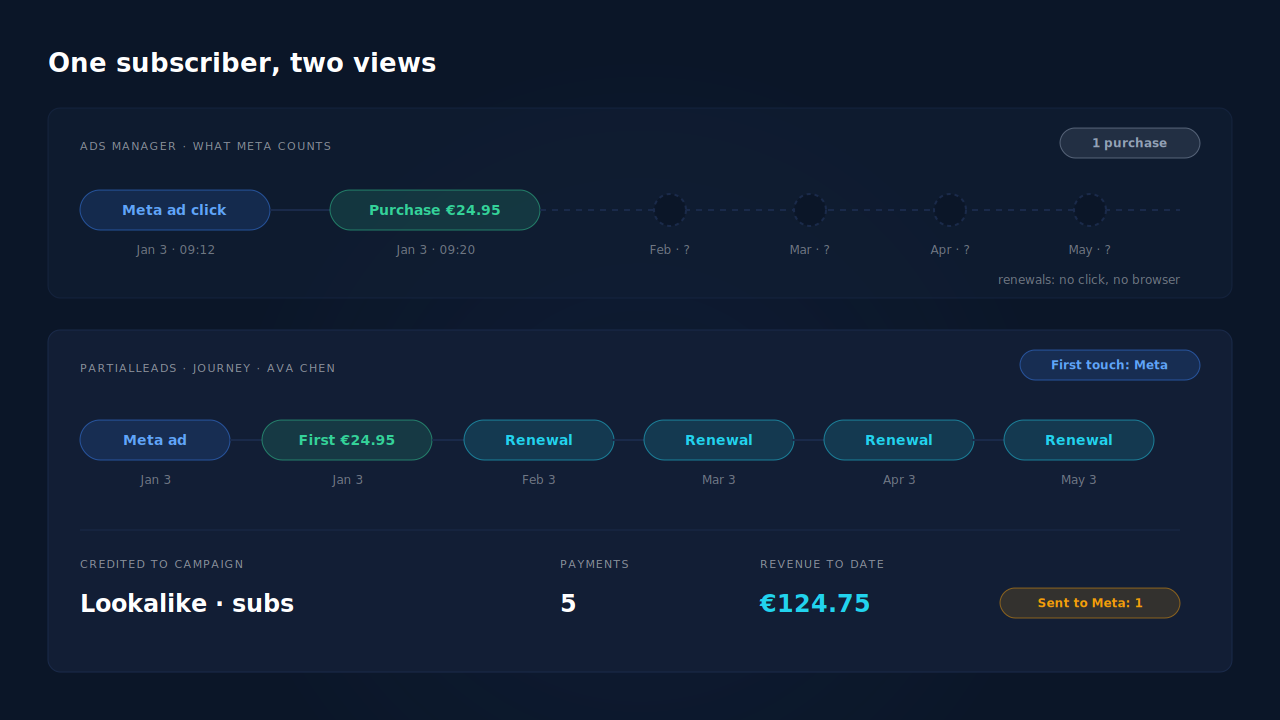
That split exists because Ads Manager is built to measure one conversion close to one click. A subscription pays out over months, with no click attached to any payment after the first.
Below: why Meta never sees renewals, why forcing them in makes things worse, how to calculate lifetime-value ROAS per campaign, and what to do with the number once you have it.
Why does Meta only see the first subscription payment?
Because only the first payment happens in a browser session that started with an ad click. Every renewal after it is created by your store’s scheduler, on a server, with nobody on the site. No pixel loads, no click id is present, and nothing connects that charge to an ad unless you connect it yourself.
In WooCommerce Subscriptions, a renewal is a brand-new WooCommerce order. The plugin’s own code describes it as an order created “to record a scheduled subscription payment”, copying the subscription’s items and meta, and linking it back to the subscription as a renewal. The charge is triggered by a scheduled action, woocommerce_scheduled_subscription_payment, queued through WordPress’s Action Scheduler.
So the thank-you page never loads for a renewal. A browser pixel can’t fire, and even a server-side setup only sends what you tell it to send.
Meta also measures inside a window. Ads Manager credits a purchase to an ad when it happens inside your attribution setting, which is counted in days after the click or view (Meta Business Help Center). A renewal in month four is far outside any window you can pick.
Why is first-payment ROAS misleading for a subscription business?
Because it ranks campaigns by how cheaply they sell a first month, not by how much their subscribers pay in total. A campaign that brings people who stay for a year and a campaign that brings people who cancel after one charge can show the same ROAS in Ads Manager. Only one of them is profitable.
Here’s an illustrative example, with round numbers, on a €24.95 monthly plan:
| Campaign | Spend | New subscribers | First-payment revenue | Avg. payments per subscriber | Revenue to date |
|---|---|---|---|---|---|
| Campaign A (broad) | €1,000 | 50 | €1,247.50 | 1.5 | €1,871.25 |
| Campaign B (lookalike) | €1,000 | 36 | €898.20 | 6 | €5,389.20 |
Ads Manager shows A at about 1.25× and B at about 0.9×. On first payment, you’d cut B. On revenue to date, B has returned about 5.4× and A about 1.9×.
The same trap applies to promo pricing. A first month at €1 makes every campaign look terrible on day one, while the real revenue arrives in months two to twelve.
Should you send renewal payments to Meta as purchases?
No. A renewal is not a new acquisition, and Meta has no way to know that. If you send it as a Purchase, Meta either credits it to whatever ad the subscriber happened to see in the last few days, or counts it as an unattributed conversion. Either way, your purchase count inflates and the campaign mix gets distorted.
It also changes what the algorithm learns. Purchase events are optimisation signal. Feed Meta a stream of renewals and you’re telling it that people who already pay you are the people who convert. That pushes delivery toward existing customers, which is the opposite of what an acquisition campaign is for.
The clean rule: send the first payment under your acquisition event, and keep renewals in your own ledger. We cover the mechanics in keeping subscription renewals from double-counting as new purchases.
What is LTV ROAS, and how do you calculate it per campaign?
LTV ROAS is the total revenue a campaign’s subscribers have paid you so far, net of refunds, divided by what the campaign cost. First-payment ROAS asks “did the first charge cover the ad?”. LTV ROAS asks “has everyone this campaign brought in paid back the spend yet, and how fast?”.
To calculate it:
- Assign each subscriber one acquiring campaign, frozen at signup. This is a first-touch rule. Later visits don’t change it.
- Attach every later payment to the person, not to the session it happens in. Renewals have no session worth reading.
- Subtract refunds and chargebacks from the revenue side. The reasoning is the same as for calculating true ROAS from CRM revenue and refunds.
- Group by acquisition month so you compare cohorts, not calendar months.
- Compare at the same age. A campaign from January has had more time to renew than one from May. Read both at 30, 90 and 180 days after signup.
Step 5 is where most spreadsheets go wrong. A campaign launched last month will always look worse than one that has been renewing for half a year. That’s age, not quality.
How do you credit renewals to the campaign that acquired the subscriber?
You stamp the source onto the customer at the first payment, then join every renewal to that customer rather than to a click. The subscription or customer record is the join key. When a renewal arrives, you look up who paid, find their first touch, and add the revenue to that campaign.
This is why the attribution model matters. A last-touch view credits each payment to the latest session before it. Renewals don’t have one, so they drift into Direct or vanish, and paid social loses credit for revenue it created. That’s the same bias covered in why last-click attribution undervalues Meta and Pinterest.
A first-touch view keeps the credit where acquisition happened. If you already report recurring revenue this way, reporting MRR by acquisition channel uses the same frozen stamp, applied to the monthly revenue you hold rather than the cumulative revenue collected.
Can you tell Meta about lifetime value at all?
Partly. Meta’s Conversions API accepts a predicted_ltv field in custom data, next to value and currency (Meta for Developers). Some advertisers also send a higher value on the first purchase, such as an expected twelve-month total, so value-based bidding favours long-lived customers.
Both approaches send Meta a forecast, not money. Once you do it, the ROAS in Ads Manager is modelled revenue, and it will drift from your bank balance whenever the forecast is wrong. If you go this way, keep your own LTV ledger as the check, and revisit the forecast every quarter against real cohorts.
For most stores, the simpler move is to leave Meta on the real first payment and make budget decisions from your own lifetime-value report.
How does PartialLeads credit renewal revenue to the Meta campaign that acquired the subscriber?
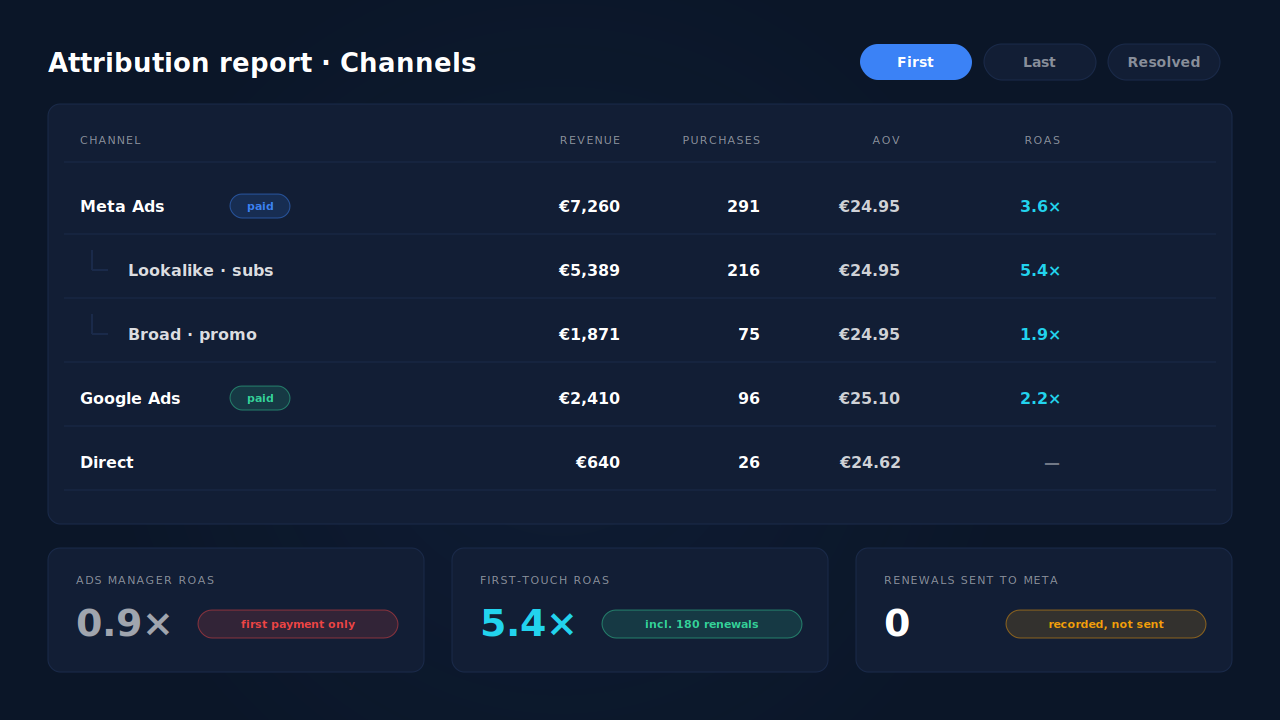
On WooCommerce Subscriptions stores, PartialLeads records every renewal order and matches it back to the subscriber, while sending only the first payment to Meta. Each matched renewal gets first-touch and last-touch attribution rows like any purchase. So the Attribution report’s first-touch view adds renewal revenue to the campaign that originally brought the subscriber in.
Here’s how the pieces fit, following the full WooCommerce Subscriptions tracking setup:
- The first payment goes to Meta. When the first order is paid (processing or completed), PartialLeads sends a Purchase through the Conversions API with the full order total, from the order webhook rather than the thank-you page.
- Renewals are recorded, never sent. No renewal goes to Meta, any other ad platform or the Google Sheet. Ads Manager stays on first payments, so it never double-counts.
- Renewals are matched to the person. The match runs by visitor id, then email, then phone. The subscriber’s sessions are stitched into one identity, so the first touch is the original ad click, not the last visit.
- The Channels table shows it by campaign. In the Attribution report, switch the Channels table to First. Meta Ads expands to its campaigns, with Revenue, Purchases and ROAS columns. Read the ROAS there against the ROAS in Ads Manager for the same dates. The gap is renewal revenue Meta can’t see.
- The Subscriptions report gives the store-wide view: MRR, churn and customer lifetime value.
Honest limits:
- WooCommerce Subscriptions only. This flow depends on renewal orders arriving from WooCommerce Subscriptions.
- Unmatched renewals carry no source. If a renewal can’t be matched to the buyer, it’s recorded without a campaign.
- The report is period-based, not a cohort table. It totals purchases inside the period you pick. To read one campaign’s cumulative value, start the period at its launch. Same-age cohort comparisons still need the steps above.
- The Subscriptions report has no by-source breakdown. Lifetime value there is store-wide. Per-campaign value comes from the first-touch Attribution report.
- No predicted LTV is sent to Meta. Meta’s own numbers stay first-payment only.
For how to weigh the three models against each other, see how to read an attribution report honestly.
| What breaks | The mechanism | Where you see it in the dashboard |
|---|---|---|
| Meta only sees the first €24.95 payment | First paid order sent to Meta server-side, renewals kept out | Meta CAPI activity log |
| Renewals have no click and fall into Direct | Renewal matched to the subscriber, first-touch row written | Attribution report, Channels table set to First |
| Campaigns ranked on first-month revenue | Renewal revenue credited to the acquiring campaign | Meta Ads rows expanded to campaigns, Revenue and ROAS columns |
| Store-wide retention hidden | MRR, churn and lifetime value tracked per store | Subscriptions report |
| One subscriber looks like several visitors | Sessions stitched by visitor id, email and phone | Journey ribbon on the Leads list |
Tell us what's broken. We'll fix your tracking — free.
Describe the tracking/attribution problem you're stuck on and we'll map it to a fix: server-side conversions to Meta, Google, TikTok and Pinterest, plus first-party tracking that survives Safari. No code required.
Sources
- https://www.facebook.com/business/help/458681590974355
- https://developers.facebook.com/docs/marketing-api/conversions-api/parameters/custom-data
- https://github.com/Automattic/woocommerce-subscriptions-core/blob/trunk/includes/wcs-renewal-functions.php
- https://github.com/Automattic/woocommerce-subscriptions-core/blob/trunk/includes/class-wcs-action-scheduler.php