True ROAS is the revenue that actually settled, net of refunds and chargebacks, matched back to the campaign that caused it, divided by the spend for the same window. Your ad platform cannot calculate it: it reports its own claimed conversions, at the value it was sent, gross of returns, inside its own attribution window.
So you build the number yourself, from CRM or payment-processor data. Four inputs decide whether it is honest: which revenue counts, what you subtract, what spend sits underneath, and whether both sides cover the same dates.
Why does your ad platform’s ROAS disagree with your accounting?
Because they measure different things. Ads Manager answers “how much revenue did events attributed to my ads report?” Your books answer “how much money did we keep?” They diverge for four structural reasons, none of them a bug.
The platform counts what it was sent. A purchase event carries a value and a currency, and the platform takes both at face value (Meta, Conversions API custom data parameters). Send order totals including shipping and tax, and ROAS is computed on shipping and tax.
The platform counts inside its own window. Every network decides for itself how long after a click — and usually after a view — a conversion still belongs to the ad. Two platforms running the same week will both claim the same sale, which is why Google Ads and Meta both claim the same conversion and why summing platform-reported revenue always exceeds what the bank shows.
The platform never hears about the refund. Conversions are append-only: once an event is accepted it stays accepted, and no retraction API reaches back into yesterday’s reported revenue. Whatever you refund next week is still sitting in last week’s ROAS.
Modelling fills the gaps. When a pixel is blocked or a user opts out, platforms estimate — useful for bidding, not a receipt.
None of that makes platform ROAS a lie. It makes it a media-buying metric — fine for deciding which ad set to pause, wrong for deciding whether the business made money. Reading it as a business number is the most common way to misread an attribution report.
Which revenue belongs in the numerator?
Revenue you have actually collected, for orders you can tie to a click, valued the way a finance person would. Three rules keep it clean.
Use settled money, not authorised money. An order that failed capture, bounced on a fraud check or sat unpaid is not revenue. Payment-processor status is the source of truth, not the order table in your store.
Strip what is not yours. Shipping collected and remitted taxes flow through you to someone else. Including them inflates every ROAS you report. Pick one basis — net goods revenue is the usual choice — and use it on both the report and the target you judge it against.
Count the order once. A store, a CRM and a processor each hold a version of the same sale. Deduplicate on an order or invoice identifier before anything gets summed.
That gives you gross matched revenue. It is still not the numerator.
How do refunds and chargebacks change the number?
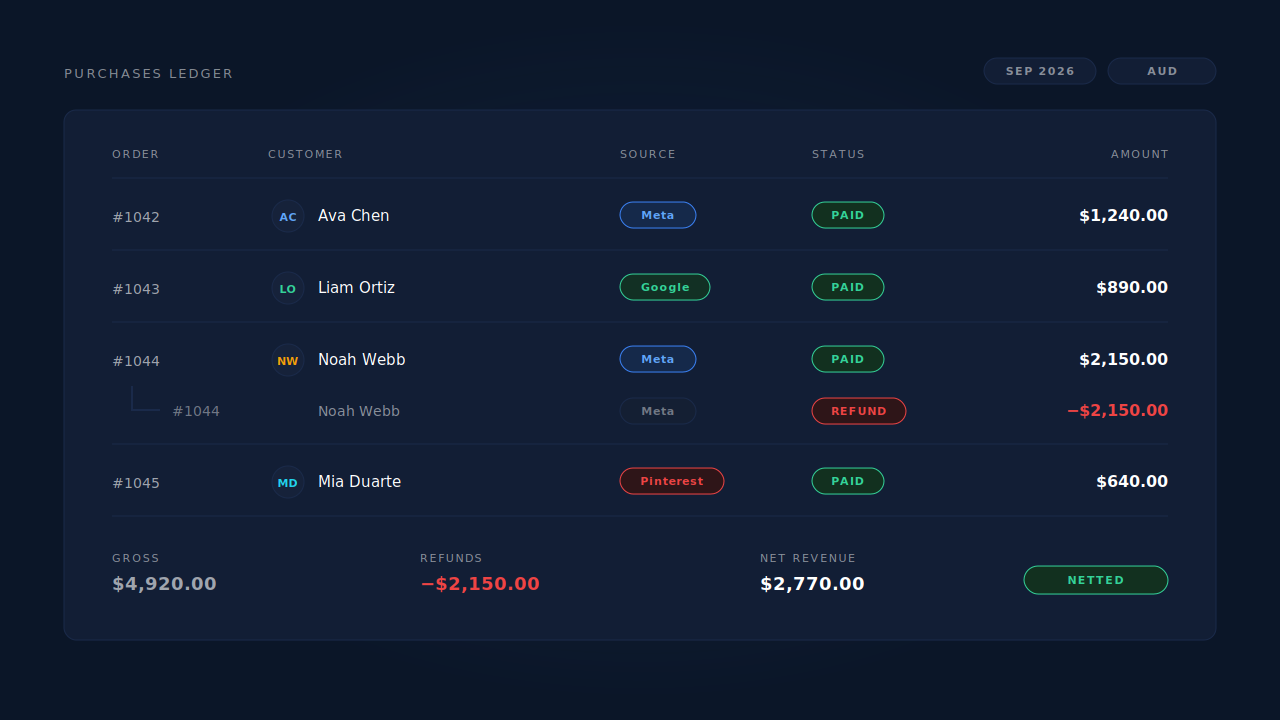
They come out, dated to the order they belong to. A refund is not a negative sale in the week it was processed — it is a correction to a sale that already happened, and to the ROAS you reported for it.
The mechanics matter because refunds arrive late. A thirty-day return window means the campaign you are evaluating today is still accumulating refunds for another month, so a fresh week’s ROAS drifts down for weeks afterwards. That is not instability, it is the truth catching up — the same effect that makes refunds inflate attributed revenue on any report built from purchase events alone.
Chargebacks are worse in one way: they land months later, they take the fee with them, and they concentrate in exactly the audiences a loose prospecting campaign attracts. A campaign with a good headline ROAS and a bad dispute rate is not a good campaign.
Two practical rules:
- Net refunds against the original order date. October’s ROAS should reflect October’s orders as they finally stand, not October’s orders minus September’s returns.
- Re-read recent periods rather than freezing them. Treat the last thirty to sixty days as provisional and say so in the report, so nobody budgets on a number that has not finished settling.
Which spend belongs in the denominator?
All of the media cost for the channel you are measuring, at the same grain as the revenue above it. The failure here is almost always a missing cost rather than a wrong one.
Platform-reported spend covers the auction cost and the fees baked into the billed amount. It excludes everything else that made the campaign possible: agency retainers, creative production, affiliate and influencer payouts, the tools in the stack, and any offline media running in the same window.
Decide deliberately which of those you include, and keep the decision stable. A blended number that includes agency fees is honest; a denominator that changes definition every month is worse than useless, because the trend then measures your accounting, not your marketing. Grain matters as much as scope — campaign-level revenue against account-level spend is a ratio of two different things, and it will be wrong in the flattering direction.
Why do both sides have to cover the same window and timezone?
Because the divide only means something when both sides describe the same period, and most reporting stacks quietly disagree about what “yesterday” means. Ad platforms report in the account’s timezone, your store records orders in its own, and a payment processor records in UTC.
Off-by-one-day boundaries move daily ROAS by more than most optimisation decisions do, and they never cancel out on short windows. If your dashboard has a timezone control, set it once, write it down, and make every report use it — the same discipline that keeps attribution reporting across multiple currencies from producing three different totals for the same week.
A second timing problem no timezone setting fixes: lag. Spend happens on click day, revenue happens when the customer decides, so a same-day ROAS on a long sales cycle always reads low. Measure over a window comfortably longer than your typical time-to-purchase, or report by cohort — week one’s spend against all the revenue those clicks eventually produced.
How do you match CRM revenue back to the campaign that earned it?
By identity, not by cookie. The join you need is order → person → session → click, and only the first hop exists in your CRM.
A CRM order carries an email, usually a phone number, sometimes a customer id. A session carries a click id, UTM parameters, a landing page and a referrer. Matching means keeping a durable identifier on both sides and resolving the same human across them, which is the whole job of visitor identity resolution.
Three things break that join in practice: the checkout sits on another domain or a hosted page, so the buying session looks like a brand-new visitor with no source; the buyer switched device between the click and the purchase; or the click id is gone, cleared by the browser or stripped by a redirect.
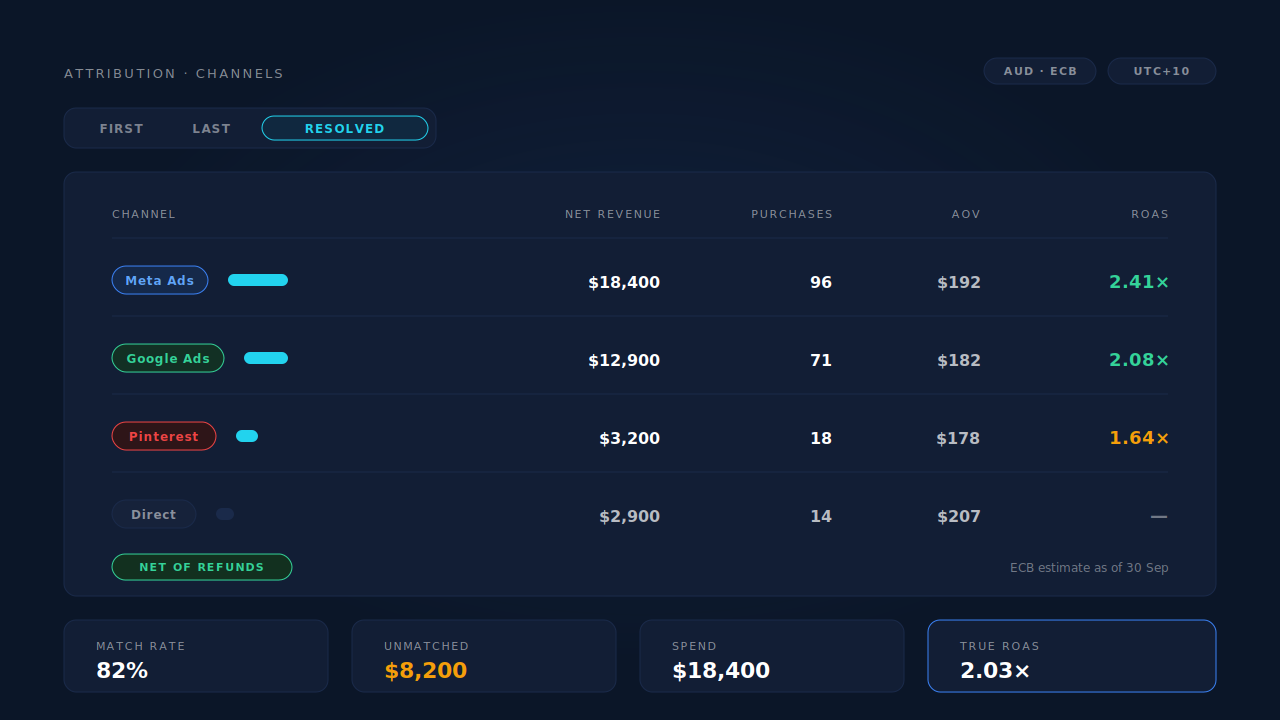
Every unmatched order is revenue you cannot attribute, and that has one effect on ROAS: it pushes every channel’s number down while “Direct” quietly swells. So check your match rate before you trust a low ROAS. A channel often looks unprofitable not because it is, but because a third of its revenue landed in the unmatched bucket.
What does the calculation look like step by step?
Six steps, in this order. Illustrative figures below, not benchmarks.
1. Gross matched revenue      $48,200   orders tied to a click
2. Less shipping and tax      -$5,900   not your revenue
3. Less refunds (order-dated) -$4,300   including late returns
4. Less chargebacks           -$600     plus dispute fees
   Net attributed revenue     $37,400
5. Media spend, same window   $16,000   platform-billed
   Plus agency and tooling    $2,400    if you count them
   Total cost                 $18,400
6. True ROAS = 37,400 / 18,400 = 2.03x
Run the same six lines per channel and the comparison becomes fair, because every channel is judged on money that arrived. Keep the platform’s own ROAS beside it: the gap is a diagnostic. A channel whose platform ROAS is double its true ROAS is either over-claiming attribution, selling to people who refund, or both.
How does PartialLeads calculate true ROAS from matched revenue?
It builds the numerator from purchases rather than pixel events, and keeps the netting and the matching in one pipeline.
Purchases arrive server-side from Shopify, WooCommerce, GoHighLevel, Stripe or a universal webhook. Dedup is idempotent on client, source, order id and status phase, so a redelivered webhook cannot double-count — and a refund arrives as its own status-phase row that nets against the paid order rather than as a second sale. That is step three, automatic, dated to the order it corrects.
Matching is tiered: a visitor id echoed back from the checkout carries the highest confidence, then email, then phone, then IP. When it lands, the purchase flips the lead to Completed with revenue attached and writes both a first-touch and a last-touch attribution row, snapshotting UTMs, click ids, referrer, landing page and time-to-purchase. Purchases that match nothing still land and stay re-matchable, so unmatched revenue stays visible — the honest version of attributing ecommerce revenue to the ad click.
The Attribution report is where the division happens. Its channels table carries Revenue, Purchases, AOV, Avg Lag, Visitors, V→L and ROAS per channel, with a First / Last / Resolved toggle that shows how much of a channel’s ROAS depends on the model you picked. One period selector and one timezone selector apply to the whole report, keeping both sides of the ratio on the same dates, and a currency selector normalises multi-currency revenue into one reporting currency, footnoted with the ECB rate date used.
Two honest constraints. Refunds are netted only when they arrive through a connected purchase source — one issued somewhere PartialLeads never hears about is not subtracted. And the spend side is only as complete as the costs you feed it: agency fees, creative and offline media are not platform line items, so the denominator is still your call.
| What breaks | The mechanism | Where you see it in the dashboard |
|---|---|---|
| Reported revenue stays gross after refunds | Refunds land as their own status-phase row and net against the paid order | Purchases ledger, net revenue |
| Revenue can’t be tied to a campaign | Purchase matched to a session by visitor id, then email, then phone, then IP | Attribution report, Match Rate and Revenue by Match Quality |
| Two platforms claim the same sale | First-touch, last-touch and resolved models computed on the same purchases | Attribution report, Attribution Models |
| Mixed currencies don’t add up | Revenue normalised into one reporting currency at ECB rates | Currency selector and its ECB rate-date footnote |
| Spend window and revenue window disagree | One period and one timezone applied across the whole report | Period and timezone selectors |
| Revenue with no session attached | Unmatched purchases still land and stay re-matchable | Purchases ledger, matched and unmatched wedge |
Tell us what's broken. We'll fix your tracking — free.
Describe the tracking/attribution problem you're stuck on and we'll map it to a fix: server-side conversions to Meta, Google, TikTok and Pinterest, plus first-party tracking that survives Safari. No code required.
Sources
- Meta — Conversions API, custom data parameters (value, currency): https://developers.facebook.com/docs/marketing-api/conversions-api/parameters/custom-data
- Meta — Conversions API, deduplicating pixel and server events: https://developers.facebook.com/docs/marketing-api/conversions-api/deduplicate-pixel-and-server-events
- Meta — Conversions API best practices (event timing and delivery): https://developers.facebook.com/docs/marketing-api/conversions-api/best-practices