Classify every payment before it leaves your system. A first subscription payment is an acquisition event; a renewal is the same customer paying again. Send only the first payment to your ad platforms under your acquisition event name, attribute every later payment to the person rather than to whatever session is open, and report new and recurring revenue on separate lines.
A renewal has no click on it. Nothing a person did in a browser caused it — a scheduled job charged a card already on file. Every problem below comes from event-shaped systems treating that charge as the same thing as a sale.
What does a double-counted renewal actually look like?
It looks like a campaign quietly getting better at nothing: the purchase count on an ad set keeps rising, revenue with it, and new customers are flat or falling. Nobody notices for months, because every individual number is real.
The shape of it, with illustrative figures: a $99/month product acquires 40 subscribers in January from one Meta campaign. In February those 40 renew and 38 new ones sign up, so billing emits 78 payments. If all 78 fire the same purchase event, the campaign is credited with 78 conversions and $7,722 — when it acquired 38 customers worth $3,762.
By June the campaign shows a few hundred purchases a month and an acquisition ROAS that would justify tripling the budget, most of it from people who converted long before.
The tell: the purchase count grows faster than the customer count, and the gap widens every month.
Why do renewals get counted as new purchases in the first place?
Because conversion tracking is event-shaped and subscriptions are relationship-shaped. A pixel or server-side event describes one moment: something worth money happened, here is the value. It has no concept of “again.” Three structural causes stack up.
The webhook for a renewal looks almost identical to the first payment. Same customer record, same amount, same currency, same product. The only reliable difference is the flag saying why the invoice was created, and a naive integration never reads it.
There is no browser attached. Renewals fire from a scheduled job days or weeks after anyone visited your site. No session, no click ID, no referrer. That absence is the most useful signal you have, and most pipelines throw it away by filling the gap with a default — usually Direct, or the last session that customer opened.
Last-click logic re-attributes on every charge. If your reporting decides a payment’s source from recent activity, every renewal takes a fresh attribution decision. Over a year, a cohort acquired from paid social drifts toward Direct and organic, because renewals keep landing on sessions where the customer just logged in. It is the same failure that makes attributing ecommerce revenue back to the ad that started it hard on any store with repeat buyers — subscriptions put it on a schedule.
How do you tell a first payment from a renewal?
Read the reason flag on the invoice, not the amount. Every serious billing system stamps each invoice with why it exists — first subscription payment, scheduled cycle, plan change, one-off charge. That flag is the classification; everything else is a guess.
Three checks, in order of reliability:
- The invoice’s own reason flag. Look it up in your provider’s invoice object — the only signal that is right by construction.
- Subscription age at the charge. Created in the same request as the payment means acquisition; created 180 days ago does not.
- Invoice sequence. The first invoice against a subscription ID is the acquisition; number 7 is not.
Do not classify on the amount (upgrades and annual plans break it), on coupons (renewals inherit them), or on time since signup (trials and paused plans distort it). A failed-then-retried renewal is one renewal — dedupe on the invoice, not the attempt.
Two adjacent cases need their own label. A trial converting to paid is an acquisition even though the subscription is old, which is the whole argument in tracking trial-to-paid conversions weeks later. A plan upgrade is expansion revenue — real money, not a new customer. On WooCommerce rather than a hosted biller, ingestion has its own shape, covered in tracking a WooCommerce subscriptions business end to end.
// Classify once, at the edge, before anything is dispatched.
function classifyPayment(invoice, subscription) {
  // Field names differ per biller — read your provider's invoice object.
  const reason = invoice.billing_reason;        // why this invoice exists
  if (reason === 'first_subscription_payment') return 'acquisition';
  if (reason === 'plan_change')                return 'expansion';
  if (reason === 'scheduled_cycle')            return 'renewal';

  // Fallback: was the subscription born with this invoice?
  return (invoice.created_at - subscription.created_at) < 60_000
    ? 'acquisition' : 'renewal';
}
Write the result onto the record, so every downstream consumer — ad platforms, CRM, finance, your dashboard — reads one label instead of re-deriving it four ways.
What does a double-counted renewal do to your acquisition ROAS?
It inflates the metric you decide budget on, in proportion to how long a campaign has been running. Older campaigns look better than newer ones for reasons unrelated to their ads, so you scale the wrong thing and starve the one genuinely acquiring.
The distortion is not uniform, which is what makes it dangerous:
- Long-running campaigns are flattered most, because they have the biggest renewal base behind them.
- Prospecting looks worse than retargeting, since retargeting audiences are full of existing customers whose renewals get credited to the retargeting set.
- Cost per acquisition is understated by the ratio of renewals to first payments — a ratio that only grows as the business matures.
It corrupts the bidding algorithm too. Feed value-based bidding a stream of conversions where most of the value arrived with no click and no attributable user, and you teach it to chase a pattern that does not exist in the click data. The model cannot learn what caused a renewal, because nothing in the ad platform did.
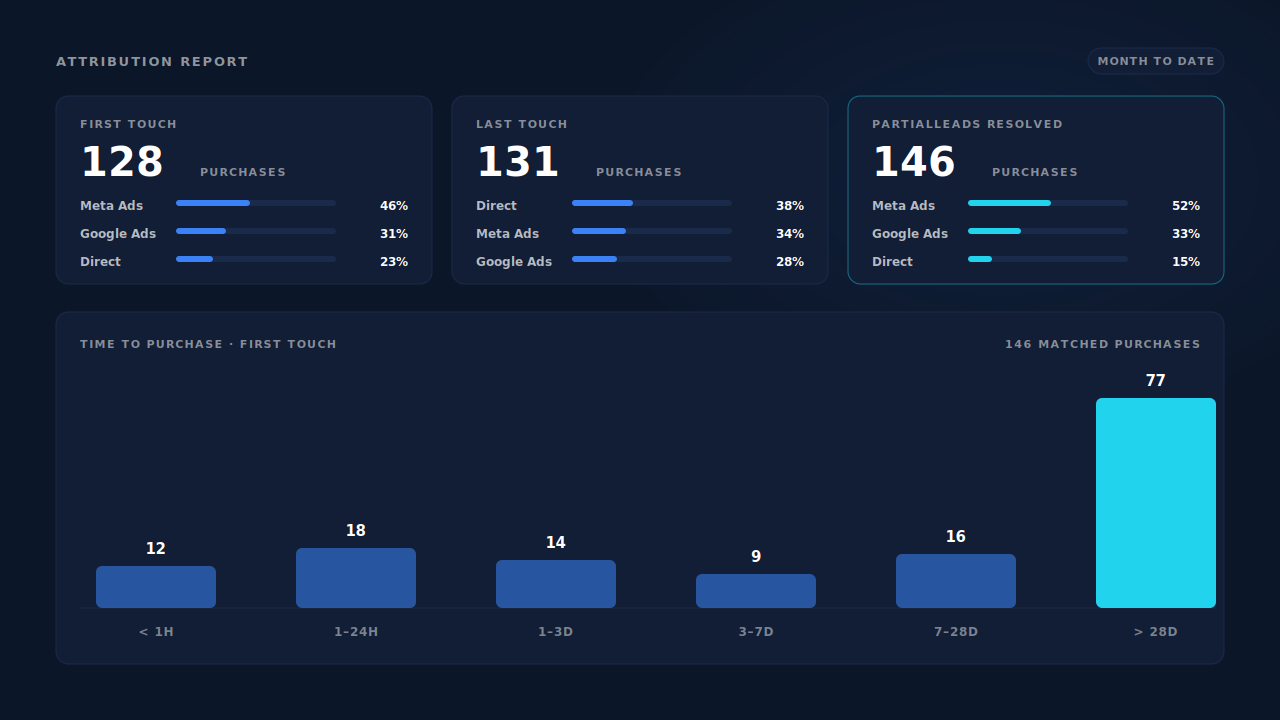
The diagnostic is a lag distribution. Group matched purchases by time since the person’s first touch: a clean business shows most purchases inside a few days and a thin tail, a double-counting one shows a hump past 28 days that grows every month. That is the point of learning to read an attribution report without fooling yourself — the shape tells you what kind of event you are looking at, before anything is labelled.
Should you send renewals to your ad platforms at all?
Usually not under your acquisition event name. Three honest options, and the right one depends on whether you want the platform to optimise toward the payment or merely to know about it.
Option 1 — send nothing. Only first payments go out, under Purchase or whatever your acquisition event is. Correct for most lead-gen and low-volume SaaS. The cost: the platform never sees retention value.
Option 2 — send renewals under a different event name. Meta’s standard event vocabulary includes Subscribe alongside Purchase, and custom event names cover anything outside that list. Renewals go out as a separate event no campaign optimises against: you keep the visibility, lose the contamination. Where most mature subscription advertisers land.
Option 3 — send the whole lifetime value once, on the first payment. Instead of $99 twelve times, report an expected value on the acquisition event and never send renewals. Value-based bidding gets something meaningful on day one. The catch: it is a forecast, and a wrong churn assumption makes every bid wrong too.
Whichever you pick, the rule underneath is the same: one money type, one event name. Once renewals and first payments share an event name, no report downstream can separate them again. The distinction was destroyed at dispatch.
How do you fix this without a data team?
Fix it at the boundary, in four steps that need no data warehouse.
- Classify at ingest. Read the reason flag, write
acquisition/renewal/expansion/refundonto the record, never re-derive it downstream. - Split your event names. Acquisition keeps the event your campaigns optimise on; everything else gets its own.
- Net your refunds. A refunded renewal is not revenue, and a refund almost never fires an event — that asymmetry is why refunds inflate attributed revenue in the same reports that double-count renewals.
- Report two lines per channel. New revenue this period, and recurring revenue from customers the channel acquired earlier. Averaging them is what hides the problem. To normalise the second line into a run rate, see reporting MRR by acquisition channel.
The honest limits: classification happens wherever payments enter your stack, so one integration per biller, and you still need an identity join to answer “which channel acquired this renewing customer” — the renewal carries no answer. Spreadsheet versions break the first time someone pauses mid-month.
How does PartialLeads keep renewals out of your acquisition numbers?
By making every payment land on the person who made it, and keeping the acquisition click on the person rather than on the payment. That is the half that does the silent damage — credit drifting off the campaign that actually acquired the customer.
Three mechanisms do the work.
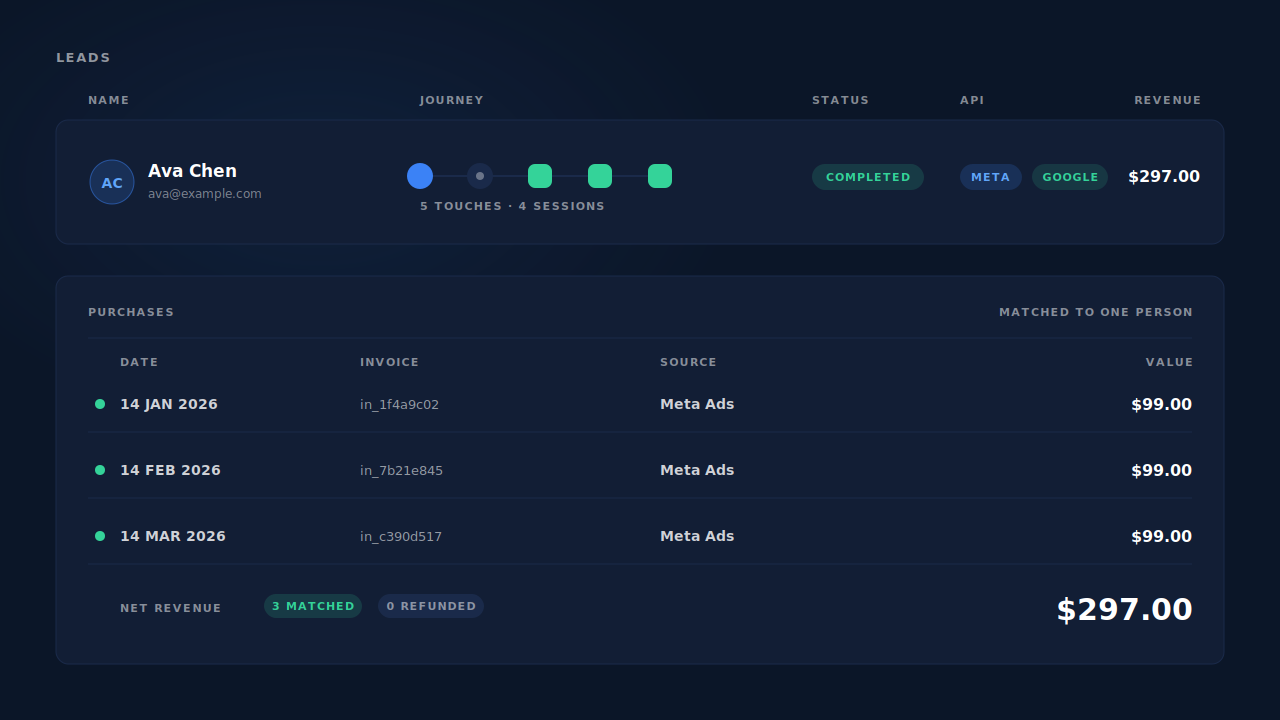
The identity cluster unions a person’s sessions and payments. Six tiers — visitor ID, email, phone, IP plus user agent, device fingerprint and click ID — resolve every session to one person. A renewal matched back by email or Stripe customer ID lands on the existing customer instead of creating a new one. On the Leads list that is one row with a session count, not three strangers who each bought once.
First-touch and last-touch rows are written on every matched purchase. First touch is stored against the cluster, so the twelfth payment still carries the click that started the relationship. The Attribution report shows first touch, last touch and the resolved model side by side, each with its own purchase count — you see the disagreement instead of one number to trust.
Time to purchase is a distribution, not an average. Matched purchases are bucketed from under an hour to over 28 days, with an average lag per channel. Renewals pile into the long buckets, so the cohort shows up in the chart before you have classified a single invoice.
The honest constraints. PartialLeads matches payments to people and attributes them; it does not read your billing system’s subscription state, and will not label a charge “renewal” for you. Connect Stripe and every successful payment lands as a purchase, netting against its refunds — the separation is per person and per model, not a renewal flag. To keep renewals out of the ad platforms entirely, post only first payments through the universal webhook. Deterministic event IDs and unique dedup tables mean the same payment cannot fire twice, but a renewal is a different payment with its own record — deduplication will not suppress it, and should not.
| What breaks | The mechanism | Where you see it in the dashboard |
|---|---|---|
| A renewing customer counts as a new one | Six-tier identity cluster unions a person’s sessions and payments | Leads list — one row per person, with revenue |
| Acquisition credit drifts off the original click | First-touch and last-touch rows per matched purchase, first touch held on the cluster | Attribution report — three models side by side |
| You cannot tell which purchases are renewals | Time-to-purchase bucketing and average lag per channel | Attribution report — lag distribution, channels table |
| Refunded renewals still count as revenue | Refund rows carry their own status phase and net against the paid row | Purchases ledger — net revenue |
| A redelivered invoice webhook fires twice | Deterministic event ID from the internal record, dedup table unique per config | CAPI activity log — retry resolves to one event |
Tell us what's broken. We'll fix your tracking — free.
Describe the tracking/attribution problem you're stuck on and we'll map it to a fix: server-side conversions to Meta, Google, TikTok and Pinterest, plus first-party tracking that survives Safari. No code required.
Sources
https://developers.facebook.com/docs/marketing-api/conversions-api https://developers.facebook.com/docs/marketing-api/conversions-api/deduplicate-pixel-and-server-events https://developers.facebook.com/docs/meta-pixel/reference https://developers.facebook.com/docs/marketing-api/conversions-api/parameters/custom-data