Push each lead to the sheet as it is captured, with a webhook, rather than exporting a file later. A tool that records form fields before submit posts one JSON payload per lead; an Apps Script endpoint or an automation platform turns that payload into a row. The sheet updates in seconds and nobody has to remember to download anything.
The spreadsheet is not a reporting choice here. It is where the calling happens — and a lead that arrives tomorrow morning in a CSV is a lead somebody else already called.
Why doesn’t your form tool already do this?
Because it only knows about submitted forms. The native Google Sheets integrations in Typeform, Jotform, Google Forms, Unbounce and most CRMs are wired to the submit event: one submission, one row. No submit, no row. The people you most want in that sheet — the ones who typed an email and left — never trigger it.
This is a structural limit, not a settings problem. Everything those tools know about a visitor arrives in the submit payload, so a half-filled form that is abandoned produces nothing at all. The typed values sit in browser memory and die with the tab.
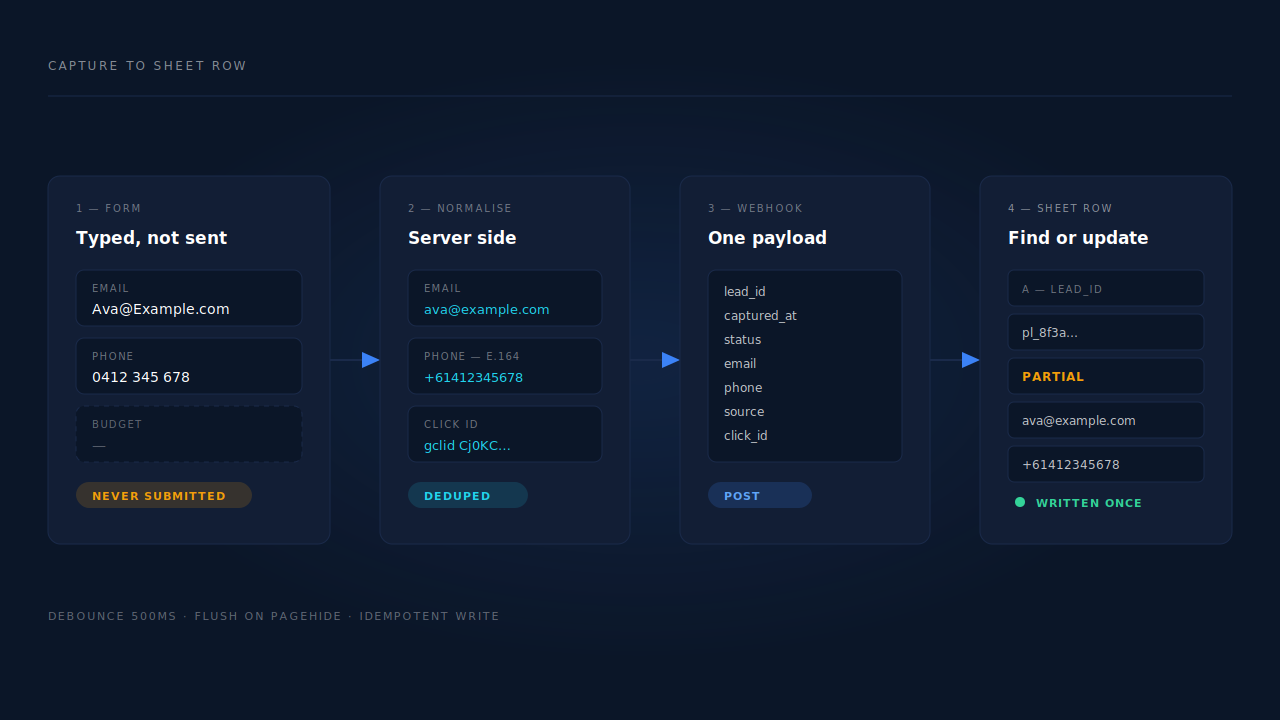
Partial lead capture changes the trigger. Instead of waiting for a button, a script listens to each field’s input and blur events, waits out a short debounce, and posts the value as it is typed — then flushes anything still pending when the page is hidden or closed. Now there is an event to send to your sheet, because there is a lead before there is a submission.
What has to happen for a lead to reach a sheet on its own?
Four things, all of which have to run without you: capture the fields as they are typed, normalise the email and phone, authenticate to the Google Sheets API, and append a row keyed to something stable so a retry does not write the lead twice.
Capture is the only one of the four that has to happen in the browser.
Normalisation decides whether the sheet is usable. A phone typed as 0412 345 678 and the same phone typed as +61412345678 are two rows to a spreadsheet and one person to a human. Normalise the phone to E.164, and lowercase and trim the email, before either becomes a cell.
Authentication is where no-code plans stall. The Sheets API does not accept a plain HTTP POST from a stranger. You either give a Google service account edit access to the sheet and sign requests as it, or use a platform that already holds an OAuth grant to your Google account.
Appending is one API call, and the only interesting question is idempotency. Carry an identifier for the lead on the row, and write “find this id, update or insert” rather than “add a line” — every retry then converges on one row instead of stacking three.
Which columns should the sheet carry?
One row per lead, never one row per session — mixing the two grains is how sheet totals stop agreeing with the dashboard they came from. Beyond contact details, carry the fields that decide who gets called and the fields that let the row be matched later.
| Column | Why it is there |
|---|---|
lead_id |
The stable key. Everything else depends on it. |
captured_at |
With an explicit UTC offset. A bare local timestamp starts arguments. |
status |
Partial or completed. Your caller needs to know whether this person finished. |
email |
Lowercased and trimmed at the source, not with a spreadsheet formula. |
phone |
E.164, stored as text so the sheet does not eat the leading +. |
last_field |
The field they reached before leaving. The single best read on intent. |
source / medium / campaign |
As captured. Do not reconstruct them from the landing page later. |
click_id |
gclid, gbraid, wbraid, fbclid, msclkid — whichever arrived. |
landing_page |
The first page of the visit, not the page the form sits on. |
country |
Enough geo to pick a dialling window before somebody calls at 3am. |
Two of those get skipped constantly and both cost money. The click ID is what lets the row become a conversion you can import into Google Ads later; without it, the row is a name your platform can never connect to spend. And last_field is free intent data: somebody who stopped at “budget” is a different call from somebody who stopped at “email”.
How do you build this without a developer?
Three routes, in rising order of how well they hold up. All three are buildable in an afternoon by someone comfortable with a settings page.
A scheduled CSV export into the sheet. The floor. It costs nothing and it is stale by design — a lead captured at 09:05 shows up whenever the export runs. Fine for weekly reporting, useless for calling.
An automation platform. Zapier, Make or n8n catch a webhook and run an “add a row to Google Sheets” step. Fastest to build, and where most teams land. Watch two things: they bill per task, so a busy form becomes a monthly line item, and their retry behaviour duplicates rows unless the step is an update-or-insert against your lead_id.
A Google Apps Script web app. A doPost endpoint bound to the sheet, deployed as “anyone with the link,” with a shared secret checked on every request. It costs nothing, holds its own permission to the sheet, and gives you the find-or-update logic the no-code steps make awkward:
function doPost(e) {
  const body = JSON.parse(e.postData.contents);
  if (body.secret !== PropertiesService.getScriptProperties().getProperty('SECRET')) {
    return ContentService.createTextOutput('forbidden');
  }

  const sheet = SpreadsheetApp.getActive().getSheetByName('Leads');
  const ids = sheet.getRange('A2:A').getValues().flat();
  const row = [
    body.lead_id, body.captured_at, body.status, body.email,
    "'" + body.phone,            // leading quote keeps E.164 as text
    body.last_field, body.source, body.campaign, body.click_id, body.landing_page
  ];

  const found = ids.indexOf(body.lead_id);   // find-or-update, so retries converge
  if (found > -1) {
    sheet.getRange(found + 2, 1, 1, row.length).setValues([row]);
  } else {
    sheet.appendRow(row);
  }
  return ContentService.createTextOutput('ok');
}
Deploy that, paste the URL into your capture tool’s webhook field, and the sheet fills itself. The trade-off is ownership: redeploying after an edit is manual, and Apps Script runs under Google’s execution quotas, so a very high-volume form eventually wants a real backend.
Why do rows duplicate, and how do you stop it?
Three separate causes, needing three different fixes. Deduplicating with a spreadsheet formula treats all three as one problem, which is why it never quite works.
Delivery retries. A webhook that times out gets sent again, and a plain appendRow writes the lead twice. Fixed by the find-or-update pattern above, keyed on the lead id.
The partial-to-completed upgrade. The same person is captured mid-form and then submits, so you hold two events for one lead. That is not a duplicate — it is a status change, and the second event should overwrite the row.
One person, several sessions. Somebody starts the form on a phone at lunch and finishes on a laptop that night. Two visitors, two form starts, one human. No spreadsheet formula resolves that, because the rows may share no exact field: a work email on one, a personal email on the other. It is fixed upstream, by identity resolution that joins sessions on email, phone, click ID and device before anything is dispatched — the same reason one customer so often counts as three leads.
Can that same sheet feed Google Ads offline conversions?
Yes, and it is the reason to insist on the click ID column. Google Ads can be pointed at a Google Sheet on a schedule and pull conversion rows from it, turning your call list into the feedback loop Smart Bidding runs on.
What the rows need is narrow: a click identifier, the conversion action name exactly as it is spelled in your account, a conversion time with an explicit timezone, and — when you have it — a value and a currency. Use Google’s own template sheet for the column headers rather than typing them from memory, because the import matches on header text and fails silently against a near-miss.
Click IDs are not always a gclid any more: app and iOS campaigns hand you gbraid and wbraid instead, and a row carrying the wrong one matches nothing. Where no click ID survived, the fallback is hashed email and phone rather than the raw values — the other reason to normalise before the row is written.
How does PartialLeads get partial leads into Google Sheets?
By making capture and dispatch the same pipeline. Fields are captured on input and blur with a short debounce and flushed before the page unloads, so a visitor who types an email and leaves already exists as a lead. That lead is normalised server-side — phone to E.164 with a country fallback from the session’s geo, email lowercased and trimmed, Gmail dot and plus variants collapsed before hashing — then handed to whichever outbound path you have switched on.
For Google, that path is a scheduled Google Sheets upload: PartialLeads writes conversion rows carrying gclid, gbraid or wbraid plus hashed email and phone, and Google Ads imports them on its own schedule. For everything else, the same fan-out posts the lead to your own webhook endpoint — the Apps Script above, your automation platform, or your CRM — with the attribution attached.
The two paths are not interchangeable. The Sheets dispatcher exists to feed Google Ads offline conversions, so its rows carry click identifiers and hashed contact fields, not your full captured-field set. If what you want is a call sheet with every field on it, the webhook is the route, and the sheet on the other end stays yours to shape. A lead who typed an email and never clicked submit can travel either way.
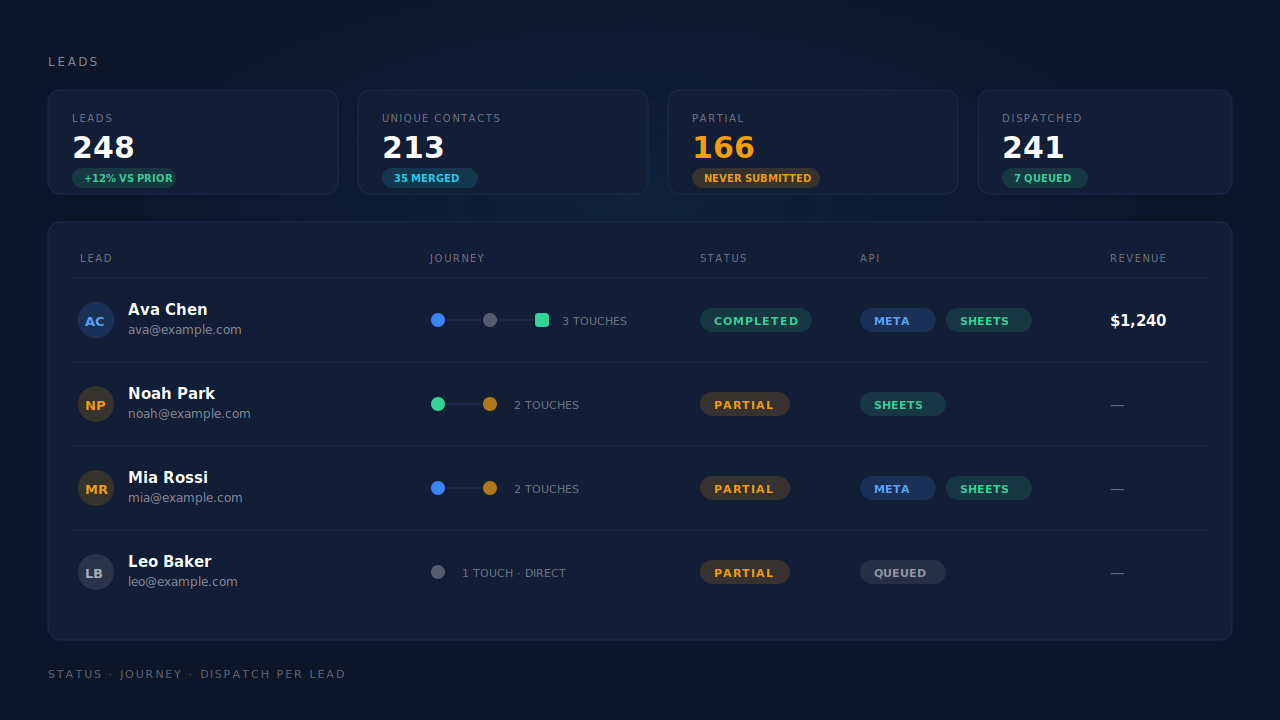
The proving surface is the Leads list. Each lead carries a Partial or Completed badge, its journey rendered left to right as source badges, and an API column showing which conversion platforms that lead was dispatched to — so a lead that never reached your sheet is visible as a row, not as an absence. Unique-contact counts sit beside the raw lead count, which is where a duplicate problem shows up before it reaches the spreadsheet.
The honest constraints: dispatch is the half anyone controls, and matching is not. Google decides whether an uploaded conversion ties back to a click, and a row with neither a surviving click ID nor a resolvable hashed identifier will not match. Nothing here makes a person answer the phone either — the sheet is only worth building if somebody actually works it.
| What breaks | The mechanism | Where you see it in the dashboard |
|---|---|---|
| The form tool’s Sheets integration only fires on submit | Field capture on input/blur, flushed before the page unloads |
Leads list, Partial badge |
| Phone numbers arrive in six formats and the sheet treats them as six people | E.164 normalisation with a country fallback from session geo | Phone column on the lead |
| Gmail dot and plus variants split one person across rows | Dot and plus normalisation applied before hashing | Unique contacts beside the lead count |
| The same person fills the form on a phone and a laptop | Six-tier identity cluster: visitor ID, email, phone, IP and user agent, device, click ID | Journey ribbon on the Leads list |
| The row reaches Google Ads with nothing to match on | gclid, gbraid and wbraid captured at first touch and carried onto the upload row with hashed email and phone |
Google Sheets conversion rows |
| Nobody can tell whether a lead was ever sent anywhere | Per-lead dispatch record of the platforms the lead went to | API column on the Leads list |
Recover the leads you're already earning
Tell us what you're trying to track or fix. We'll show you which visitors your forms miss — and how PartialLeads recovers and qualifies them.
Sources
- https://developers.facebook.com/docs/marketing-api/conversions-api/parameters/customer-information-parameters
- https://developers.facebook.com/docs/marketing-api/conversions-api