A pending or cash-on-delivery (COD) Shopify order should count as a Purchase when Shopify marks it Paid — not when the shopper clicks Complete order. Until the courier collects the cash or the bank deposit lands, the order is a promise. Counting it early inflates your purchase count and trains your ad platform to find people who order but don’t pay.
The early count isn’t a broken pixel. Shopify shows the order status page before payment, and any pixel on that page sees a completed checkout.
Why does a cash-on-delivery order fire Purchase before it’s paid?
Because checkout finishes before payment does. With a manual payment method — cash on delivery, bank deposit, money order or a custom method you’ve added — Shopify creates the order with a payment status of Pending and sends the shopper to the order status page. Browser pixels fire Purchase there, so every COD order is counted at placement, paid or not.
Shopify’s own pixel framework says so. In its web pixels type definitions, the checkout_completed event “logs when a visitor completes a purchase” and is “available on the Order status and checkout pages”. Completing checkout is the trigger. The payment method isn’t part of the decision.
So a typical COD order runs like this:
- Shopper completes checkout with cash on delivery. Payment status: Pending.
- The order status page loads. A browser pixel fires Purchase here.
- The parcel ships. Days pass.
- The courier collects the cash and you mark the order Paid — or the shopper refuses the parcel and you cancel it.
What do Shopify’s payment statuses mean for tracking?
Shopify tracks payment separately from fulfilment, in a field called financial_status. Only one value means the full amount has been collected: Paid. Everything before it is a stage on the way, and everything after it is money going back. A clean Purchase event keys on that one value.
| Payment status | What it means for the order | Should it be a Purchase? |
|---|---|---|
| Pending | Manual payment not yet collected (COD, bank deposit) | Not yet |
| Authorized | Card approved, funds not yet captured | Not yet |
| Partially paid | A deposit or part payment received | Not yet |
| Paid | Full amount collected | Yes |
| Partially refunded / Refunded | Money returned after payment | Already counted; net the refund in your reporting |
| Voided | Authorisation cancelled, nothing collected | Never |
What does counting pending orders as purchases cost?
It costs you accurate revenue and a clean optimisation signal. Every COD order that’s refused at the door, or bank deposit that never arrives, stays in Meta as a Purchase. Your reported ROAS sits above what you banked, and Meta’s delivery system learns to find more people who place an order and walk away from paying.
Two details make it worse:
- Cancelling the order doesn’t un-count it. When you cancel a refused COD order in Shopify, the Purchase Meta already received stays in Events Manager. Sending another event to “correct” it adds a second purchase, not a subtraction.
- The damage is uneven. A campaign that drives impulse COD orders can look like your best performer while losing money on refused parcels and courier fees.
If COD is a real share of your orders — common in markets where shoppers prefer to pay on delivery — this distorts every scaling decision you make from Ads Manager.
What does waiting until the order is paid cost?
It costs you speed. A COD order is often marked paid days after the click, so Meta gets fewer events, later. Meta also has a hard limit: a server event’s event_time can’t be more than seven days in the past when you send it. A parcel that takes longer than a week to deliver and settle needs a plan.
The delay hurts less than it sounds. Meta compares the conversion’s time with the click, so a sale sent three days late still lands against its ad if it falls inside your attribution window. What you lose is fast feedback.
What if the order is paid more than seven days after it was placed?
Then an event stamped with the order’s creation time can’t go out as-is. Send it with the time the payment was collected — that’s when the sale happened — or clamp the timestamp to the edge of the window. The 7-day event time window in Meta CAPI explains the rule and the options. The operational fix is to mark COD orders paid as soon as your courier reports the collection, not when the remittance arrives weeks later.
So when should a pending Shopify order count as a Purchase?
Count it when financial_status becomes Paid, and not before. If you want an earlier signal for the algorithm while you wait, send a different event at checkout — AddPaymentInfo, or a custom “order placed” event — never a second Purchase. Your purchase count then equals money collected, and Meta still gets something to learn from on day one.
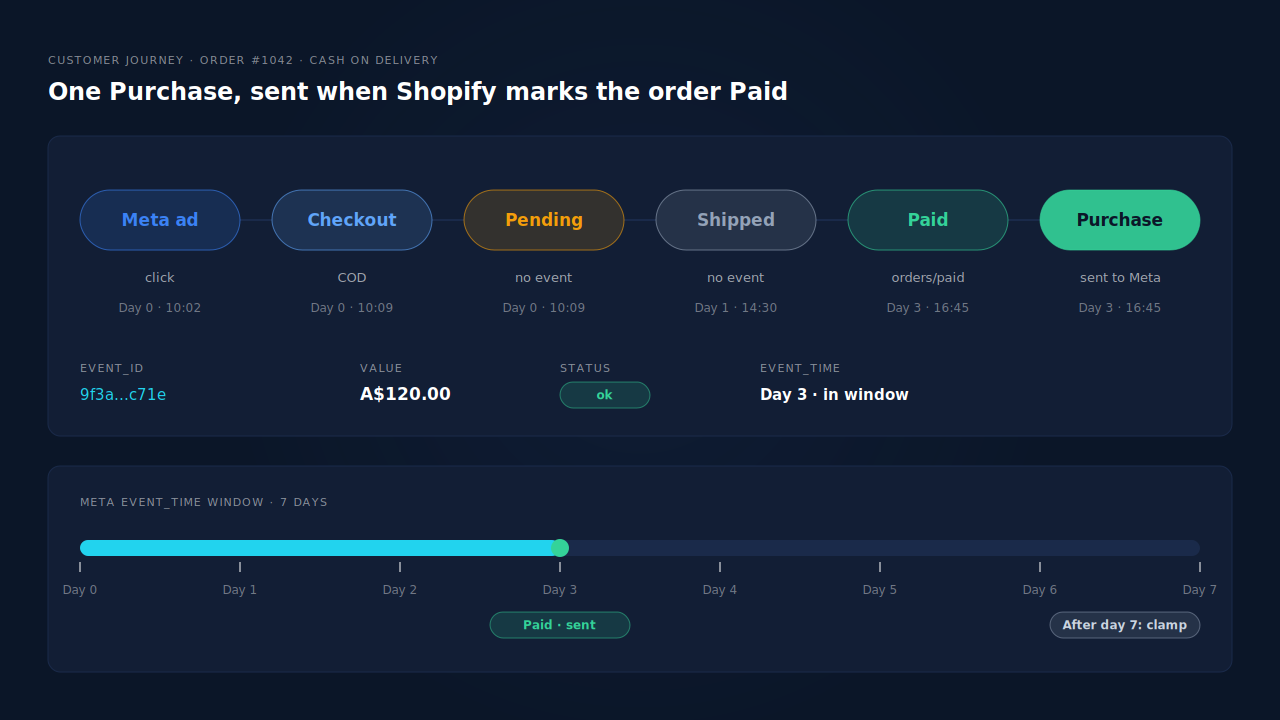
Here’s how the options compare:
| Setup | Purchase count | Signal speed | Main risk |
|---|---|---|---|
| Purchase on the order status page | Includes unpaid and refused orders | Immediate | Meta optimises toward non-payers |
| Purchase when the order is created (server) | Includes unpaid and refused orders | Immediate | Same problem, harder to spot |
| Purchase when the order is marked Paid | Matches money collected | Delayed until payment | Sends later than 7 days need handling |
| Early non-Purchase event + Purchase on Paid | Matches money collected | Early proxy, real sale later | Two events to maintain |
The one honest case for counting at placement is a store where almost every COD order is delivered and paid. Measure your refusal rate first; if you can’t state it, you can’t justify the early count.
How do you make Shopify send Purchase only when an order is paid?
Take the Purchase off the order status page and send it from the order record when Shopify marks the order paid. Shopify emits an orders/paid webhook at that moment, separate from orders/create, so a server-side sender can wait for it. Then test it with one real COD order.
- Find every tool that sends Purchase. Shopify’s Facebook & Instagram app, a custom pixel in Customer events, Google Tag Manager, a tracking app. List them before changing anything.
- Stop the checkout-time Purchase. A pixel on the order status page can’t know whether the courier will collect. Turn its Purchase off, or keep that tool for browse events only.
- Send Purchase server-side on payment. The pattern is in the guide to firing Shopify purchase events server-side without an app, delivered through the Conversions API. Trigger it from
orders/paid, or from an order update that shows the status is now Paid. - Keep one source per event. If two tools send Purchase with different event ids, Meta counts both.
- Test it. Place a COD order and watch Events Manager’s test events tool — the same check you’d use to see whether your Meta CAPI is working. Nothing should arrive. Mark the order paid; one Purchase should.
Because a paid-on-delivery sale can come days after the click, attribution has to survive the gap. The email and phone on the order are what tie it back to the session that started it — the same problem as attributing a purchase weeks after the ad click.
How does PartialLeads decide when a Shopify order counts as a Purchase?
PartialLeads sends a Purchase only when a Shopify order’s financial_status is paid. It listens to the store’s orders/create, orders/paid and orders/updated webhooks, so a COD or bank-deposit order sits Pending and is not sent, then goes out once you mark it paid. An order that’s refused and cancelled is never sent at all.
Nothing is sent from the order status page. The PartialLeads Shopify pixel forwards browse and checkout events server-side; the Purchase comes from the order webhooks, so the order record decides when a sale happened.
What goes out when the order is paid. One Purchase per paid order, at the full order total including tax and shipping after discounts, with the hashed email and phone from the order. It’s sent to each connected platform — Meta, Pinterest, TikTok — and written as a row in the Google Sheet you import into Google Ads. Every event carries a deterministic event_id, so a redelivered webhook can’t send the same order twice. If an order is marked paid late enough that its event would fall outside Meta’s seven-day window, the event time is clamped into the window rather than rejected.
Tying the late sale back to the ad. The order’s email and phone are matched to the buyer’s earlier sessions, and the purchase gets first-touch and last-touch attribution rows. A COD order paid four days after the click still carries the campaign that brought the shopper in — the same matching described in attributing ecommerce revenue to the ad click.
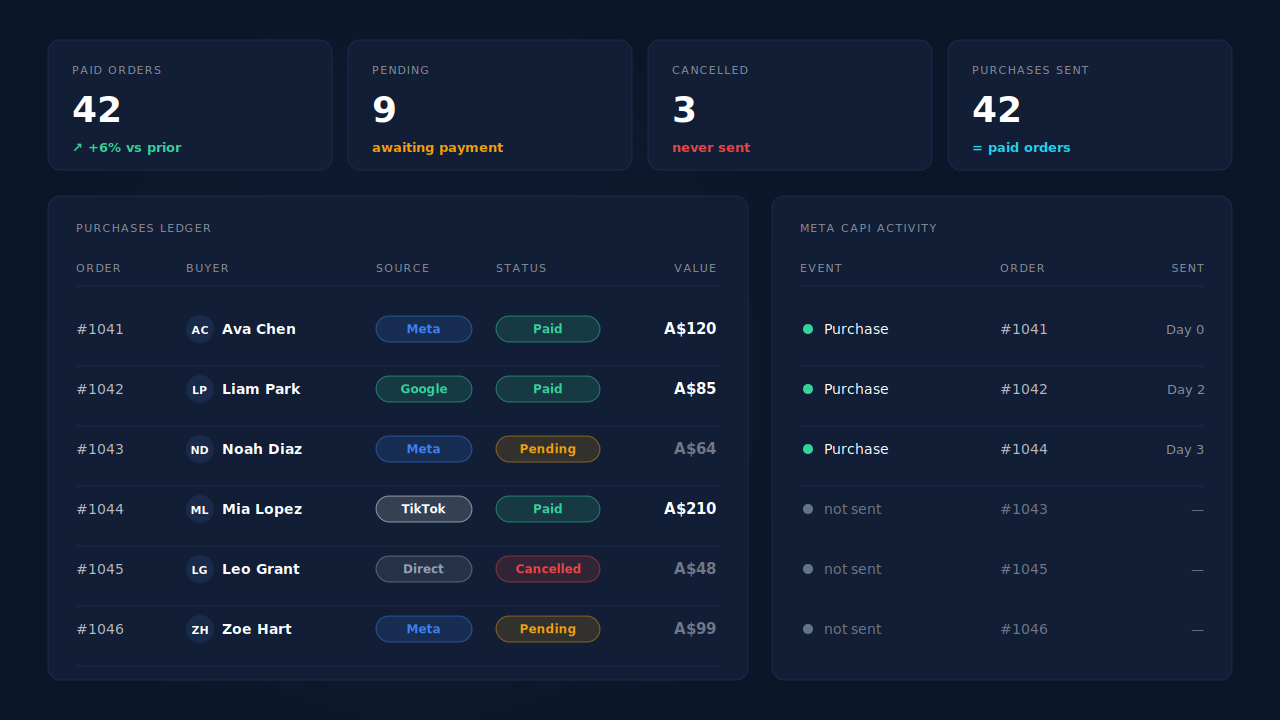
Where you see it working. The Purchases ledger shows each order with its payment status, value, source and session match; paid orders there should equal your Paid orders in Shopify for the same days. The Meta CAPI activity log lists each server Purchase with its status and timestamp, so you can confirm it went out when the order was marked paid. The Attribution report’s Time to Purchase shows how long buyers take from first touch to paid order.
The honest constraints. The rule is Shopify’s Paid status, nothing looser: an Authorized card order waits until you capture it, and a Partially paid order waits until the balance is in. An order is recorded once, so editing it later doesn’t update the value or re-send the event. Event ids are PartialLeads’ own and don’t deduplicate against another app’s browser pixel — if Shopify’s Facebook & Instagram app still fires Purchase at checkout, switch its Purchase off or unpaid orders keep counting through it. Refunds are recorded as their own rows and net against attributed revenue in the ledger. PartialLeads controls which orders are sent and when; how Meta matches and attributes them is Meta’s half.
| What breaks | The mechanism | Where you see it in the dashboard |
|---|---|---|
| Order status page fires Purchase before payment | Purchase comes from order webhooks, never from the page | Meta CAPI activity log |
| Pending COD and bank-deposit orders counted as sales | Sent only when financial_status is paid |
Purchases ledger, Pending vs Paid |
| Refused parcels stay counted in Meta | Cancelled orders that were never paid are never sent | Purchases ledger vs Events Manager |
| Paid days after the click | orders/paid triggers the send; event time clamped into Meta’s 7-day window |
CAPI activity log timestamps |
| Late sale loses its campaign | Order email and phone matched to earlier sessions | Attribution report, Time to Purchase |
| Another app still fires Purchase | No cross-tool dedup — keep one source per event | Leads-list API column vs Events Manager |
Tell us what's broken. We'll fix your tracking — free.
Describe the tracking/attribution problem you're stuck on and we'll map it to a fix: server-side conversions to Meta, Google, TikTok and Pinterest, plus first-party tracking that survives Safari. No code required.
Sources
- https://registry.npmjs.org/@shopify/web-pixels-extension/-/web-pixels-extension-2.18.0.tgz
- https://raw.githubusercontent.com/Shopify/hydrogen/main/packages/hydrogen-react/storefront.schema.json
- https://raw.githubusercontent.com/Shopify/shopify-api-js/main/packages/shopify-api/rest/admin/2024-04/order.ts
- https://developers.facebook.com/docs/marketing-api/conversions-api/parameters/server-event
- https://developers.facebook.com/docs/marketing-api/conversions-api/deduplicate-pixel-and-server-events