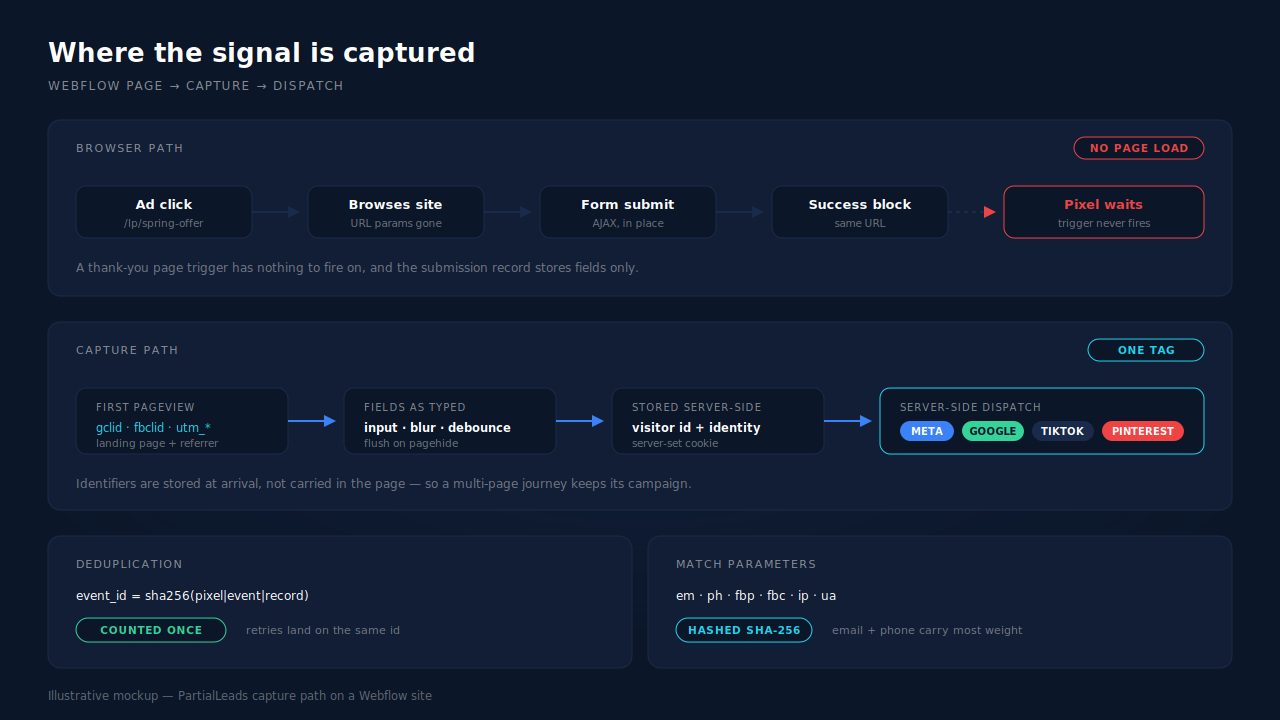
Track Webflow leads by capturing the click ID and UTMs on the first pageview, persisting them server-side against a durable visitor ID, and firing the conversion from a server rather than the browser. Webflow forms break tracking for one structural reason: the submission is an AJAX swap, not a page load, so there is no thank-you URL for a pixel to fire on.
That one behaviour explains most of what looks broken on a Webflow site: conversions that never register, leads with no campaign attached, a cost per lead that disagrees with Ads Manager. Below: the causes, the fixes you can build on a no-code stack, and where each stops.
Why does a Webflow form lose its lead attribution?
Because nothing in the default stack carries the campaign from the ad click to the form record. Webflow stores the values that were in the inputs at submit time. The click ID, the UTMs, the referrer and the landing page are not inputs, so they are not stored — and the conversion event most setups depend on never fires at all.
Six causes; most Webflow sites have several.
1. The success state is not a page. Webflow submits the form in the background and reveals its success block in place. The URL does not change. Every conversion trigger keyed to a thank-you page — a pixel on /thank-you, a destination-URL goal, a page-view trigger in a tag manager — waits for a navigation that never happens.
2. The submission record holds fields, not campaigns. You get a name, an email, maybe a phone. Unless you added hidden fields and populated them with JavaScript yourself, no gclid and no fbclid travel with that lead. The lead exists; its origin does not.
3. You have no server. Webflow hosting runs your site, not your code. Server-side conversion sending — the part that does not depend on the browser cooperating — has nowhere to live on a Webflow-only stack. That constraint is architectural, not a setting someone forgot.
4. The click ID lands on one page and the form lives on another. A campaign lands on /lp/spring-offer; the visitor clicks through to /contact and submits there. By then the URL carries no click ID and the referrer is your own domain. That is the mechanism behind ad-driven leads that show up as Direct.
5. Client-side scripts are the first thing blocked. Content blockers and browser storage limits hit exactly the scripts a no-code stack depends on. A setup whose only signal path is a script in the page has one point of failure.
6. Everyone who starts and does not finish leaves nothing. Webflow records a submission or it records nothing. Somebody who typed their email into the first field, hesitated at the phone field and closed the tab left no record anywhere — even though they handed you a working email address on the way past. That person is a partial lead, and on a default Webflow setup they are invisible.
What does broken Webflow tracking actually cost?
Three costs, in the order they hurt.
Your ad platforms optimise on a partial picture. Meta and Google bid toward the conversions they are told about. When a share of your real leads never reports back, the algorithm learns from a filtered sample — and cannot tell “this campaign produced no leads” apart from “this campaign’s leads never reported.”
Your cost per lead is wrong in a direction you cannot see. Leads reported as Direct inflate the CPL of every paid campaign and quietly credit organic. Cut-or-scale decisions get made on that number.
Sales calls leads blind. A name and an email say nothing about what the person wanted. The landing page, the campaign and the fields they filled before stopping all existed at capture time and were discarded.
How do you fix Webflow lead tracking without a server?
Four things you can build on a no-code stack. Each works; each stops somewhere.
Populate hidden fields with the click ID and UTMs
Add hidden inputs to the Webflow form, then fill them from the URL on page load:
// Copy campaign parameters from the URL into hidden form inputs.
// Add inputs named gclid / fbclid / utm_source / utm_campaign to the form first.
(function () {
  var params = new URLSearchParams(window.location.search);
  var keys = ['gclid', 'gbraid', 'wbraid', 'fbclid', 'utm_source', 'utm_medium', 'utm_campaign'];

  keys.forEach(function (key) {
    var value = params.get(key);
    var input = document.querySelector('input[name="' + key + '"]');
    if (value && input) input.value = value;
  });
})();
Where it stops: it reads the current URL only. A visitor who lands on your offer page and submits from /contact two clicks later arrives with an empty query string, so the hidden fields go out blank — the common case, not the edge case. Writing the values to localStorage at first pageview and reading them back at submit handles multi-page journeys within one session. It still captures at submit only, so abandoners leave nothing.
Fire a conversion on the success state instead of a thank-you page
Since there is no navigation, watch for the success block instead:
// Webflow reveals its success block in place after an AJAX submit.
// Watch the form wrapper for that change and fire the conversion there.
document.querySelectorAll('form').forEach(function (form) {
  var wrapper = form.closest('div');
  if (!wrapper) return;

  new MutationObserver(function (mutations, observer) {
    var done = wrapper.querySelector('[class*="form-done"]');
    var visible = done && getComputedStyle(done).display !== 'none';
    if (!visible) return;

    // Replace with your own conversion call.
    if (window.fbq) fbq('track', 'Lead');
    observer.disconnect();
  }).observe(wrapper, { attributes: true, childList: true, subtree: true });
});
Where it stops: this fixes the trigger, not the signal path. The event is still a browser event, so a content blocker stops it, and it carries only the cookies present at that moment. Confirm the success element’s markup against your own published page before trusting the selector — Webflow’s generated class names are the contract, and they are not yours.
Route Webflow’s form submissions to your CRM with an automation
Webflow can hand each submission to an automation tool that creates the CRM record. Worth doing for delivery.
Where it stops: delivery is not attribution. An automation forwards the fields that were captured; it cannot add a campaign that nothing recorded. Blank hidden fields arrive blank in the CRM too.
Swap the Webflow form for an embedded third-party form
Some teams drop in a Typeform or Jotform embed for richer form logic.
Where it stops: it relocates the problem. An embedded form renders in an iframe whose own URL carries none of your page’s query parameters, so referrer and campaign context die at the frame boundary unless something relays them across. You trade a success-state problem for an attribution problem.
How does PartialLeads track leads from a Webflow site?
There is no Webflow app to install. Webflow is served by the universal tag: one script, about 10KB gzipped, pasted into your site’s custom code. Most installs take a few minutes, and Webflow keeps handling your forms exactly as it does today — the tag observes, it does not intercept.
Campaign identifiers are captured at first pageview and stored, not carried. The tag reads UTMs from the URL with a document.referrer fallback, plus gclid, gbraid, wbraid, gad_source, fbclid, msclkid, ttclid, epik, the landing page and the referrer — on the first page the visitor touches, whichever that is. Those values persist server-side against a durable visitor ID, so the multi-page journey that empties your hidden fields costs nothing: the visitor can browse four pages before submitting and the campaign is still attached.
That visitor ID survives Safari. The cookie is set by the server rather than by script in the page, so the 7-day cap browsers apply to script-written cookies does not reach it. Returning visitors stay stitched to their original click instead of arriving as strangers.
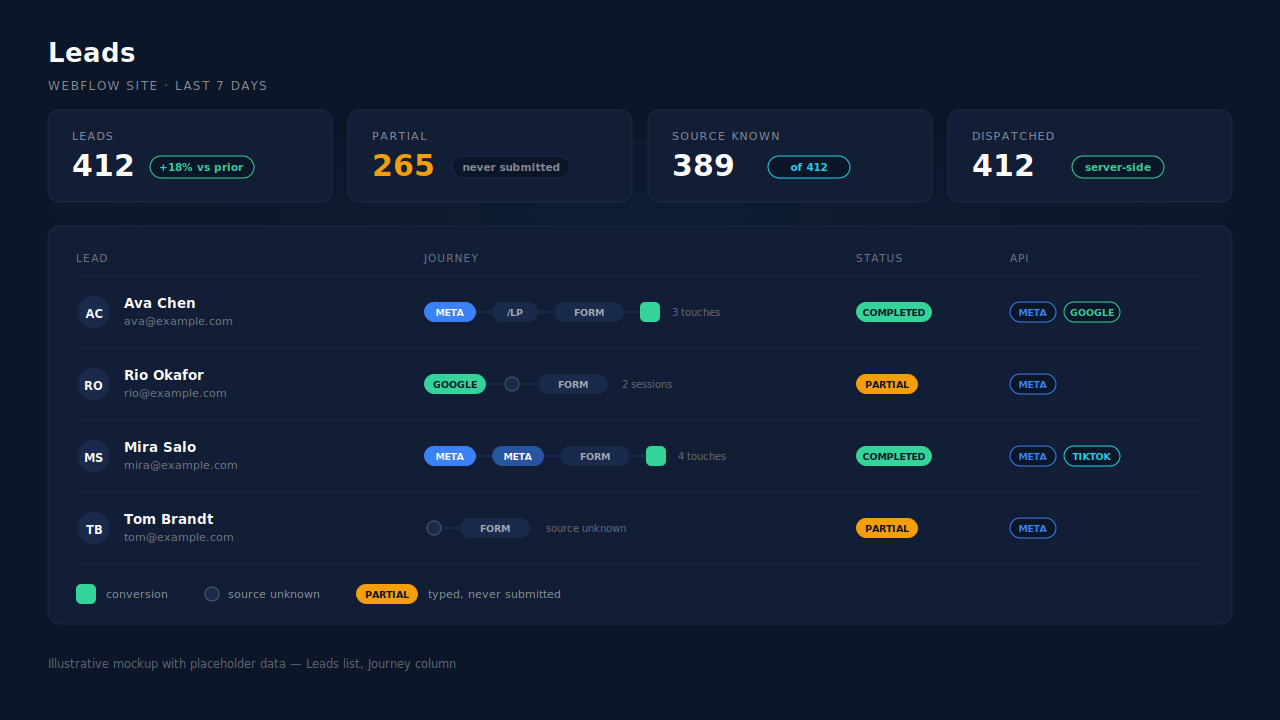
Fields are captured as they are typed, so abandoners exist. Capture runs on input and blur with a short debounce, and a terminal flush on submit, pagehide and visibilitychange drains anything pending — so the last field someone typed before closing the tab is not lost. Same mechanics as capturing a partial form lead in JavaScript, run as a service. Email and phone are normalised on the way in, phone to E.164 with a country fallback from session geo. The lead shows with an amber Partial badge and flips to Completed if they return and submit.
Sessions become people. A six-tier identity cluster unions a person’s sessions by visitor ID, email, phone, IP plus user-agent, device fingerprint and click ID, and visit-sibling inheritance repairs a session that lost its source by taking it from a sibling session in the same visit. The Journey ribbon on the Leads list renders that inline — source badges left to right, with a grey dot where the source is genuinely unknown rather than a channel invented to fill the gap.
Conversions leave from a server. Matched leads and purchases fan out to Meta’s Conversions API, Pinterest, TikTok, Microsoft and Google Ads offline conversions, with PII hashed per each platform’s spec and _fbc reconstructed from fbclid when the cookie is missing. Every event carries a deterministic event_id — a SHA-256 of the pixel, event name and record ID — written against a unique dedup key, so a retry cannot double-count, and Meta deduplicates the browser and server copies of the same event (Meta for Developers, event deduplication).
One honest note on match quality, because it decides your numbers. Event match quality is arithmetic on what you collected: hashed email is Meta’s highest-weight customer parameter and hashed phone is next (Meta for Developers, customer information parameters). With email and phone as required form fields, PartialLeads consistently delivers EMQ 9+, observed across customer accounts. An email-only Webflow form structurally caps lower — a collection ceiling, not a configuration failure, and no server-side tool can transmit a phone number nobody asked for. Requiring a phone field costs some form conversion rate; partial capture softens the trade, because a visitor who types a phone then abandons still produces a full-PII lead.
Constraints worth knowing up front. Adding site-wide custom code requires a Webflow plan that allows it — a Webflow-side prerequisite, not a PartialLeads step. Keep your Meta base pixel installed: PartialLeads reconstructs _fbc from a fbclid, but it does not synthesise _fbp out of nothing, and without that cookie server events match at reduced quality. And the split worth internalising: dispatch is controlled, matching is not — every lead you capture gets sent, while whether the platform resolves it to a real person depends on that platform’s own graph.
| What breaks | The mechanism | Where you see it in the dashboard |
|---|---|---|
| AJAX submit, no thank-you URL for a pixel | Capture on input/blur plus terminal flush on submit and pagehide; conversions dispatched server-side, not from the page |
Leads list — Partial and Completed badges, API column showing which conversion APIs each lead went to |
| Hidden fields arrive blank on multi-page journeys | Click IDs and UTMs captured at first pageview, persisted server-side against the visitor ID | Lead detail — source, campaign, landing page and referrer on the record |
| Ad-driven leads recorded as Direct | Six-tier identity cluster plus visit-sibling attribution inheritance | Journey ribbon on the Leads list; first-touch and last-touch rows in the Attribution report |
| Returning visitors lose their original click | Visitor ID in a server-set first-party cookie, outside the script-cookie cap | Multi-session leads carrying their original source across visits |
| Blocked browser scripts drop conversions | Server-side dispatch to Meta, Pinterest, TikTok, Microsoft and Google Ads | CAPI activity log — per-event status and errors |
| The same conversion counted twice | Deterministic event_id plus unique dedup keys per config |
CAPI activity log; deduplicated in Meta’s Events Manager |
| Form-starters who never submit leave no record | Debounced field capture before submit, normalised server-side | Leads list — Partial badge, with the fields they completed |
The free tier covers the whole test on 50 leads: paste the tag into your Webflow custom code, run one paid click into a landing page, browse to your contact page, type an email, close the tab. If that lead appears with the right campaign attached, the pipeline works on your site.
Recover the leads you're already earning
Tell us what you're trying to track or fix. We'll show you which visitors your forms miss — and how PartialLeads recovers and qualifies them.
Sources
- Meta for Developers — Conversions API: https://developers.facebook.com/docs/marketing-api/conversions-api
- Meta for Developers — Customer Information Parameters: https://developers.facebook.com/docs/marketing-api/conversions-api/parameters/customer-information-parameters
- Meta for Developers — Deduplicate Pixel and Server Events: https://developers.facebook.com/docs/marketing-api/conversions-api/deduplicate-pixel-and-server-events