A micro-conversion is a smaller, earlier action you report to Google Ads so Smart Bidding has enough events to learn from. Feeding qualified partial leads — people who typed an email or phone number into your form and then left without submitting — as a separate secondary conversion action gives a starved lead-gen campaign far more training signal, without inventing sales that never happened.
This is a fix for one specific situation: a campaign that spends real money and produces a handful of conversions a month. If Google keeps telling you a campaign is “learning” and cost per lead swings 3× week to week, you are the audience.
What Is a Micro-Conversion, and Why Does Smart Bidding Need One?
A micro-conversion is any tracked action that happens before the outcome you actually sell — a pricing-page view, a video watched to the halfway mark, a form started. Smart Bidding is a prediction model: it estimates the probability that a given auction produces a conversion, then bids against that estimate. Predictions need examples. Micro-conversions are extra examples.
Most micro-conversions are weak examples. A scroll to 75% says almost nothing about whether that person will buy, and an account optimising toward scroll depth will happily buy you scrollers.
A partial lead is the exception worth using. Someone who typed their work email into your form has done something almost nobody does idly, and unlike a scroll event it arrives with a contact identifier attached — so you can check later whether those people became customers. Partial lead capture exists precisely because that moment is both high-intent and, to a standard pixel, invisible.
Why Does a Low Conversion Count Stall Smart Bidding?
Low volume widens the model’s uncertainty. With a handful of conversions a month, the bidder cannot separate a genuinely good placement from a lucky one, so it either bids conservatively and loses reach or overcorrects on single conversions. Every meaningful edit restarts the learning period, and the campaign never leaves it.
Google publishes minimum conversion-volume guidance for each Smart Bidding strategy, and the thresholds have changed over the years — check the current figure in Google Ads Help for the strategy you are running rather than trusting a number you read in a blog post, including this one.
The arithmetic is brutal for lead gen. Take a B2B account spending $6,000 a month at a $550 cost per lead: eleven conversions, spread over dozens of keywords, two match types and three geographies. That is not a training set, it is anecdote. The same account’s tag sees several hundred people start the form and leave — events that already exist and are not being counted.
Which Partial Leads Should Count as a Micro-Conversion?
Not all of them. A field-capture event fires the moment someone types a character into an email box, and a raw feed of every keystroke event would be worse than no micro-conversion at all. Set a bar and apply it before anything reaches Google.
Three tests, in order of how much they matter:
- A usable identifier. The captured email or phone has to be well-formed and not disposable. “a@a.com” is a typo, not a lead.
- Evidence of a human. Continuous dwell on the page, real interaction, no automation flags. Bot traffic that fills forms will otherwise become your optimisation target.
- A fit signal. For B2B, a free-mail address from a country you do not sell into is not a micro-conversion worth bidding toward, even though it is a genuine partial lead.
The third test is the one people skip, and it is the one that decides whether this play helps or hurts. You are telling Google “find me more of these.” Be certain you want more of these. If you already score leads against your ideal customer, that verdict is the natural gate.
How Do You Set Up a Micro-Conversion Action in Google Ads Without Polluting Your Primary Goal?
Create a new, separate conversion action. Do not reuse the one your real form fills report to, and do not send partial leads under the same name. You need to be able to look at qualified leads and partial leads as two independent numbers, and you cannot unmix them later.
Four settings carry the weight:
- Category and name. Call it something unambiguous — “Qualified Partial Lead” — so nobody on the account mistakes it for a submitted form six months from now.
- Primary vs secondary. Start it as a secondary action, excluded from the “Conversions” column and therefore out of bidding. Let it accumulate while you watch. Promoting it to primary is the moment it starts steering spend, and that should be a deliberate decision made on evidence.
- Count. One per click, not every. A person who abandons three times in a week is one interested person, not three.
- Value. Assign an expected value, not a deal value. If a submitted lead is worth $200 in expected pipeline and qualified partials convert at roughly a quarter of that rate, $50 is a defensible starting number. The arithmetic is illustrative — run it on your own close rates and revisit it once you have matched outcomes to check it against.
Leaving the action secondary for a full learning cycle costs nothing and tells you whether the population is worth bidding toward at all.
What Does a Micro-Conversion Row Actually Need to Contain?
An offline click conversion is matched back to the ad click, so the click identifier is the load-bearing field. A row that lacks it imports as a zero-match. At minimum you need the Google Click ID, the exact conversion action name, a conversion timestamp that falls after the click, and a value with its currency.
Google Click ID       Conversion Name          Conversion Time            Value  Currency
Cj0KCQiA...VzXwE      Qualified Partial Lead   2026-09-18 14:32:07 +1000  50     AUD
Cj0KCQiA...9mQrT      Qualified Partial Lead   2026-09-18 16:05:41 +1000  50     AUD
Two details break more uploads than anything else. The conversion action name must match the one in your account character for character. And the timestamp must be later than the click and inside the click window Google accepts for offline imports — check that window in Google’s documentation, because it is Google’s rule and changes independently of anything on your side.
On iOS traffic the identifier may arrive as gbraid or wbraid instead of gclid, and those capture and upload differently. If the click ID is missing from your landing pages entirely, no upload strategy will save you — that is a separate and more urgent problem.
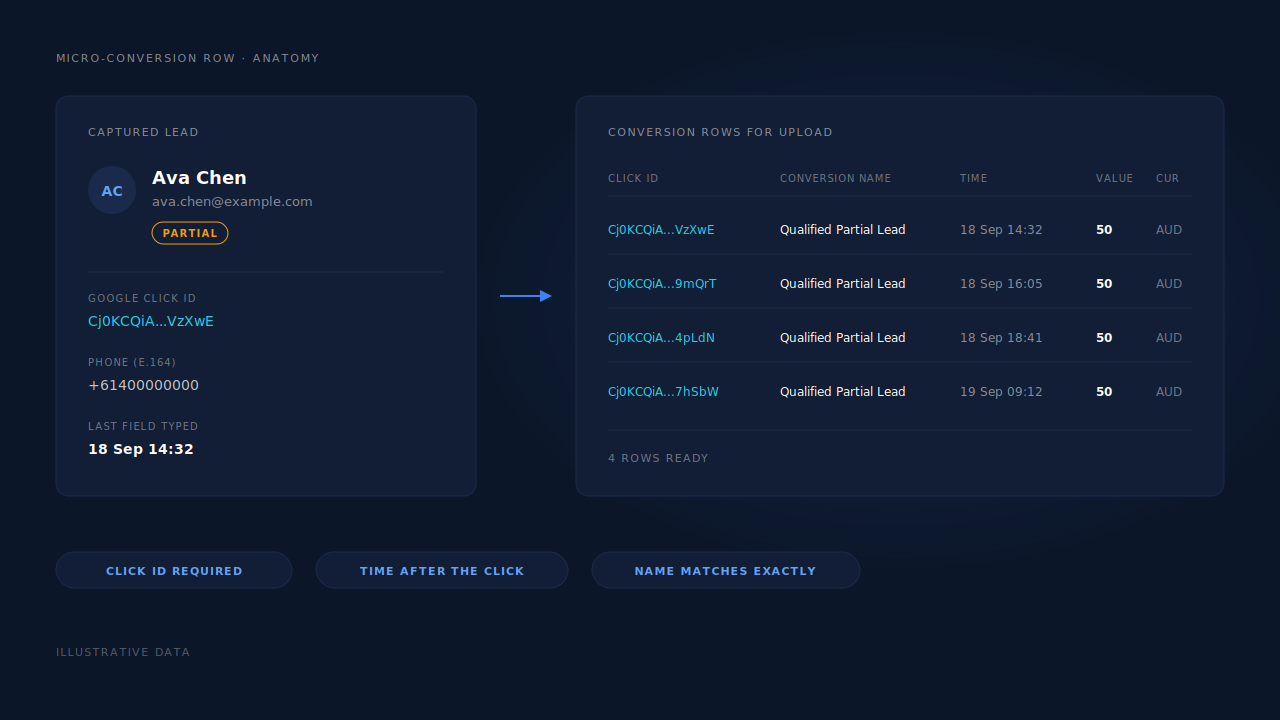
You can also attach hashed email and phone for enhanced conversions for leads, which gives Google a second way to match a row whose click ID has aged out. Normalisation matters more than the hashing itself — lowercase and trim the email, reduce the phone to E.164 digits, then hash.
If you run the same play on Meta, the payload shape differs. Meta’s Conversions API takes the same identifiers as hashed customer-information parameters, with email as its highest-weight field and phone next, and it clamps event_time to a seven-day window. That clamp is a good argument for firing the micro-conversion when the capture happens rather than batching it into a weekly upload, on either platform.
How Do You Avoid Teaching Smart Bidding the Wrong Lesson?
The failure mode is specific: you optimise toward cheap form-starts and Google delivers exactly that — more people who start forms and leave. Cost per lead drops, the dashboard looks better, and sales gets worse leads. Four guardrails keep that from happening.
Keep the submitted form as a primary conversion with a higher value, so the model still prefers a real lead to a partial one. Judge the experiment on cost per qualified lead, and define “qualified” before you start rather than after you see the result. Review a cohort — take one month’s partial leads and check what fraction became real opportunities. And set an exit condition in advance: if qualified-lead cost rises over a full learning cycle, pull the micro-conversion back out of bidding.
The honest limitation is that this is a remedy for starvation. A campaign already producing comfortable conversion volume gains little and takes on real risk from a noisier target. There, the same data is better used for reporting than for bidding.
How Does PartialLeads Feed Partial Leads to Smart Bidding?
PartialLeads supplies the two things a micro-conversion row needs and a standard setup cannot produce: the contact detail of a visitor who never submitted, and the ad click ID that visitor arrived on. The tag captures email and phone on input and blur as they are typed, with a terminal flush on pagehide, so the last field typed is never lost when the tab closes.
The click identifier is captured at the landing page — gclid, gbraid, wbraid and gad_source — and held on the session, then on the person’s identity cluster. That second step is what makes a delayed upload work at all: someone can land on the ad on Monday, return direct on Thursday, and type an email into the form then, and the click ID from Monday is still attached to them.
Phone numbers are normalised to E.164 with a country-code fallback from the session’s geo, and Gmail dot and plus variants are normalised before hashing — so identifiers upload in the shape the platform expects, not the shape the visitor typed.
PartialLeads’ Google Ads offline-conversion path writes conversion rows — click ID plus hashed email and phone — into your Google Sheet, which Google Ads imports on its own schedule. If you are building that path from scratch, importing lead conversions into Google Ads covers the setup end to end.
For the qualification bar, the AI layer enriches each lead and returns a verdict — strong match, possible match, unlikely match, or insufficient data — against the ideal-customer description you write. You still choose the threshold; the product supplies the evidence for it.
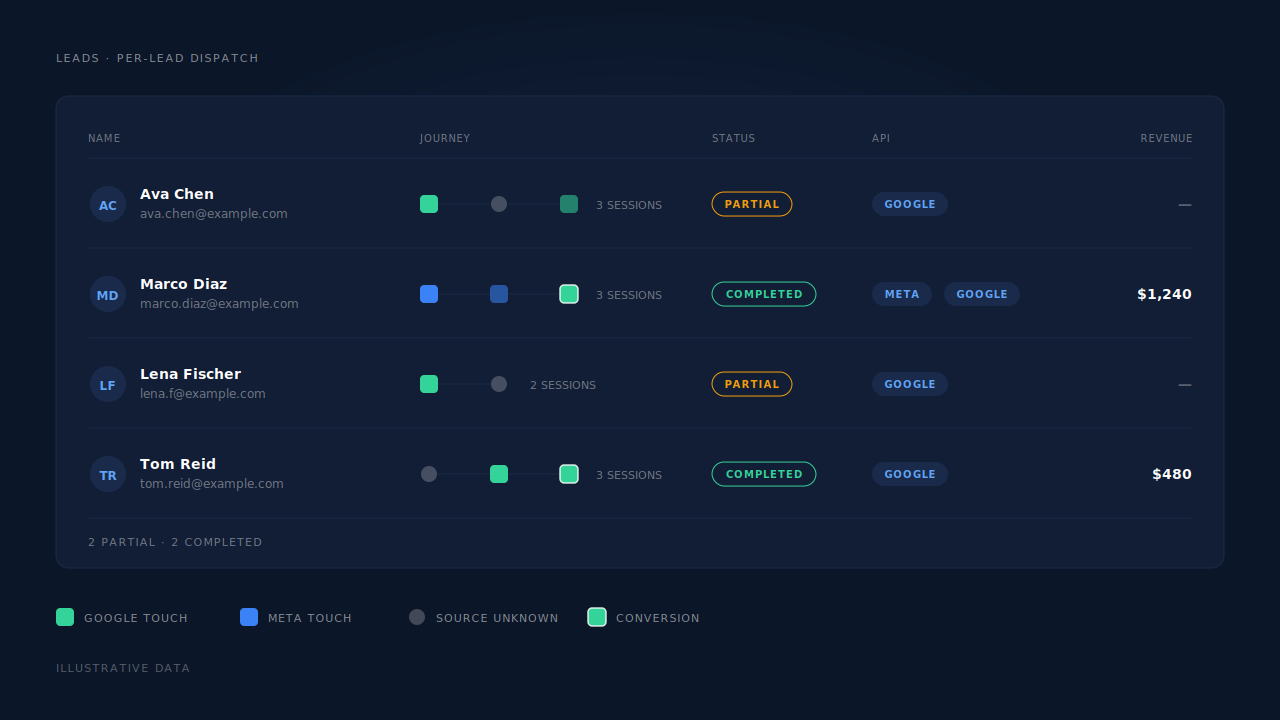
The proof is on the Leads list. Each row carries the journey as a strip of touch badges, a Partial or Completed status, and an API column showing which conversion APIs that specific lead was dispatched to — per-lead dispatch confirmation, rather than a total you have to trust.
Three honest constraints. Google’s click-age window bounds what it will accept, so a partial lead that sits unqualified for weeks may age out. The Sheets import runs on Google’s schedule, so treat this as a daily loop, not a real-time one. And a partial lead whose whole cluster carries no click ID cannot be uploaded as a click conversion — hashed email and phone are the only route there.
| What breaks | The mechanism | Where you see it in the dashboard |
|---|---|---|
| Not enough conversions for Smart Bidding to learn | Field capture on input/blur with a terminal flush, so form-starters become countable events |
Leads list, Partial status badges |
| The click ID is gone by the time the person converts | gclid/gbraid/wbraid captured at landing and held on the identity cluster across sessions |
Journey ribbon on the Leads row |
| Identifiers rejected on upload for bad formatting | E.164 phone with geo fallback, Gmail dot/plus normalisation, hashing through one canonical builder | Conversion rows written to your Google Sheet |
| No defensible bar for which partials should count | Two-step AI enrichment scored against your ideal-customer persona | Customer Match verdict on the lead |
| No way to confirm a lead actually reached the platform | Per-lead dispatch record | API column on the Leads list |
Start it as a secondary action. Watch a full learning cycle. Promote it only if cost per qualified lead moves the right way. A partial lead is a better micro-conversion than anything else available to you — but it is still a micro-conversion, and the algorithm will take you literally.
Tell us what's broken. We'll fix your tracking — free.
Describe the tracking/attribution problem you're stuck on and we'll map it to a fix: server-side conversions to Meta, Google, TikTok and Pinterest, plus first-party tracking that survives Safari. No code required.
Sources
https://developers.facebook.com/docs/marketing-api/conversions-api/parameters/customer-information-parameters https://developers.facebook.com/docs/marketing-api/conversions-api/using-the-api