Divide the campaign’s spend by every lead it produced — including the people who typed an email or phone number and left without submitting. Google Ads’ cost per conversion divides spend by the conversions you fed it, which for most lead-gen accounts means submits only. Adding contactable partial leads to the denominator changes the number, and it usually changes which campaign looks expensive.
You end up with two numbers per campaign. That is the correct outcome, not a measurement failure. One prices the event Google optimises toward. The other prices the contact records your sales team can actually call.
Why doesn’t Google Ads’ cost per conversion tell you your cost per lead?
Because it divides spend by conversions, and a conversion is whatever you told Google to count. In a lead-gen account that is almost always a thank-you page view or a form-submit event. Everybody who typed their email into your form and closed the tab is absent from that count — so the column prices your submits, not your leads.
The conversion column is a definition, not a census. Two accounts running identical traffic to identical forms report different costs per conversion if one counts submits and the other counts submits plus phone clicks. Nothing is broken in either. They are answering different questions and printing the answer under the same header.
There is a second gap underneath the first. Even for the submits, the browser has to cooperate: the tag has to load, the conversion has to fire, and the click identifier has to survive the trip from the ad to your landing page. When the gclid goes missing on the landing page, the lead is real but the campaign never gets credit for it, and your reported cost per conversion rises for a reason that has nothing to do with the campaign.
So treat Google’s number as what it is: the price of a specific event, through a specific pipe, under the definition you configured. Useful, but not your cost per lead.
What counts as a lead when most of them never hit submit?
A lead is a contactable record — an email address or a phone number you can act on. A submit is an event. Most teams conflate the two because, historically, the form was the only place a record could come from.
Field-level capture breaks the conflation. A partial lead is a visitor who typed identifying information into your form and left before submitting. The email exists — it just never travelled anywhere, because the only thing listening was a submit handler that never ran.
That gives you a definitional choice, and you should make it explicitly rather than by accident:
- Contactable partial — carries a plausible email or a phone number. This is a lead. Count it.
- Non-contactable partial — someone typed a first name, or three characters of an email, and left. This is a signal about your form, not a lead. Exclude it.
Write that rule down before you compute anything, and apply it identically to every campaign. Half of the arguments about cost per lead are undeclared arguments about what a lead is. Partial lead capture gives you the raw material; the definition stays yours.
How do you actually calculate CPL including partial leads?
Three inputs per campaign, per period: spend, completed leads, and contactable partial leads. Then two divisions.
- Submitted CPL = spend ÷ completed leads
- Captured CPL = spend ÷ (completed leads + contactable partial leads)
Here it is for two campaigns with identical budgets. The numbers are illustrative, chosen to show the reversal rather than drawn from an account.
| Campaign | Spend | Completed | Contactable partials | Submitted CPL | Captured CPL |
|---|---|---|---|---|---|
| A — problem-aware search | $4,000 | 40 | 60 | $100.00 | $40.00 |
| B — brand search | $4,000 | 50 | 10 | $80.00 | $66.67 |
By Google’s column, B is the efficient campaign and A is the one you cut. By captured CPL, A produces contact records at under two-thirds of B’s cost. Both calculations are correct. They disagree because A sends traffic that engages the form and hesitates, and B sends traffic that already knows you and completes.
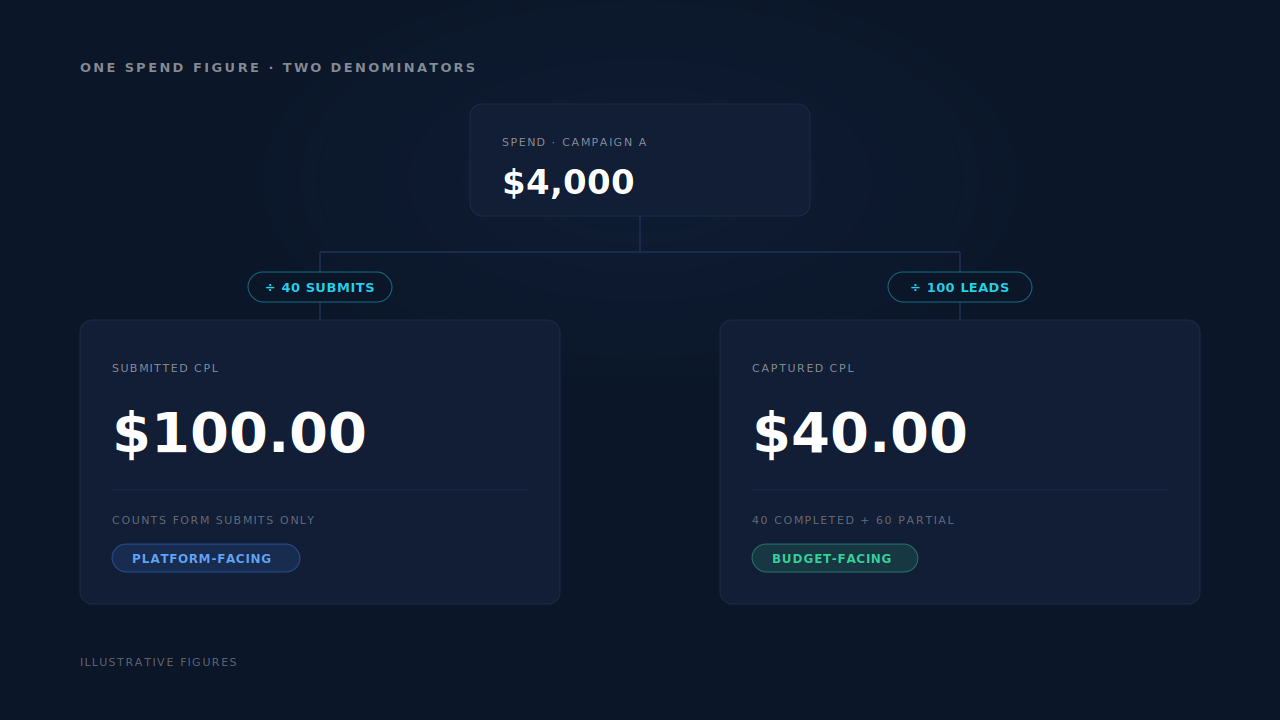
The reversal is the point of running both. A campaign that fills forms halfway is not the same as one that produces nothing, and a single number cannot tell them apart.
Which spend figure do you divide by?
Campaign-level cost from Google Ads, for the same date range, in one currency, on one day boundary. Each of those three qualifiers breaks the arithmetic on its own.
The day boundary. Your Google Ads account has a timezone. Your lead records have one too, and it is often different. A lead captured at 11:40pm can land on Tuesday in one system and Wednesday in the other, which is invisible at monthly grain and severe at daily grain — exactly the grain at which people make bid decisions.
The currency. If spend reports in one currency and your deal values sit in another, pick one and convert consistently, with the rate date recorded. A CPL that silently mixes currencies is not a number, it is a mood.
The campaign identity. The campaign label on a lead is whatever the click carried — usually utm_campaign, written by your tracking template. If that template writes the campaign name and someone renames the campaign mid-quarter, your history splits into two campaigns that were always one. Use a stable identifier there, not a human-editable name.
Which of the two numbers do you act on?
Use submitted CPL for platform-facing decisions and captured CPL for business decisions.
Submitted CPL reconciles with what Google shows you, because it counts the same events the platform counts. Use it when you are checking bids, comparing against target CPA, or arguing with the platform’s own reporting.
Captured CPL is the number to set against what a contact record is worth to you. It answers budget and staffing questions: whether this campaign deserves another $2,000, and whether a channel that looks expensive is your cheapest source of people to talk to.
One honest caveat, and it matters more than the arithmetic: captured CPL is only real if somebody works the partial leads. If the list sits in a dashboard that nobody opens, you have not lowered your cost per lead — you have lowered your cost per row. Count partials in the denominator when they enter a follow-up sequence, and not before.
What quietly breaks the denominator?
Four things, in rough order of damage.
Duplicates. One person who visits on a phone, returns on a laptop and fills the form twice produces three records in a naive system. Counting them as three leads flatters your CPL by two-thirds. This is the single biggest inflation risk in any lead-count denominator, and it is why one customer can show up as three leads in tools that never stitch sessions into people.
Junk. Bots, disposable addresses and test submissions look like leads to a counter and deflate CPL without producing a single conversation. Filter before you divide, the same way every period.
Unattributed leads. A lead whose session carried no click identifier and no UTM does not land on the campaign that produced it — it lands in Direct. That understates the campaign’s lead count, which overstates its CPL. It pushes in the opposite direction from duplicates, so the two can mask each other into a plausible number that is wrong twice.
Definition drift. Somebody starts counting non-contactable partials in month three, the CPL improves, and nobody knows why. Version your lead definition like you version a conversion action.
Should partial leads count as conversions in Smart Bidding?
Measuring and uploading are separate decisions. Counting a partial lead in your CPL is reporting — it changes what you know. Uploading a partial lead as a conversion is bidding — it changes what Google’s algorithm chases. Do the first freely. Do the second deliberately.
If you do upload them, give them their own conversion action rather than folding them into the one your bidding strategy already optimises toward, and keep them out of the primary goal until you can show that the partials you count actually turn into pipeline. Otherwise you have asked the algorithm to buy more hesitation.
The mechanics are the same as for any offline lead: the conversion has to carry a click identifier or hashed contact details, which means importing lead conversions into Google Ads from wherever it was captured. Google also limits how old a click can be when you upload against it — check the current rule in Google’s documentation rather than assuming your backfill lands.
The stronger move for most accounts sits upstream of bidding: rank sources by cost per qualified lead rather than raw lead count, so a cheap denominator full of poor-fit contacts stops winning arguments.
How does PartialLeads help you measure Google Ads cost per lead?
By building the half of the arithmetic that is hard: a lead count per campaign that includes the people who never submitted, and counts one person once.
The tag captures form fields as they are typed, on input and blur, and flushes anything pending when the page hides — so a visitor who types an email and leaves still produces a record with a usable contact channel. That record carries the session’s attribution: gclid, gbraid and wbraid are captured alongside the UTMs at first touch, so the lead arrives already attached to the click that paid for it.
Underneath, a six-tier identity cluster unions a person’s sessions — visitor ID, email, phone, IP and user-agent, device fingerprint, and click ID — so the same human across two devices is one lead in your denominator, not three.
On the Leads list, every row carries a Status of Partial or Completed, alongside the Journey column, the UTM column and the per-lead source. Those two statuses are your two denominators, in one table. The Attribution report adds the aggregate view: a Revenue by Match Quality split of partial-captured, submit-completed and unmatched, and a Channels table carrying Revenue, Purchases, AOV, Avg Lag, Visitors, V→L and ROAS per channel, with paid channels expanding to their campaigns.
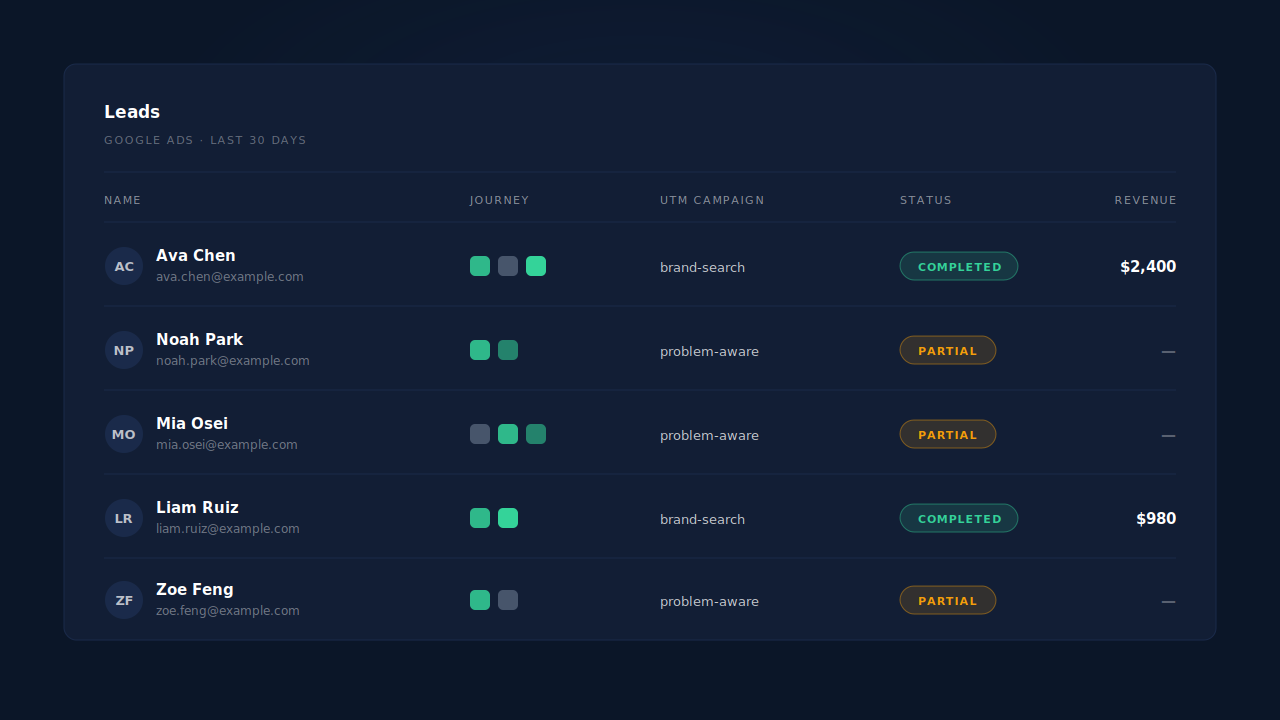
The honest constraint: there is no cost-per-lead column to point at. CPL is arithmetic you perform, and you bring the spend figure from Google Ads. What the product removes is the guesswork in the denominator — which leads exist, which campaign each belongs to, and which records are the same person.
| What breaks | The mechanism | Where you see it in the dashboard |
|---|---|---|
| Cost per conversion prices submits, not leads | Field capture on input/blur, flushed before the page hides |
Leads list — Partial and Completed rows side by side |
| The lead has no campaign attached to it | gclid, gbraid, wbraid and UTMs captured at first touch |
UTM column and per-lead source on the Leads list |
| One person counted as three leads | Six-tier identity cluster unions a person’s sessions | Journey column — multiple touches on a single row |
| No view of what unsubmitted leads contributed | Partial-captured, submit-completed and unmatched split of matched revenue | Attribution report — Revenue by Match Quality |
| Campaigns not comparable to each other | Channels table with paid channels expanded to their campaigns | Attribution report — Channels table |