Use a script tag, not a plugin. An abandoned lead is the email or phone someone types before they leave, so capturing it is a browser job: listen to the form fields, debounce what gets typed, and flush it with a beacon as the tab closes. The processing — normalising, storing, matching — belongs on a server that isn’t yours. Nothing in that sequence needs PHP, a new database table, or code that runs on every WordPress request.
That distinction is the whole answer to the “heavy plugin” problem. Plugins are heavy because they execute inside WordPress. A capture script executes inside the browser and posts somewhere else, so the weight it adds to your site is one HTTP request for a small file.
Why don’t WordPress form plugins capture abandoned leads?
Because a form plugin’s job begins at submit. Gravity Forms, WPForms, Contact Form 7, Fluent Forms and Elementor’s form widget all work the same way structurally: they render fields, wait for the submit handler, serialise the fields, and POST them to WordPress. Until that POST happens, the typed values exist only in the DOM, and the plugin has no reason to look at them.
So the plugin is not failing. It is doing exactly what it was built to do, and form abandonment happens entirely inside the window it does not watch. The visitor who typed their email, hesitated at the phone field and closed the tab produced no entry, no notification, and no row in your CRM.
A few form plugins ship a partial-entries or save-and-continue add-on, which narrows the gap. They share two traits that matter here: they save the incomplete entry into your WordPress database, and they generally only cover forms built by that same plugin. If your site runs a Gravity form on the pricing page and an embedded booking widget on the demo page, the add-on sees one of them.
What does a “heavy” WordPress plugin actually cost you?
Four things, and only one of them is page speed. A plugin that captures partial entries adds PHP execution to requests, write traffic to your database, front-end assets to your pages, and a permanent compatibility surface you now have to maintain.
The database cost is the one people underestimate. Partial capture means writing on a timer while a visitor is still typing, so a form that would have produced one row on submit now produces several rows per visitor, stored in your install. On shared hosting that lands on the same database that serves your pages.
The front-end cost is more familiar. Plugins tend to enqueue their own scripts and styles sitewide rather than only on pages that contain a form, and each of those is a request the browser makes before it can finish rendering. A render-blocking script on a landing page is a direct tax on the exact traffic you are paying for.
The maintenance cost is quiet until it isn’t. Every plugin is code running with full access to your site, updated on someone else’s schedule. A capture script that lives outside WordPress cannot take the site down when it fails — it just stops capturing.
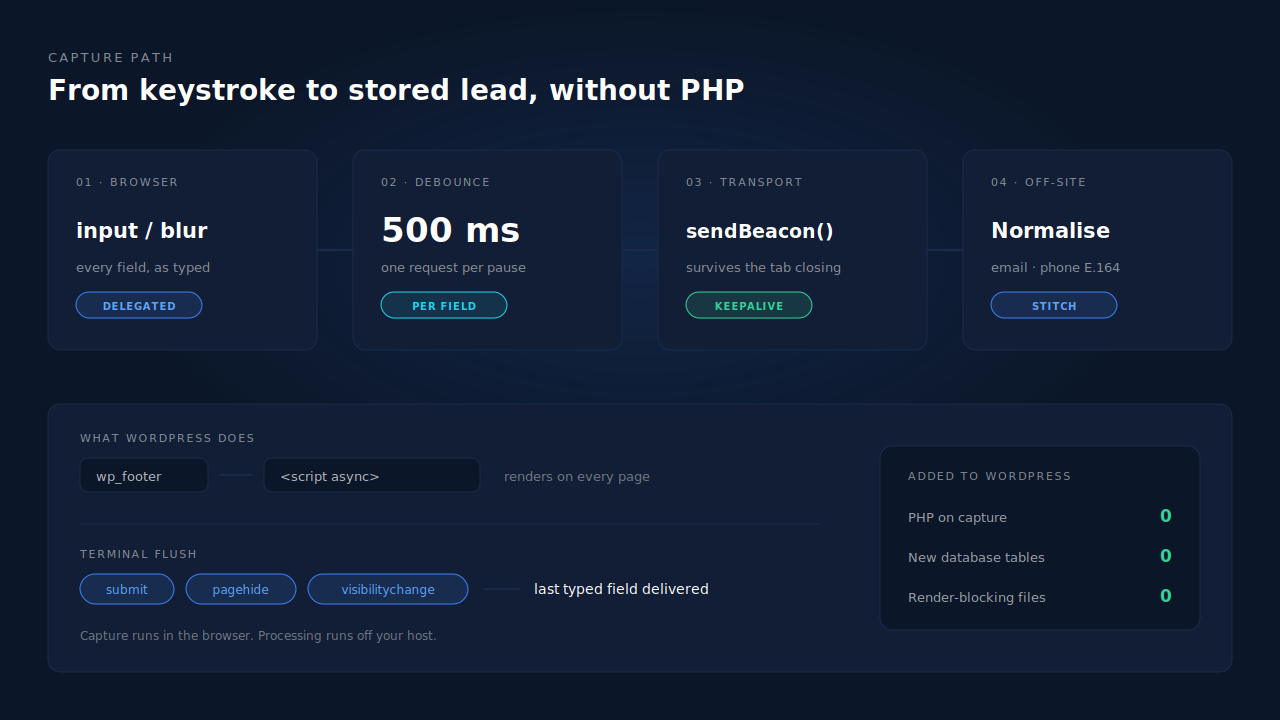
What do you actually need to capture an abandoned lead?
Four pieces: a listener on the form’s fields, a debounce so you don’t send a request per keystroke, a transport that survives the page unloading, and an endpoint off your own server to receive it. Everything else is refinement.
The listener should bind at the document level rather than to specific form elements. WordPress pages load forms late — inside accordions, popups, Elementor widgets and lazy-loaded blocks — and a listener attached on DOMContentLoaded to a selector that doesn’t exist yet catches nothing. Delegated listeners on input and blur catch forms that appear at any point in the page’s life, which is what makes the approach plugin-agnostic: the script never needs to know which plugin rendered the field.
The transport is where naive implementations lose the lead they just captured. A normal fetch issued during pagehide is cancelled when the document goes away, which means the last field a visitor typed — usually the most valuable one — is the one that never arrives. navigator.sendBeacon is designed for exactly this: it hands the request to the browser, which delivers it after the page is gone.
// Delegated listeners — work for forms added to the page later.
let pending = null;
let timer = null;

document.addEventListener('input', function (e) {
  const el = e.target;
  if (!el.name || el.type === 'password' || el.type === 'hidden') return;

  pending = { name: el.name, value: el.value };
  clearTimeout(timer);
  timer = setTimeout(send, 500);   // debounce: one request per pause
}, true);                          // capture phase, so it sees everything

function send() {
  if (!pending) return;
  navigator.sendBeacon('https://capture.example.com/field', JSON.stringify(pending));
  pending = null;
}

// Terminal flush: drain whatever is still debounced before the tab dies.
addEventListener('pagehide', send);
addEventListener('visibilitychange', function () {
  if (document.visibilityState === 'hidden') send();
});
That is the shape of partial lead capture in about twenty lines. The production version has more to handle — field classification, password and payment exclusion, consent gating, retry on beacon rejection — and how to capture a partial form lead in JavaScript goes through those edges properly. The point for WordPress is narrower: none of this code is WordPress code. It never touches PHP.
How do you add a capture script to WordPress without a plugin?
Print one script tag in the footer from your child theme’s functions.php. That is the entire install, and it works on classic themes, block themes and page builders alike, because wp_footer fires on all of them.
// wp-content/themes/your-child-theme/functions.php
add_action( 'wp_footer', function () {
	?>
	<script async
	        src="https://cdn.example.com/px.js"
	        data-key="<?php echo esc_attr( YOUR_CAPTURE_KEY ); ?>"></script>
	<?php
}, 20 );
The async attribute matters. It tells the browser to fetch the file without blocking the parse, so the script costs you a background request rather than a delay in rendering. Placing it in the footer rather than the head means the form markup already exists when it runs.
Two practical warnings. If you would rather not edit a theme file, the same tag can go in a header-and-footer snippet tool or your site’s custom-code field — the requirement is that it renders on every page, not where it renders from. And check your caching plugin: most ship a “delay JavaScript until user interaction” option, enabled by default in some configurations. A capture script delayed until the first click captures nothing from a visitor who lands, types and leaves. Add the file to that plugin’s exclusion list.
How do you keep the captured lead attached to the ad that produced it?
Capture the attribution at the same moment you capture the field, in the same script. When the visitor lands, read the click IDs and UTM parameters off the URL — gclid, gbraid, wbraid, fbclid, msclkid, ttclid, epik — store them with the visitor, and attach them to every field payload you send.
This has to happen on the landing hit, not at submit time. A lead captured on step three of a funnel has a clean URL with no trace of where the person came from, and if nobody recorded it on arrival the source is genuinely gone. Fall back to document.referrer when there are no parameters, and store the landing page separately from the page the form sits on — conflating them is how a pricing page gets credited for traffic an ad bought.
This capture path also keeps working when the platform pixels don’t. Ad blockers break conversion tracking by blocking known pixel domains, and a first-party request to your own capture endpoint has a different destination.
Where should the captured data actually go?
To a server you don’t have to run, which then does three jobs: normalise, stitch and dispatch. Normalising means lowercasing and trimming the email, and rewriting the phone number into E.164 so (02) 9000 1234 and +61290001234 are recognised as one person. Stitching means recognising that this visitor is the same human as the one who visited last Tuesday. Dispatching means pushing the lead onward — to your CRM, and to the ad platforms through the Conversions API so the algorithm learns from leads its pixel never saw.
Keeping that pipeline off WordPress is not only a performance argument. Partial leads are unsubmitted personal data, and storing them in wp_postmeta makes your CMS the system of record for PII a visitor never actually sent you. An endpoint with hashing at rest and a retention policy is a better home for it.
How does PartialLeads capture abandoned WordPress leads without a heavy plugin?
With one script tag — the same universal tag that runs on any site — and no WordPress plugin at all on the lead-capture path. It is vanilla JavaScript, roughly 10KB gzipped, installed with a single tag whose client key is injected server-side. No tag manager is required, and most installs are done in under five minutes.
What it does in the browser is the mechanism described above, hardened. Fields are captured on input and blur with a 500ms debounce and posted to a capture endpoint. A terminal flush on submit, pagehide and visibilitychange drains any pending field through navigator.sendBeacon, with a keepalive fetch as fallback, so the last thing typed is never the thing lost. Because the listeners are bound to the document rather than to a plugin’s markup, it does not care which form plugin rendered the field — Gravity, WPForms, Contact Form 7, Fluent, an Elementor widget or a hand-written HTML form all capture identically.
Attribution rides the same payload: UTMs with a referrer fallback, plus gclid, gbraid, wbraid, fbclid, msclkid, ttclid and epik, the landing page, and geo enrichment from the visitor’s IP. The visitor ID is written as a first-party cookie by the server, not by script, which is why it survives Safari’s cap on script-written cookies and why a visitor returning two weeks later still stitches to the same person.
Everything after that happens off your host. Emails and phones are normalised, sessions are unioned into one identity, and the lead lands on the Leads page with a Partial badge, its source, its journey and its captured fields. When that person later buys, the purchase matches back to the session and the lead flips to Completed with revenue attached — and if the store is WooCommerce, the same account can track WooCommerce purchases server-side, which is the one place a plugin does get installed.
Honest constraints. The tag has to load, so a caching plugin that defers all JavaScript until interaction suppresses capture until the visitor clicks, and a consent-gated setup captures nothing until consent is given. Server-side conversion quality still depends on the platform cookies the browser collects, so keep your existing Meta base pixel installed alongside the tag. And PartialLeads controls dispatch, not matching: every captured lead can be sent, but whether the platform resolves it to a person is the platform’s half of the job.
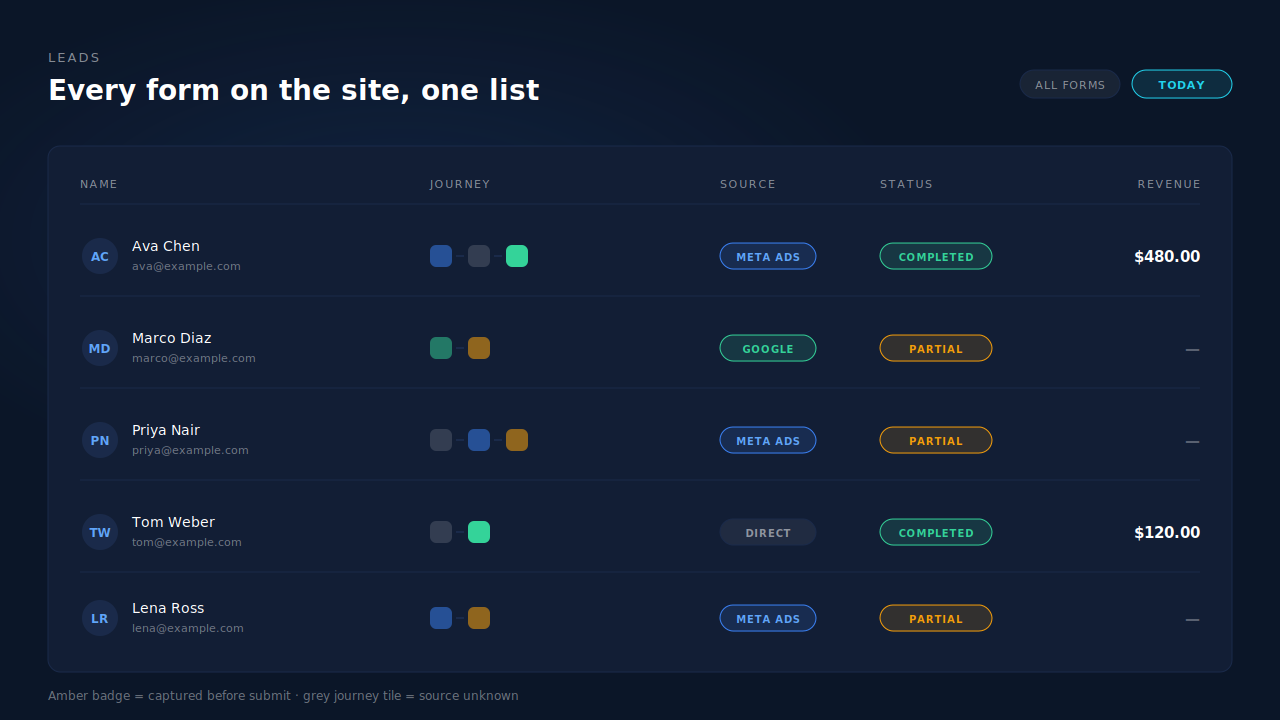
| What breaks | The mechanism | Where you see it in the dashboard |
|---|---|---|
| Form plugin only records submitted entries | Field capture on input/blur, 500ms debounce, posted as typed |
Leads page, Partial badge on the row |
| Last field typed is lost when the tab closes | Terminal flush on submit / pagehide / visibilitychange via sendBeacon |
Captured fields on the lead detail, in order |
| Plugin-specific add-on misses other forms on the site | Document-level listeners, independent of the form’s renderer | Leads from every form and embed in one list |
| Click ID gone by the time the lead converts | Click IDs and UTMs read on the landing hit, stored with the visitor | Source badge and UTM column on the lead |
| Safari drops the visitor after a week | Visitor ID set as a first-party cookie by the server, not by script | Returning visitor stitched into one journey |
| Partial PII sitting in your WordPress database | Capture posts off-site; nothing is written into your install | Leads live in PartialLeads, not wp_postmeta |
| Ad platform optimises only on submitted leads | Server-side dispatch to Meta, Pinterest, TikTok and Google Ads | CAPI activity log, per-lead API column |
Tell us what's broken. We'll fix your tracking — free.
Describe the tracking/attribution problem you're stuck on and we'll map it to a fix: server-side conversions to Meta, Google, TikTok and Pinterest, plus first-party tracking that survives Safari. No code required.
Sources
https://developers.facebook.com/docs/marketing-api/conversions-api https://developers.facebook.com/docs/marketing-api/conversions-api/parameters/customer-information-parameters