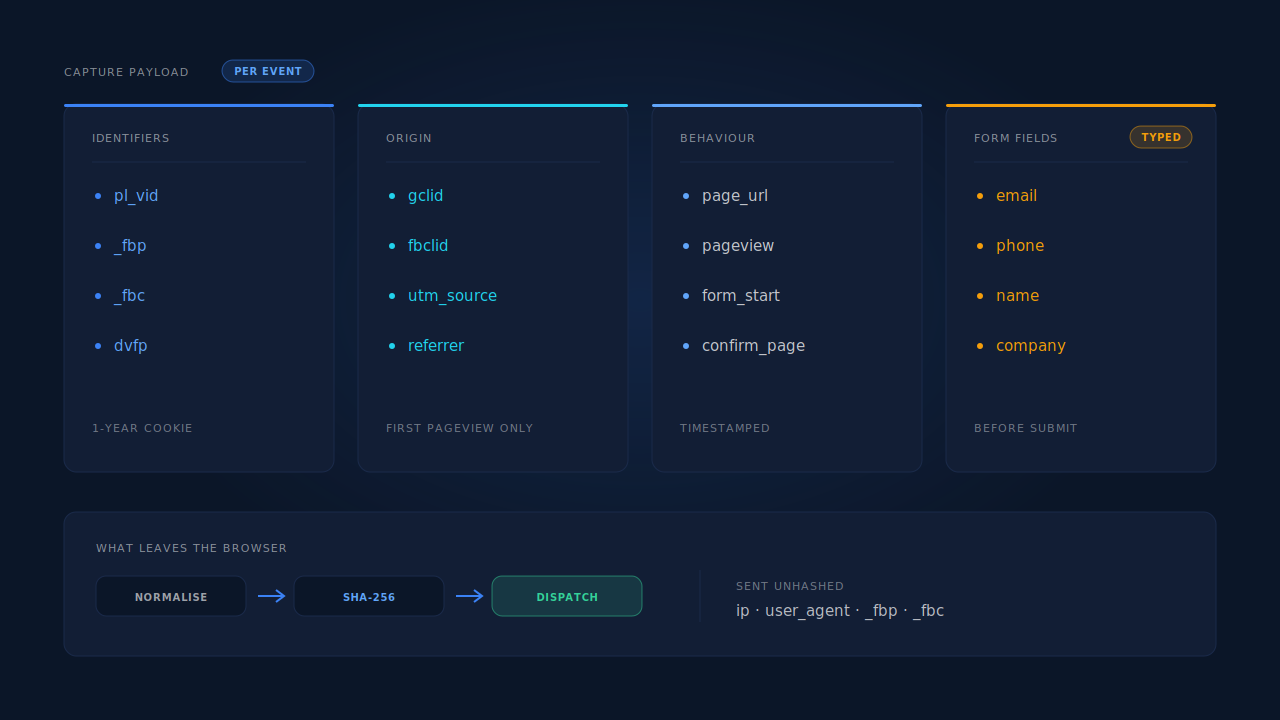
A tracking tag collects four things: identifiers that let it recognise the same browser on a later visit, origin data that records where the visit came from, behaviour data about what happened on the page, and — if it does form capture — the contact details typed into your form fields. Every item on a vendor’s data page is one of those four in different words.
That is the whole inventory. The reason nobody can ever tell you which one their tag does is that “we take privacy seriously” is easier to write than a list of field names.
This matters beyond curiosity. You cannot write an honest privacy notice for data you have not enumerated, you cannot answer a client’s security review, and you cannot judge whether a tag is worth its risk until you know what it carries. So here is the list, followed by the ten-minute audit that gets you the same answer for whichever tag you already have installed.
What data does a tracking tag actually collect?
Four categories, and they rarely overlap. Identifiers answer “is this the same person as last time.” Origin answers “where did they come from.” Behaviour answers “what did they do.” Contact data answers “who are they.” A tag that does conversion tracking needs the first three. A tag that does lead capture needs all four.
| Category | Typical fields | Why the tag wants it |
|---|---|---|
| Identifiers | a first-party ID cookie, a value in localStorage, a device hash, platform cookies like _fbp and _fbc |
to recognise the same browser across pages and across visits |
| Origin | utm_source and the rest of the UTM set, gclid, fbclid, msclkid, ttclid, epik, the referrer, the landing URL |
to tie whatever happens next to the click that caused it |
| Behaviour | page URLs, page views, timestamps, scroll depth, form starts, clicks, the confirmation page | to know what happened, in what order, and when |
| Contact data | whatever the visitor types into form fields — name, email, phone, company | to create the lead record, and to match a later purchase back to a session |
Two of these deserve a second look because they surprise people.
Identifiers are set, not just read. A tag does not find a visitor ID lying around; it creates one and stores it. Whether that write happens in a cookie, in localStorage, or both, and whether the cookie is written by JavaScript or by your server, changes how long it survives and which consent rules apply to it. It is the single most consequential technical choice in a tag and it is almost never documented.
Origin data is collected on the first pageview or not at all. Click IDs live in the URL of the landing page. One internal navigation later the URL is clean and the referrer is your own domain. If the tag was not running on that first pageview, that data does not exist anywhere for it to collect later. This is why the difference between gclid, fbclid and UTM parameters turns out to matter operationally and not just as trivia.
What does a tracking tag not collect?
A tag runs in one browser tab on your own site, so its ceiling is that tab. It cannot read other tabs, other sites, or anything the visitor did before they arrived beyond the referrer string. It cannot see their identity from some central registry. It has no view into their email, their device contacts, or their behaviour on a competitor’s site.
The realistic limits, which are worth knowing because they are the answer to most of the alarming versions of this question:
- No cross-site browsing history. A first-party tag sees your domain only. Third-party cookies, the mechanism that once made cross-site tracking possible, are not available to it.
- No other tabs, no other apps. The browser’s own security model enforces this, not the vendor’s good intentions.
- Nothing when it does not load. If a blocker stops the script, the tag collects nothing at all — which is the mechanism behind how ad blockers break conversion tracking, and also the reason “the tag sees everything” cannot be true.
- No identity the visitor never supplied. A tag can recognise a returning browser. It cannot turn an anonymous visitor into a name and an email address. If a name appears on a lead record, somebody typed it.
What a form-capture tag can see is the thing to focus on, because it is the genuinely sensitive case: the characters typed into form fields, as they are typed, before any submit button is pressed. That is not a loophole — it is the stated function. But it means the question “does it exclude password and payment fields?” has a right answer, and you should get it in writing from any vendor whose tag runs on a page that has those fields.
Why does a tag collect identifiers you never asked for?
Because each identifier does a job that no other one can do, and the tag cannot know in advance which ones will survive. Click IDs die at the first navigation. Cookies die at browser eviction. Device hashes are weak on their own. A tag collects several because it is building redundancy, not a profile.
Here is the honest version of what each is for:
- The first-party ID is the backbone. Everything else in the record is hung off it. Without it, every pageview is a stranger.
- Click IDs (
gclid,fbclid,msclkid,ttclid,epik) are the only thing that ties a session to a specific ad click. Ad platforms match on them and on nothing else with the same confidence. - Platform cookies (
_fbp,_fbc,_epik) are what the ad platform’s own server-side matching looks for. A server event without them is an anonymous server event. - IP address and user agent are weak identifiers with a strong secondary use: they carry approximate location and device type, and they are required parameters in most server-side conversion APIs.
- A device hash is the last resort — a fingerprint-style value used to join sessions when every stronger signal has been lost.
The pattern is that identity is reconstructed from several partial signals rather than read from one perfect one, which is the mechanic behind how visitor identity resolution works. The upside is that one broken identifier does not lose the visitor. The cost, and it is a real cost, is a longer list of collected fields in your privacy notice.
What happens to the data after it leaves the browser?
It gets normalised, then usually hashed, then stored. Normalisation means lowercasing an email, trimming whitespace, and rewriting a phone number into E.164 international format, because two systems must agree on the exact string before a match can work. Hashing means running that normalised string through SHA-256 so the receiving platform matches on the hash rather than on the address itself.
Hashing is worth understanding precisely, because it is where a lot of privacy copy gets loose.
Meta’s Conversions API documentation sets out which customer-information parameters are hashed and how each must be normalised first — email lowercased, phone digits-only in E.164 — while client_ip_address and client_user_agent are sent unhashed, because the platform needs to read them (Meta, 2026). Google, Microsoft, TikTok and Pinterest follow the same pattern with their own field names.
What that buys you: the ad platform never receives a readable email address. What it does not buy you: anonymity. The same email always produces the same hash — that determinism is exactly what makes matching possible — so a hash remains a stable identifier for a specific person. Treat a hashed email in your database as personal data that happens to be unreadable, not as data that stopped being personal. If you want the deeper version of why server-side dispatch changes the shape of this, the Conversions API is the mechanism doing the sending.
How do you audit your own tag in ten minutes?
Open the network tab and read the requests. This is the only method that survives a vendor changing their documentation, and it takes about ten minutes on a page you already own.
- Open your landing page in an incognito window with DevTools open, on the Network tab, preserving the log across navigations.
- Filter by the vendor’s domain. Every request the tag makes will be there. If you do not know the domain, sort by initiator or look at the
srcof the script tag you installed. - Fill in your own form with obviously fake but recognisable data —
audit-test@example.com, a phone number of all 5s — and watch the requests appear as you type. If field capture is running, you will see a request per field, usually a moment after you stop typing. - Click a request and read the payload. That is the answer to the whole question. Every field name and every value the tag sends is right there.
- Reload the page with test parameters appended —
?utm_source=audit&gclid=test123— and confirm what the tag picks up from the URL. - Check Application → Cookies and Local Storage for what the tag wrote. Note which cookies came from a
Set-Cookieresponse header (server-set) versus JavaScript. - Repeat on a page with a password or payment field and confirm those values never appear in any payload.
Write down what you find as a field list with a purpose beside each entry. That document is your privacy notice’s source of truth, your answer to a client security review, and the thing that makes a data subject access request a twenty-minute job rather than a crisis.
What does PartialLeads collect, field by field?
The same four categories, enumerated. One script tag, roughly 10KB gzipped, no tag manager required. The capture behaviour is partial lead capture: form fields are read on input and blur with a 500ms debounce and posted as they are typed, so a visitor who types an email and leaves still produces a record.
Identifiers. A durable visitor ID (pl_vid) in localStorage with a first-party cookie backup on a one-year lifetime — and the cookie is set by the server rather than by JavaScript, which is what makes it survive Safari’s cap on script-written cookies. A 32-character device fingerprint hash cached for 30 days, used only as a last-resort identity tier. Platform cookies (_fbp, _fbc, _epik) read where they exist.
Origin. The full UTM set, with document.referrer as a fallback when a form is embedded in an iframe and the frame URL carries no parameters. Click IDs: gclid, gbraid, wbraid, gad_source, fbclid, msclkid, ttclid, epik. The landing page and the referrer. Where fbclid is present in the URL but the _fbc cookie is missing or malformed, _fbc is reconstructed from it server-side — this is first-party attribution doing the repair, using a value that was in your own URL.
Behaviour. Page URL on every capture payload, so the page a form was started on is distinguishable from the landing page. Confirmation-page detection for conversions. A terminal flush on submit, pagehide and visibilitychange drains any pending field via navigator.sendBeacon, with a keepalive fetch as fallback, so the last field typed is not lost when the tab closes.
Contact data and enrichment. Whatever is typed into the form. Phone numbers are normalised to E.164 with a country-code fallback derived from the session’s geography. Location is derived from IP at city, region, postcode and country level per session. For accounts using AI qualification, the lead’s email domain is researched via web search to score the lead against your ideal-customer description — an outbound lookup on the company, and worth naming explicitly in your own notice.
The honest constraints. Product-side: the ad platform’s own cookie still matters — _fbc is reconstructed from fbclid, but _fbp is read, never invented, so keeping your platform base tag improves match quality. Disclosure-side: pre-submit field capture is the feature, and it is the part of this list a visitor is least likely to assume, so it belongs in your privacy notice in plain words rather than buried under “analytics.”
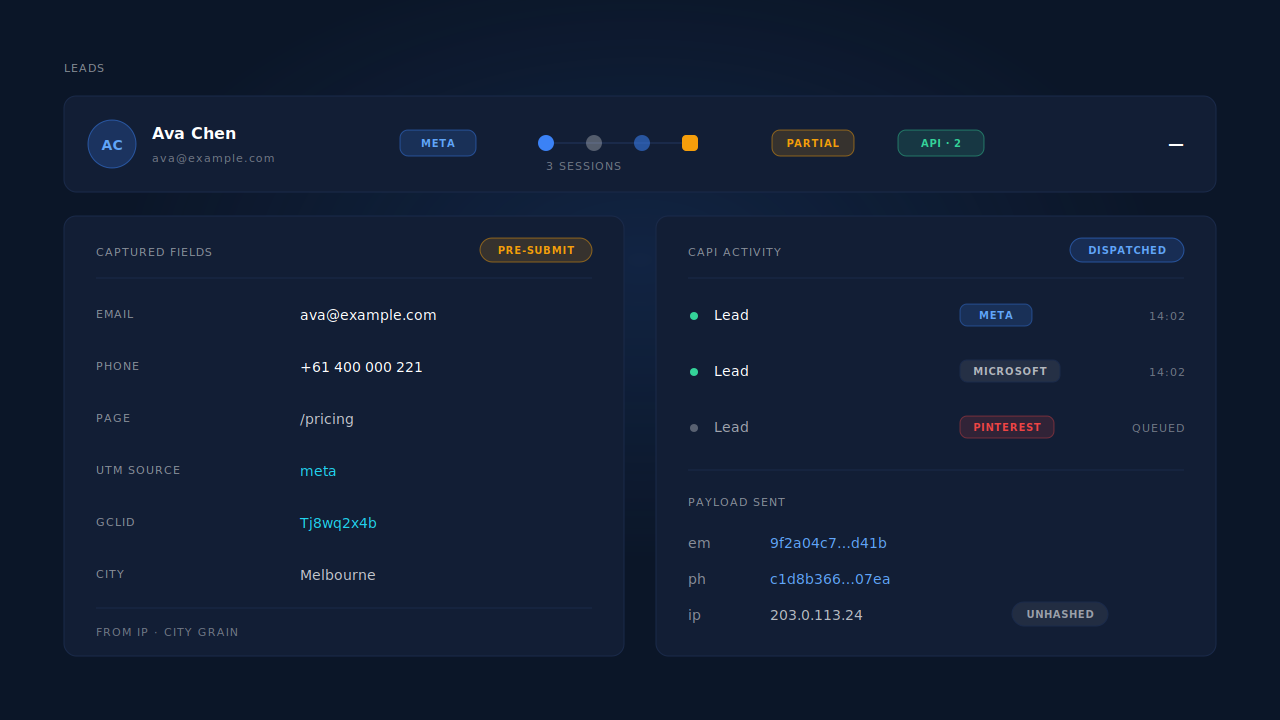
You do not have to take the list on trust, which is the point of the audit above. Every field named here appears in a payload you can read in your own network tab, and again on the lead record in the dashboard.
| What breaks | The mechanism | Where you see it |
|---|---|---|
| You cannot say what the tag collects | Fixed payload shape: identifiers, origin, page, typed fields | The capture requests in your own network tab |
| Legal asks which fields hold personal data | Email, phone and name captured from form input; geography derived from IP | Lead record: name, email, phone, location |
| “Where did this lead come from” has no answer | UTMs plus click IDs captured on the first pageview, referrer fallback in iframes | Leads list: source badge, UTM and Journey columns |
| A client asks what leaves your infrastructure | Normalisation then SHA-256 before dispatch; IP and user agent unhashed per platform spec | CAPI activity log: per-event payload and status |
| A returning visitor is unrecognisable after a week | Server-set first-party cookie plus localStorage, one-year lifetime | Journey column: multiple sessions on one person |
| Nobody knows if a field was dropped on exit | Terminal flush on submit, pagehide and visibilitychange |
Lead detail: the last field typed is present |
Tell us what's broken. We'll fix your tracking — free.
Describe the tracking/attribution problem you're stuck on and we'll map it to a fix: server-side conversions to Meta, Google, TikTok and Pinterest, plus first-party tracking that survives Safari. No code required.
Sources
https://developers.facebook.com/docs/marketing-api/conversions-api/parameters/server-event